2. Fit an eartip, preferably 16 mm, on the probe tip.
3. Press the Calibration button to select the calibration function.
When you activate calibration mode, the calibration guide is shown on the display.
4. Follow the steps shown to calibrate the probe.
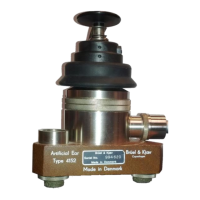
5. Place the probe in the cavity as shown on the display.
6. Press the Calibration button to start the calibration.
7. Hold the probe steady for a short while and press 'Next'.
Values for volume, level and pressure are shown.
If the probe calibration result is successful, a checkmark is shown.
If an error occurs during calibration, place the probe in the relevant cavity and
press the Restart button.
8. Press the Finish button to exit the calibration function.
If there is a probe error
In case of a probe error, the probe may be occluded or faulty.
• If the probe is occluded, clean the probe tip.
• If the probe is faulty, contact an authorized service department for repair.
11 Technical specifications
Type identification
T830/T840 is type 1100 from Inmedico A/S
Standards
Safety: IEC 60601-1, UL 2601-1, CAN/CSA - C22.2 NO 601.1-90
ANSI/AAMI ES60601-1 + AMD 1, CAN/CSA-C22.2 No. 60601-1
EMC: EN 60601-1-2:2007
Impedance/Admittance: IEC 60645-5: 2004, Type 2
Power supply: Class II externally powered supply
Inmedico A/S - T830/T840
User Guide
22



 To Next Page