1 Overview
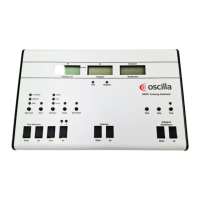
This User Guide describes the Oscilla® T830/T840 tympanometer.
T830/T840 tympanometer
T830/T840 is a screening tympanometer for conducting middle ear meas-
urements on patients.
T830/T840 is an auditory impedance tester that is intended for changing the air pressure in the external auditory canal
and measuring and graphing the mobility characteristics of the tympanic membrane to evaluate the functional condition of
the middle ear.
T830/T840 uses technologies which are highly effective for diagnostic and screening purposes. Tympanometry and acoustic
reflex measurements measure the mechanical response of the middle ear and form a basis for evaluating whether the
related physiological structures are functioning correctly or not.
Operating the device
You can operate the device either as a stand-alone unit using the front panel buttons and display, or from the Oscilla®
AudioConsole PC software.
Note • If you are controlling the devicefrom the Oscilla®AudioConsole PC software, see the Oscilla®AudioConsole
User Manual.
Note • Oscilla®AudioConsole PC software is an optional accessory, which requires a license key. If you wish to use
AudioConsole, please contact your distributor.
Probes
The device supports the following probes:
• The test probe
• A contralateral phone or insert phone (T840 only)
Supported tests
The device supports the following tests:
• Tympanometry
• Ipsi- and contralateral reflex (contralateral: T840 only)
T830/T840 - Oscilla®AudioConsole interfacing
The device is designed to operate with the Oscilla®AudioConsole PC software.
From AudioConsole you can perform tests, monitor test results, store data, and print reports.
Inmedico A/S - T830/T840
User Guide
4



 To Next Page