
 Need help?
Do you have a question about the OSD Audio NERO XA7180 and is the answer not in the manual?
Provides essential instructions for safe operation, handling, and maintenance of the amplifier.
Highlights critical warnings regarding modifications, hazardous voltage, and electrical shock risks.
Details the rear panel connections for audio inputs and speaker outputs.
Explains the remote trigger input, power switch, and AC input for power connection.
Describes the location and function of the AC fuse for surge protection.
Step-by-step guide for wiring speaker connectors using bare wire or plugs.
Details three methods for controlling the amplifier's power ON/OFF state.
Covers voltage checks, clearance, and front panel status LED meanings.
Explains auto signal detection and trigger modes for powering the amplifier.
Provides cleaning advice, troubleshooting steps, and customer service contact.
Lists technical performance metrics and general physical/electrical specifications.
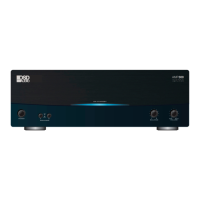
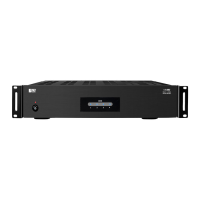
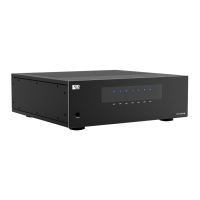
The OSD NERO XA7180 is a home theater amplifier designed to power multiple speakers in an audio system. It serves as a central component for amplifying audio signals from various sources and delivering them to loudspeakers, enhancing the overall home theater experience.
The NERO XA7180 amplifier is engineered to receive audio input signals from devices such as AVRs (Audio/Video Receivers), pre-processors, or other audio sources. It then amplifies these signals and outputs them to connected speakers. The amplifier features seven independent channels, allowing it to drive a 7-channel speaker setup, which is common in many home theater configurations. Each channel has its own input and output, providing flexibility in connecting different audio sources and speakers.
A key function of the amplifier is its ability to provide clean and powerful audio amplification, ensuring that sound is reproduced accurately and dynamically. It is designed to handle a range of audio signals and deliver them with sufficient power to fill a room with sound. The amplifier also incorporates safety features to protect itself and connected equipment from potential damage, such as short circuits or power surges.
The NERO XA7180 offers multiple power control options, allowing users to integrate it seamlessly into their existing home theater systems. These options include manual power control via a front panel switch, automatic power-on via a 12V trigger signal from a connected device, and signal-sensing power-on, where the amplifier turns on when it detects an audio signal at its inputs. This versatility ensures convenient operation and energy efficiency, as the amplifier can enter a standby mode when not in use.
The amplifier's rear panel is equipped with a comprehensive set of connections for both audio inputs and speaker outputs. For audio inputs, it provides both unbalanced RCA and balanced XLR connections for each of the seven channels. This allows for compatibility with a wide range of audio sources and provides options for minimizing noise in longer cable runs, particularly with XLR connections.
Speaker outputs are facilitated by 5-way binding posts for each channel, which are designed to accept various types of speaker wire terminations, including bare wire, spades, or banana plugs. The manual provides clear instructions for connecting speaker wires, emphasizing the importance of correct polarity and secure connections to prevent damage to the amplifier or speakers.
Power control is a significant usage feature. The front panel includes a power switch that, depending on the rear panel's ON/SIGNAL/TRIGGER switch setting, can either directly turn the amplifier on/off, enable signal-sensing auto-on/standby, or activate 12V trigger control. When set to "TRIGGER," the amplifier can be remotely turned on or off by a 8-24V signal from a connected AVR or control system, making it easy to integrate into an automated home theater setup. In "SIGNAL" mode, the amplifier will power on when it detects an audio signal and go into standby when no signal is present, offering an energy-efficient solution.
The front panel also features individual LED indicators for each channel, which display the amplifier's status. These LEDs glow bright blue when the amplifier is on and working correctly, yellow/orange when it's in standby mode (no signal or 12V trigger present), and red if it enters protection mode due to a detected problem, such as a short circuit. This visual feedback helps users quickly ascertain the operational status of each channel.
For installation, the amplifier requires adequate ventilation, with a recommendation of 6 inches of clearance, especially if rack-mounted, or the use of a cooling fan. This ensures optimal operating temperatures and prolongs the life of the components. The manual also advises users to double-check all connections to processors, AVRs, and speakers, ensuring no stray wires or loose strands that could cause short circuits.
Maintenance of the NERO XA7180 is straightforward and primarily involves routine cleaning and adherence to safety guidelines. The manual recommends wiping the amplifier with a clean, dampened soft cloth for cleaning. It explicitly advises against using chemicals, abrasive cleaners, or aerosol sprays, as these can damage the paint or allow moisture to enter the unit, potentially causing internal damage. This simple cleaning routine helps maintain the aesthetic and functional integrity of the device.
In terms of troubleshooting and service, the manual provides clear instructions for addressing common issues. If problems arise, such as loss of sound or unusual operation, users are advised to reset the power by switching off and unplugging the amplifier, then re-checking all connections to processors, AVRs, and speakers before powering it back on. This basic troubleshooting step can often resolve minor issues. If a problem persists, users are directed to contact OSD Nero's customer service department, indicating that more complex repairs should be handled by qualified personnel.
The amplifier is designed with internal protection mechanisms. For instance, if a problem like a short circuit is detected, the amplifier will enter protection mode, indicated by red LEDs on the front panel, to prevent damage to itself and the connected speakers. In such cases, the user is instructed to turn off and unplug the amplifier, then check speaker connections for short circuits (e.g., positive and negative wires touching). This self-protection feature is crucial for the longevity of the device and the safety of the audio system.
Fuse protection is another maintenance-related feature. The amplifier includes an AC fuse that protects against power surges. The manual specifies that only fuses of the same rating should be used for replacement after the cause of the fault has been identified and removed. It also emphasizes the importance of removing the mains plug before changing fuses and using an insulated screwdriver for the task, highlighting safety precautions during maintenance.
Overall, the NERO XA7180 is designed for reliable operation with minimal user intervention for maintenance, focusing on protective features and clear guidance for basic troubleshooting and cleaning.
 General
| Channels | 7 |
|---|---|
| Input Impedance | 47k ohms |
| Output Impedance | 8 ohms |
| Signal to Noise Ratio | >100dB (A-weighted) |
| Cooling | Fan Cooled |
| Damping Factor | >200 |
| Frequency Response | 20Hz - 20kHz |
| Total Harmonic Distortion | 0.1% |
| Weight | 35 lbs |
| Zone Output | Yes |
| Trigger | 12V Trigger In/Out |
| Protection | Short Circuit, Overload |

 To Next Page