PC-30 Filter control unit operating manual Page: 6
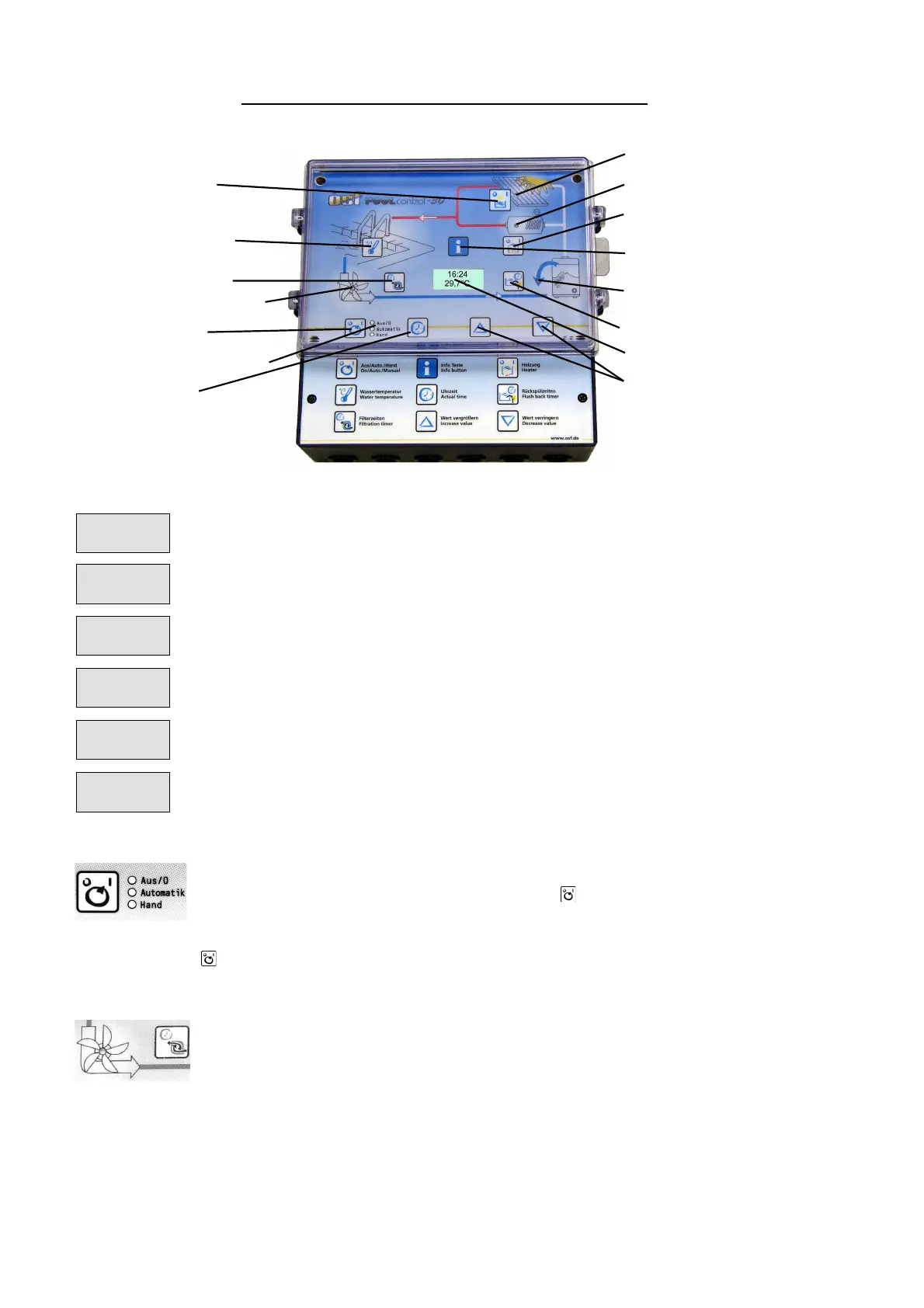
Front panel displays and controls:
Filterpump indicator lamp
Operating mode indicator lamp
Solar operation indicator lamp
Backflushing indicator lamp
Normal operating display with current water temperature and time.
The filter pump is switched on by the NR-12-TRS-2 level regulation system.
The filter pump is switched on by the EUROTRONIK-10 backflushing
control system.
The filter pump is switched off by the EUROTRONIK-10 or the NR-12-TRS-
2 level regulation system.
The filter pump is switched on because backflushing is taking place using
the bar valve connected.
The filter pump is switched on because rinsing is taking place using the bar
valve connected.
Selecting operating mode
The control system can be switched off or you can select between manual
and automatic operating mode using the key. Caution! This does not
mean that the control system has been switched to voltage-free! The
operating mode selected is displayed using the indicator lamps next to the
key.
Pump indicator lamps
This indicator lamp displays filter pump operation. You can see the pump
operating mode from the lamp colour:
Off: the filter pump is switched off
Green: the filter pump is in operation
Red: The pump is switched off temporarily by the EUROTRONIK-10
backflushing controller or the NR-12-TRS-2 level regulation system.



 To Next Page