User’s Manual (Confidential)
OsteoSys Co., Ltd.
Model Designation : SONOST 3000 DOC. No. : OT06-2R7124
71
3.4.11 Setup the worklist
Connect to worklist
In terms of Worklist, it makes database from people who checked BMD using the
device. This database is saved in the hospital server. Later, you can get this
information from the PC connected to the server. The information cannot be
changed on a local PC.
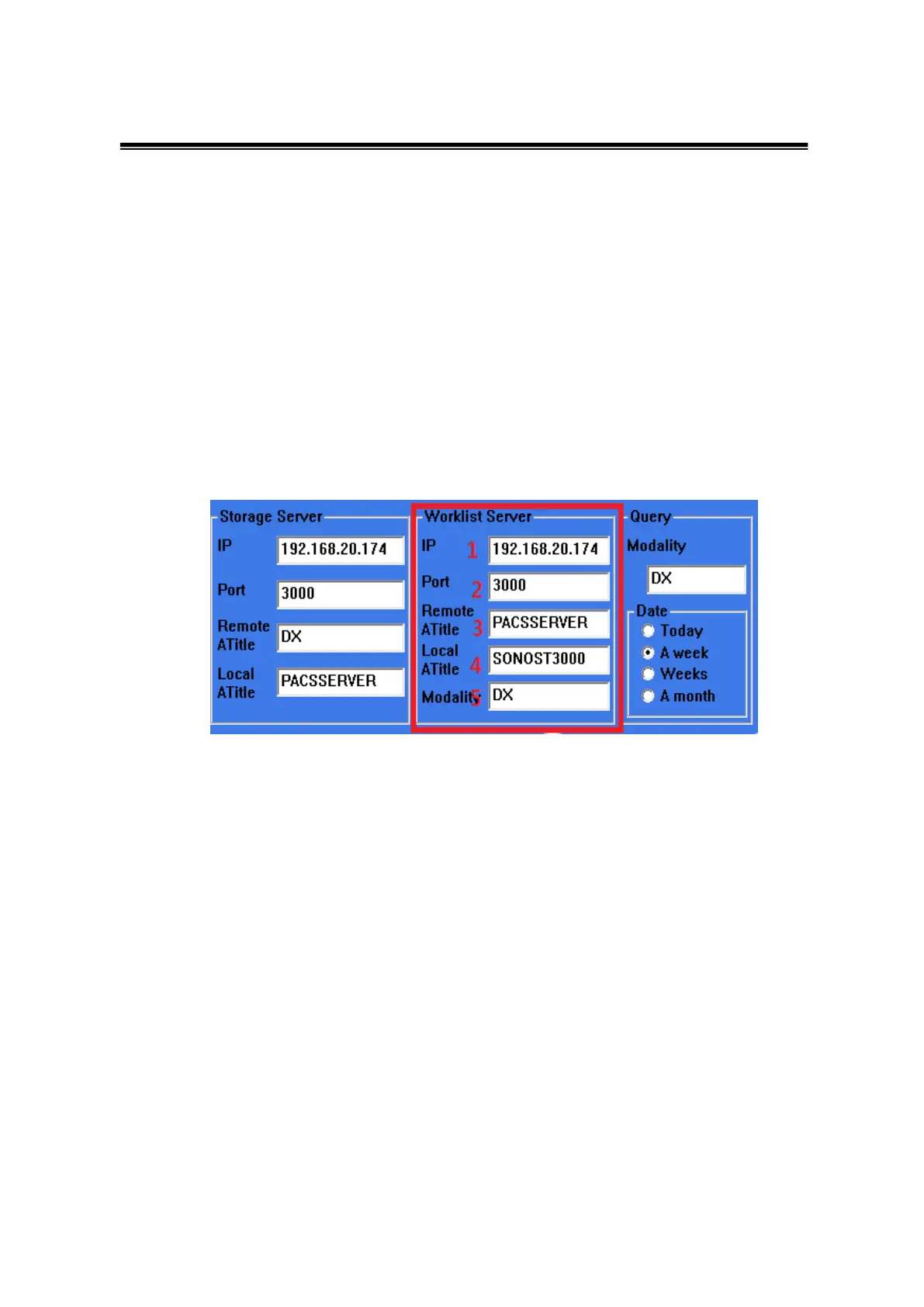
Set up User Interface in Worklist
At the beginning of SONOST 3000 program, you should press the <set up> button,
and then nevigate to <System>
You should get information from someone in charge of the server, the manager
of OCS in hospital.
∙ Worklist IP →1
∙ Port number → 2
∙ Remote ATitle → 3
∙ Local ATitle→ 4
∙ Modality → 5
- Local A-title in SONOST 3000 means SONOST 3000, you should tell the
manager of OCS. It cannot be changed.
- Modality is basically “DX”, it can be changed.



 To Next Page