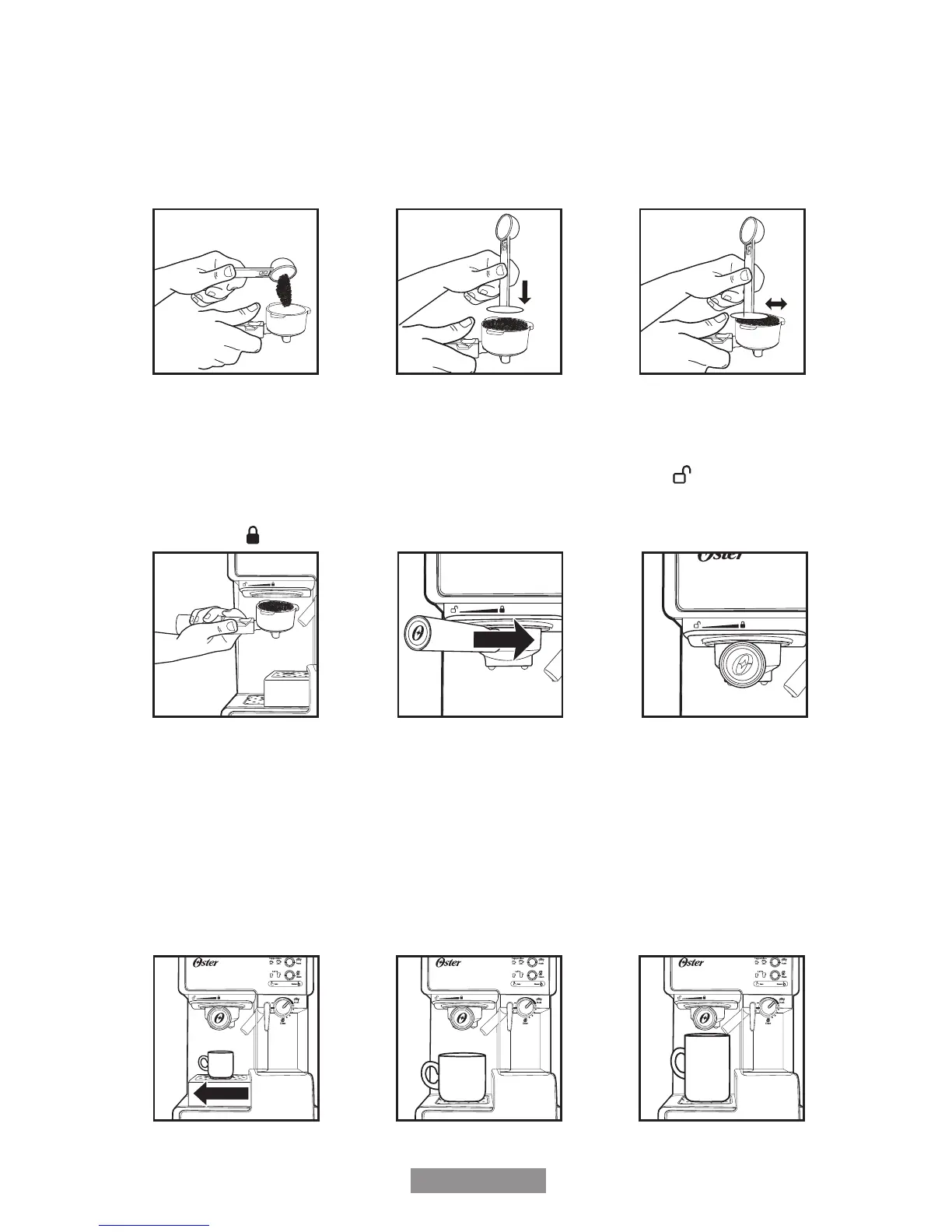
FILLING WITH COFFEE
a. Fill the lter with fresh, ne ground espresso coffee (do not overll).
b. Tamp and compress rmly and evenly ground coffee. Coffee should be 3mm below
top of lter after tamping.
c. Clean any excess coffee from the rim to ensure proper t under brew head and avoid
leaks.
a. b. c.
PLACING THE PORTA-FILTER
a. Position porta-lter underneath the brew head, attach porta-lter by rst moving
retainer clip back.
b. Position handle so that the handle lines up with the open lock icon “
Custom
Sur mesure
Clean
Nettoyer
Froth
Mousse
Manual
Manuel
” on the unit
and ts into the groove.
c. Then, slowly turn it to the right until the retention clip is aligned with the closed lock
symbol “
Custom
Sur mesure
Clean
Nettoyer
Froth
Mousse
Manual
Manuel
” on the unit.
a. c.b.
PLACING THE CUP(S)
a. Pull out the height adjustment tray if you are using a small “demitasse” cup to brew
espresso.
b. Keep the height adjustment tray inside its compartment if you are using a larger cup to
brew cappuccino.
c. Keep the height adjustment tray inside its compartment if you are using a larger cup
to brew latte.
CAUTION: When brewing cappuccino or latte, please make sure to adjust the frothing
tube lever in order to position the froth milk dispensing tube to point inside
the cup to be used.
c.
b.
a.
9
TURNING THE UNIT ON
a. Make sure unit is plugged in.
b. Turn unit on “I”.
a.
b.
The 3 control panel lights will start blinking during heating and until the water reaches the
perfect temperature. Once these lights become solid, the unit is ready to use.
NOTE: It is normal for the Espresso function to be ready before the Cappuccino and
Latte functions.
NOTE: If you leave your unit on for 15 minutes without using, your unit will go into sleep
mode. Press any button to reactivate.
SELECT THE FUNCTION
PREPARING ESPRESSO
a. Press the Espresso Button “
Custom
Sur mesure
Clean
Nettoyer
Froth
Mousse
Manual
Manuel
” once to brew one single shot.
b. Press the Espresso Button “
Custom
Sur mesure
Clean
Nettoyer
Froth
Mousse
Manual
Manuel
” twice to brew a double shot.
c. Press and hold the Espresso Button “ ” for 3 seconds to customize the brewing to
your preference. When done, press the Espresso Button “
Custom
Sur mesure
Clean
Nettoyer
Froth
Mousse
Manual
Manuel
” once again to stop it. For
safety, the unit will automatically stop after brewing 148ml (5 ounces).
a.
x1
b.
x2
c.
hold for
3 sec.
The unit will start brewing the espresso according to your selection. The unit will turn
off automatically and the lights will become solid indicating that the cycle has been
completed. Your delicious espresso is ready to be enjoyed.
NOTE: To brew less coffee than the preset serving, press the function button to stop
the brewing process when the amount of coffee desired is reached.
10
BVSTEM6601-049_14EM1.indd 11-12 10/06/14 11:19 AM



 To Next Page