www.oster.com
www.oster.com
6
7
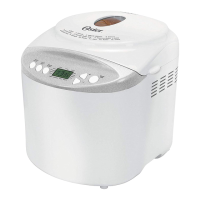
Display screen – Indicates your Menu, current baking cycle, Loaf, Color and
baking time.
Menu – The Oster ExpressBake® Bread Maker oers 12 dierent menu cycles. Press
the Menu button to scroll through and select a cycle. The numbers on the Display
screen will correspond with the numbers on the viewing window. Please see list of
program options on pages 11 for reference.
Color: Press Crust to select desired Color. An indicator arrow will appear above the
color selected: Light, Medium or Dark.
Loaf – Press Loaf to select desired Loaf: (1.5lb & 2lb). This button is not applicable
for the program, Dough, Jam, Yogurt, Cake and Bake.
START/ STOP
The button is used for starting and stopping the selected baking program. To
start a program, press the START/STOP button once. A short beep will be heard
and the two dots in the LCD begin to ash, the working light illuminates and the
program starts. Any other button is inactivated except the START/STOP button
after a program has begun. This feature will help to prevent any unintentional
disruption to the operation of program.
To cancel the program, press the START/STOP button for approx. 2 seconds, then
a beep will be heard, it means that the program has been cancelled.
INTRODUCTION OF CONTROL PANEL INTRODUCTION OF CONTROL PANEL
PAUSE FUNCTION
After the program starts up, you can press START/STOP button once to interrupt
at any time, the operation will be paused but the setting will be memorized, the
working time will be ashed on the LCD. Touch START/STOP button again or
within 10 min without touching any button, the program will continue.
DELAY START TIMER
If you do not want the appliance to start working immediately you can use this
button to set the delay time. You must decide how long it will be before your
bread is ready by pressing the TIME ( ) or TIME ( ). Please note the delay time
should include the baking time of program
KEEP WARM
Bread can be automatically kept warm for 60 minutes after baking. If you would
like to take the bread out, switch the program o with the START/STOP button.
AUTOMATIC FRUIT & NUT DISPENSER:
Before operation, put the fruit and/or nuts in the ingredient pan, and they will add
into the bread automatically when making bread.
MEMORY
If the power supply has been broken o during the course of bread making, the
process of bread making will be continued automatically within 10 minutes, even
without pressing Start/stop button. If the break time exceeds 10 minutes the
memory cannot be kept, and the bread maker must be restarted.




 To Next Page