EasyManua.ls Logo

Outdoor Tech FUEL+ - User Manual

Outdoor Tech FUEL+
12 pages
Print Icon
To Next Page IconTo Next Page
Loading...
FUEL+
POWER
BANK
& LANTERN
10,050mAh
IPX67 WATERPROOF
SHOCK PROOF
Question and Answer IconNeed help?

Do you have a question about the Outdoor Tech FUEL+ and is the answer not in the manual?

Summary

ANATOMY

Battery Indicators and Shock-Proof Bumper

Details on LED indicators for battery status and the protective shock-proof bumper.

Lantern and Power Controls

Description of the integrated lantern modes and the main power/control button.

Charging Ports Overview

Explanation of the USB-A output and USB-C input/output ports for charging.

CHARGING YOUR POWER BANK

How to Charge the Fuel+ Power Bank

Step-by-step instructions for recharging the power bank using a USB-C cable and AC adapter.

BATTERY LEVEL

Checking the Battery Level

Guide on how to interpret the LED indicators to determine the remaining battery capacity.

CHARGING STUFF

Charging Your Devices

Instructions on how to connect and charge external devices using the power bank's output ports.

LANTERN MODE

Operating the Lantern Function

Detailed steps for turning the lantern on/off and cycling through its light modes (Normal, Bright, SOS).

CARE & MAINTENANCE

Product Care and Maintenance Guidelines

Advice on cleaning, storage, charging frequency, and avoiding damage to the device.

SPECS

Technical Specifications

Comprehensive list of technical details including capacity, dimensions, weight, and ratings.

Overview

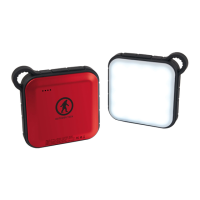
The Outdoor Tech Fuel+ is a 10,050mAh power bank and lantern designed for outdoor use, featuring IPX67 waterproof and shock-proof ratings. It serves as a portable power source for charging devices and provides illumination with a built-in lantern.

Technical Specifications:

  • Battery Capacity: 10,050mAh, 36.18Wh, 3.6V
  • Battery Type: Lithium-ion
  • Number of Cells: 3
  • Charge Time: 3 hours
  • 3-in-1 Charge Cable Length: 39.37 inches (100cm)
  • USB-C Output: 5V/3A, 9V/2A, 12V/1.5A
  • USB-C Output (PD Power Deliver): 18W
  • USB-C Input: 5V/3A, 9V/2A
  • USB-A Output: 5V/3A, 9V/2A, 12V/1.5A
  • Total Output: 18W max
  • IPX Rating: IP67 Waterproof
  • Dimensions: 3.8in x 3.8in x 1.1in (97mm x 97mm x 28mm)
  • Weight: 0.59 lbs (270g)

Usage Features:

Anatomy:

The device features:

  • A. Battery Level Indicator Lights: Four white LEDs indicate the remaining battery level.
  • B. Silicon Shock-Proof Bumper: Provides protection against impacts.
  • C. Lantern: Offers three light modes.
  • D. Power Button: Used for ON/OFF functions and mode selection.
  • E. USB Charge Port: An output port for charging other devices.
  • F. USB-C Charge Port: Functions as both a charge input and output port.

Charging the Fuel+ Power Bank:

  1. Plug the included 3-in-1 charge cable into the USB-C input port of the Fuel+ Power Bank.
  2. Connect the other end of the cable to an AC adapter plugged into a wall socket. For faster charging, an adapter with PD (Power Delivery) output is recommended.
  3. Charging will commence automatically. The LED indicators will flash and turn on sequentially. All four LEDs will become solid when charging is complete.
  4. Disconnect the adapter and charging cable once fully charged.

Checking Battery Level:

  1. Press the power button once to activate the LED indicator lights.
  2. The LED indicators will display the remaining battery capacity as follows:
    • 75-100%: All four LEDs are solid.
    • 50-75%: Three LEDs are solid, one is off.
    • 25-50%: Two LEDs are solid, two are off.
    • 10-25%: One LED is solid, three are off.
    • 0-10%: The first LED is flashing, three are off.
  3. If no device is connected after pressing the power button, the LED indicators will automatically turn off after approximately 30 seconds.

Charging Your Devices:

  1. Connect your smartphone or other device to the battery pack using the included 3-in-1 charge cable. Charging will begin automatically.
  2. During device charging, the battery pack's LED indicators will turn off one by one as the internal battery level decreases.
  3. Charging to the device will cease when the last LED indicator flashes.

Lantern Mode:

  1. To turn the LED lantern ON/OFF, press and hold the power button for 2 seconds.
  2. To switch to a brighter mode, click the power button once more.
  3. While in brighter mode, press the power button again to enter SOS mode, where the lantern will flash.
  4. To exit SOS mode and return to normal mode, press the power button once more.
  5. The lantern can also be turned off by pressing and holding the power button for 2 seconds from any mode.

Note: Using the lantern will increase the power bank's temperature. It is not recommended to charge or discharge the power bank simultaneously when the lantern is in use. The input and output will be protected if a certain temperature is reached.

Maintenance Features:

Care & Maintenance:

  • Avoid simultaneous input/output access, as this may affect product performance and charging efficiency.
  • Keep the Fuel+ away from direct sunlight and hot environments. High temperatures can shorten the lifespan of electronic components, damage the battery, or deform plastic parts.
  • Clean the surface with a soft, dry cloth. Do not use intensive chemical products or detergents.
  • Charge the product at least once every three months to prevent battery depletion.
  • For optimal performance, fully charge the Fuel+ before using it to charge other devices.
  • Do not attempt to disassemble the Fuel+.
  • Avoid scratching the surface with sharp objects.
  • It is normal for the battery to warm up during charging. The temperature should remain below 113° Fahrenheit and will not impact the Fuel+'s performance.
  • All products undergo strict quality inspection. Discontinue use if the battery emits an odor, generates heat, becomes deformed, shows abrasion, damage, or any other abnormal behavior.

Outdoor Tech FUEL+ Specifications

General IconGeneral
BrandOutdoor Tech
ModelFUEL+
CategoryAccessories
LanguageEnglish

Related product manuals