EN
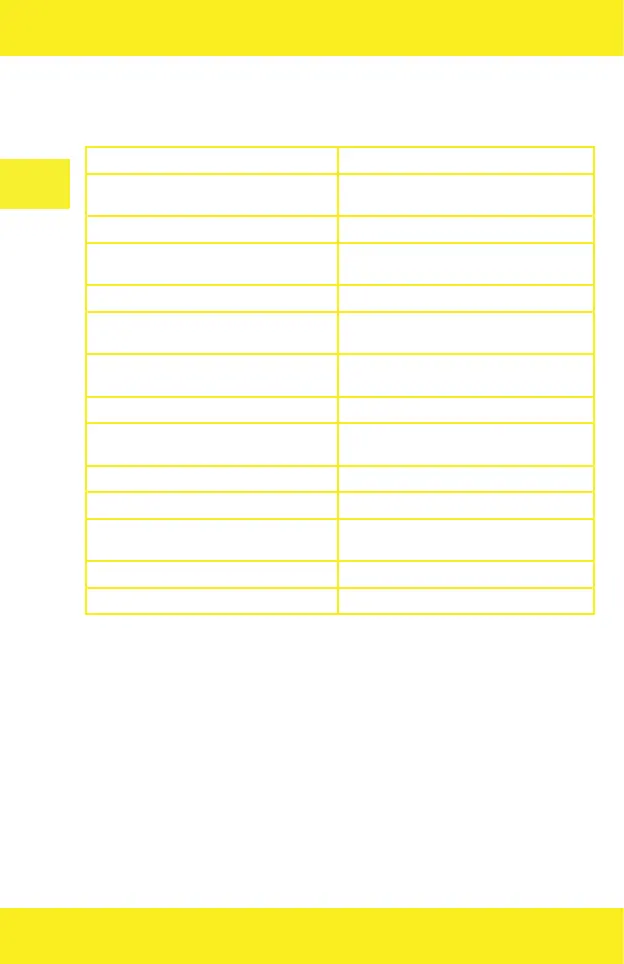
Drone status indicators
(2 in fig. 1)
Yellow LED flashes fast No connection with drone
LED flashes alternately in yellow, green
and red
Drone tries to connect to remote control
Yellow LED glows No GPS connection
Green LED glows Strong GPS signal detected, the drone will
enter GPS flight mode
Green LED flashes fast Drone calibrates the gyroscope
Yellow LED flashes Drone is in horizontal compass calibration
mode
Green LED flashes Drone is in vertical compass calibration
mode
Red LED flashes slowly Weak drone battery, 1/6 battery left
Red LED flashes fast Drone battery is almost flat, 1/8 battery
left
Red LED flashes every 1,5 seconds Gyroscope issue
Red LED flashes twice every 1,5 seconds Barometer issue
LED flashes three times every 1,5
seconds
Compass issue
LED flashes four times every 1,5 seconds GPS module issue
LED flashes six times every 1,5 seconds Vision positioning module issue
Return to home – RTH function (Return To Home)
The return function causes the drone to return to last saved place (“home”). There are three
modes of this function: smart return, emergency return and low-battery return.
The saved spot is the place in which the drone takes o. To make sure the spot is properly
remembered, GPS signal must be strong enough (at least 7 satellites at the takeo).
1. Smart return
If GPS signal is available (more than 7 satellites) and the starting point has been saved, press
return key. The drone will return to the saved place. During the return, you can control the drone,
for example to avoid obstacles. Press the key again to leave the return function.
2. Emergency return
If GPS signal is good (more than 7 satellites) and the starting point has been saved, the emergency


 To Next Page