14
Informational Icons
The following displayed icons are not accompanied by any audible feedback or any visual
change in the indicator lights.
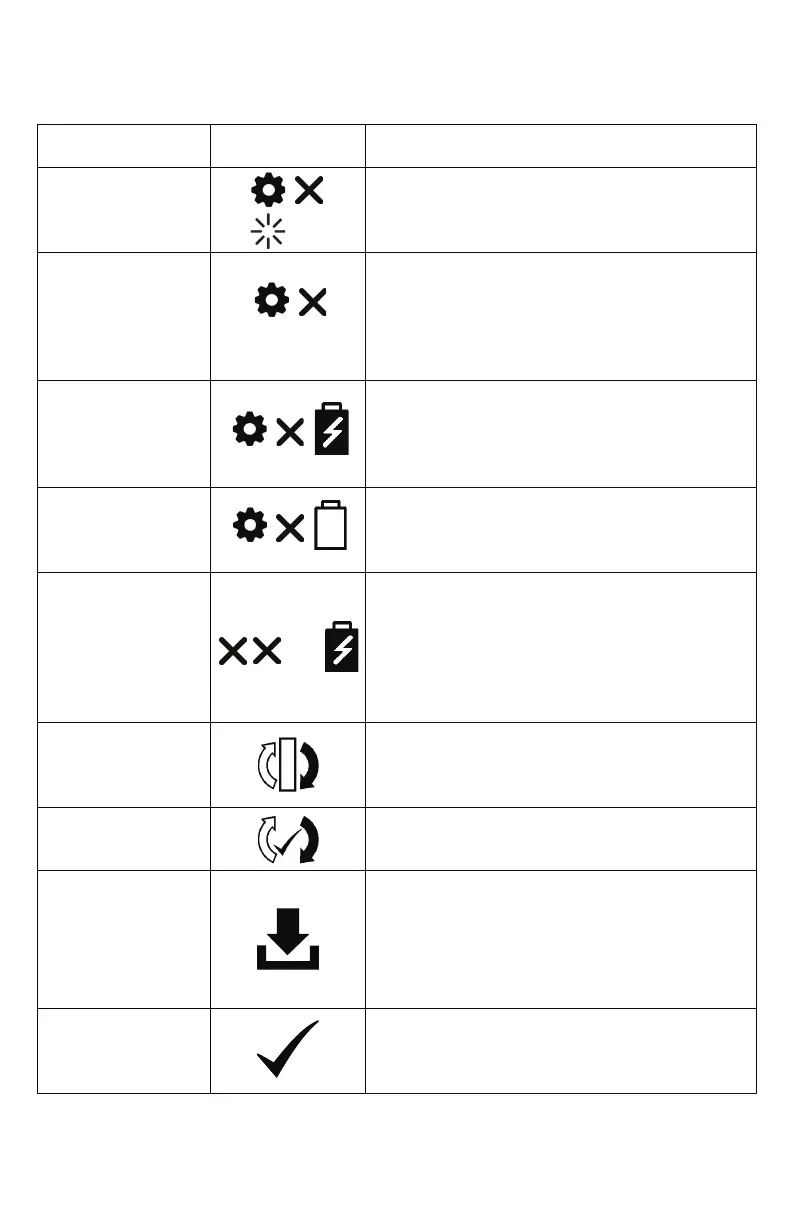
Description Display Icons Condition/Action/Explanation
Setting X
Please Wait
Displayed during warm up. “X” represents the
selected ow setting (eg., Setting 2).
Setting X
Battery
Hours:Minutes
Default display when operating on battery
power. “X” represents the selected ow
setting (e.g., Setting 2). “HH:MM” represents the
approximate time remaining on the
battery charge (e.g., 1:45).
Setting X
Battery
Charging XX%
Default display when operating on an external
power supply and the battery is charging.
“xx%” represents the percent battery charge
(e.g., 86%).
Setting X
Battery XX%
Default display when the battery is not
charging or when the time remaining is not
available from the battery.
Battery
Charging XX%
Displayed when the concentrator is plugged in
and being used to charge a battery (not being
used for oxygen production). It is normal to see
a fully charged battery read between 95% and
100% when external power is removed. This
feature maximizes the useful life of the battery.
Sieve Reset Displayed when column maintenance is
required and once the replacement columns
have been installed.
Sieve Reset
Success
Displayed once the columns have been
successfully reset.
Data log transfer in
progress
OR
SW Update in
progress (app only)
This icon is displayed during all data log
transfers and software updates initiated
through the My OxyGo app.
Data Log transfer
success (app only)
This icon is displayed after data log transfers
have been successfully completed through the
My OxyGo app.
%
HH:MM


 To Next Page