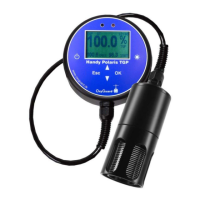
Press an arrow button to select which parameter is shown in large figures. Press
"OK" to go from the measurement display to the menus. The arrow buttons can
then be used to make a selection and the "OK" button to confirm or go to the next
level. "ESC" is used to move back. If an error occurs, a warning will blink in the
display. More information is shown in the status list.
The residual gas pressure is obtained by subtracting the oxygen partial pressure
from the total pressure. If wanted the residual value can be compensated for
dissolved CO2 in the water and for the water vapour pressure at the instrument.
A carbon dioxide content of 20 mg/l results in a reduction in the measured TGP
of 1.4%.
Compensation for water vapour pressure can be made because the %sat values are
corr
ected for changes in barometric pressure sensed by a pressure sensor in the
instrument, where the water vapour pressure can be low. In the water, the water
vapour partial pressure corresponds to 100% humi-
dity. The default value for water vapour compensation assumes a relative humidi-
ty at the instrument of 80%. This results in a reduction in the measured TGP in the
water of 0.4%.
The probe is calibrated in fresh air. The calibration procedure, which is automatic,
calibrates the oxygen sensor and aligns the gas pressure sensor in the probe with
the barometric pressure sensor in the instrument.
MENU
From measurement use “OK” and the arrow buttons to reach the desired function.
The options are:
1) Calibrate
2) Start log or stop log (depending on present setting)
3) Show Oxygen
4) Show TGP %Sat
5) Show TGP %Vol
6) Setup
7) Show Log
8) Transfer to PC
9) Status list (only if there is an error)


 To Next Page
 Loading...