13
EN
Steps Action Illustration
5
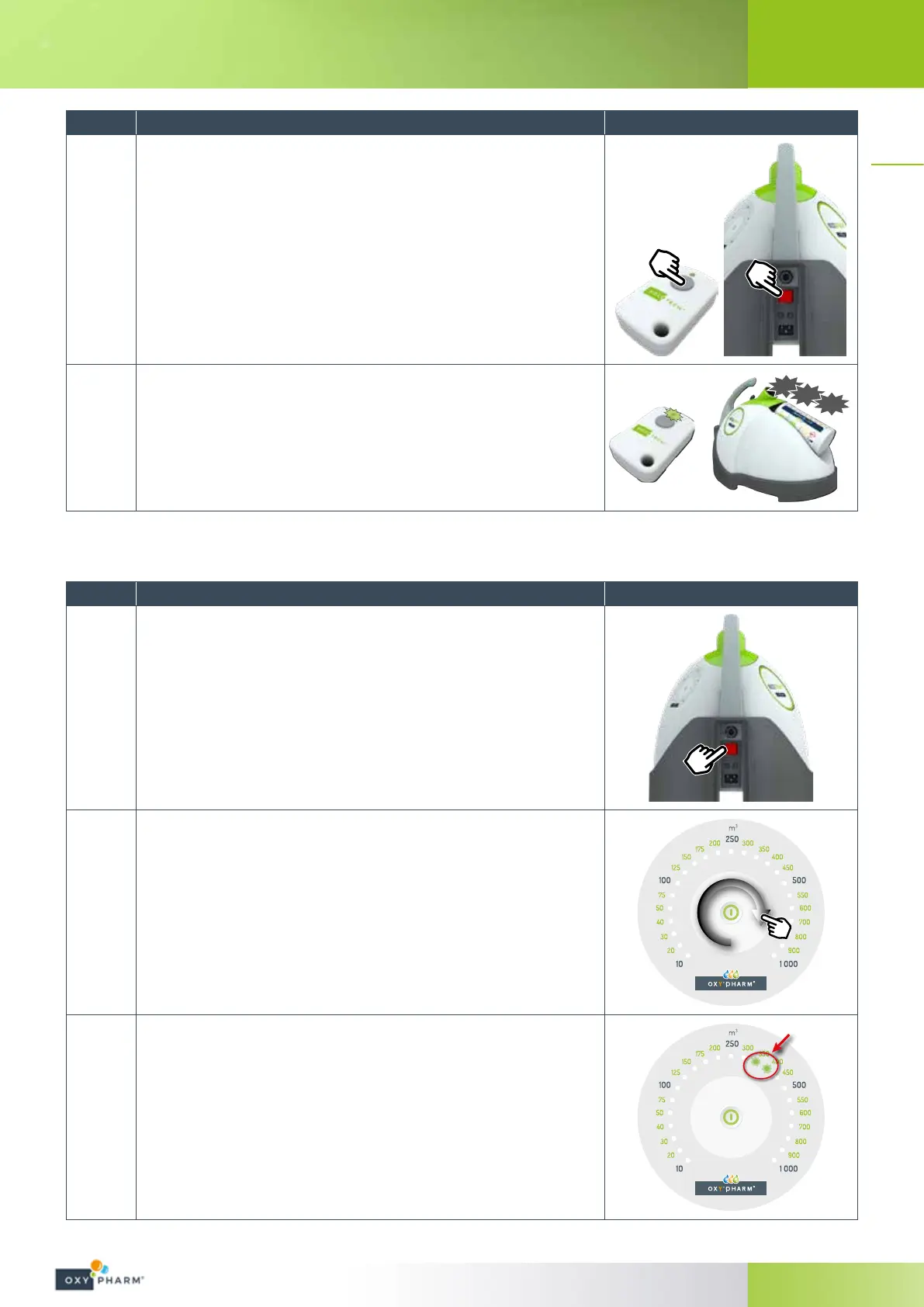
Once the LED of the remote control blinks regularly and without
stopping, turn on the NOCOSPRAY 2 to be paired using its power
switch whilst holding down the button on the remote control.
6
The LED on the remote control will begin to blink rapidly.
The paired NOCOSPRAY 2 will beep several times to signal that the
pairing has been made.
BIP
BIP
BIP
4.3.2.3 Operation with remote control
Steps Action Illustration
1
Plug in the NOCOSPRAY 2 power cable.
Set the power switch to “1”.
2
Select the volume to be treated by sliding your nger over the pale
part of the keypad.
The selection range is between 10 m
3
and 1 000 m
3
.
3
The level is progressive: if two LEDs are illuminated, the intermediary
value is selected.
For example, if LEDs 10 and 20 are illuminated, the selected volume is
15m
3
.


 To Next Page