ONLINE MANUAL
Scan this QR Code with your
mobile device to take you to
the online manual.
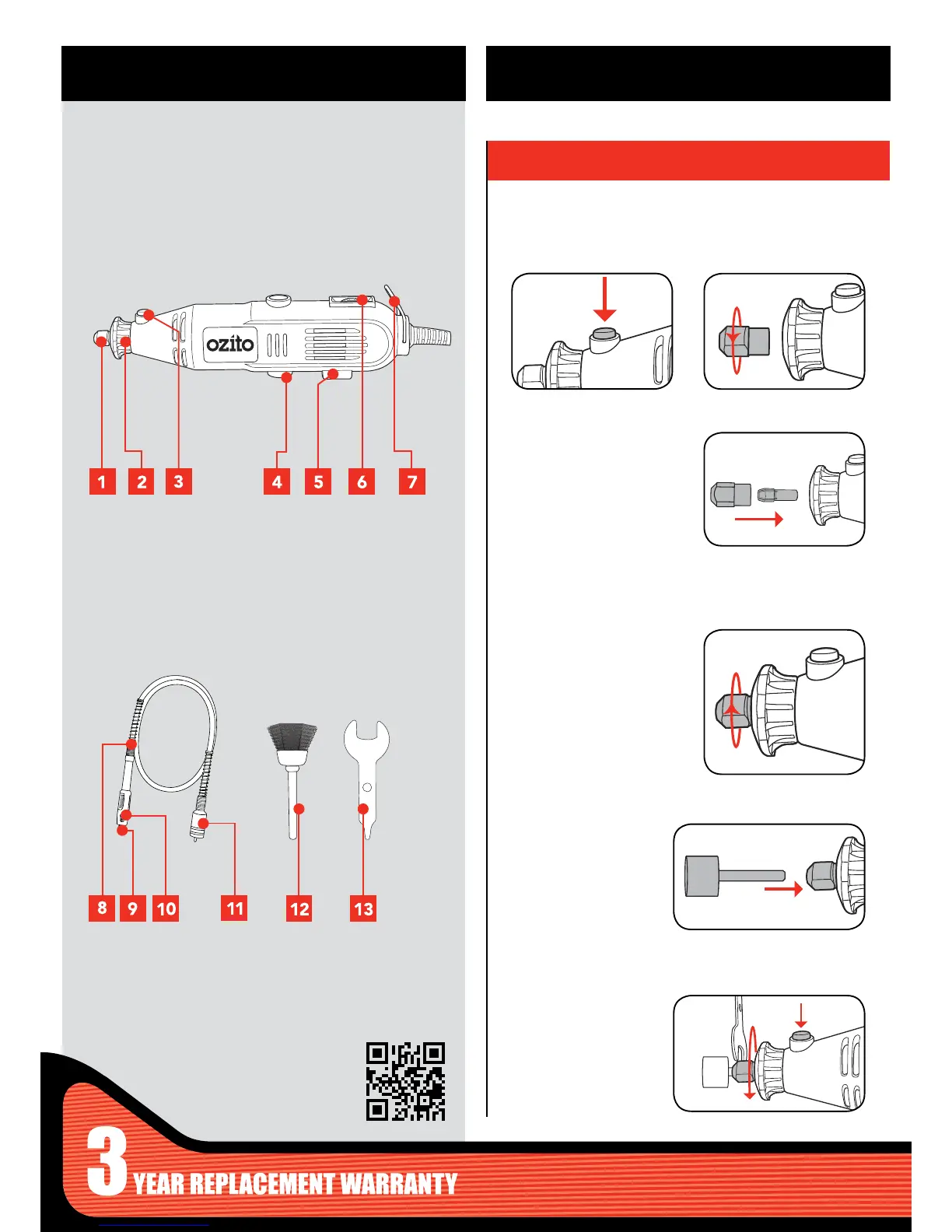
1 Collet Nut
2 Shaft Collar
3 Spindle Lock Button
4 Accessible Brushes
5 On/off Switch
6 Variable Speed Dial
7 Hanging Ring
ROTARY TOOL
KNOW YOUR PRODUCT
1. CHANGING ACCESSORIES
1. Press and hold the spindle
lock button.
8 Flexible Shaft
9 Locking Chuck
10 Spindle Lock
11 Fitting Collar
12 Rotary Bits x 218
13 Spanner
ACCESSORIES
SETUP & PREPARATION
Ensure the tool is disconnected from the power supply before
performing any of the following operations.
2. Unscrew the collet nut.
Remove completely.
3. Select a suitable collet for
the accessory to be used
and insert. Then cover with
collet nut.
4. Insert shaft of
accessory into the
collet.
5. Tighten collet nut
using spindle lock and
spanner.
4. Slightly hand tighten the
collet nut so that it stays in
place.



 To Next Page