11
EN
PLACEMENT
07
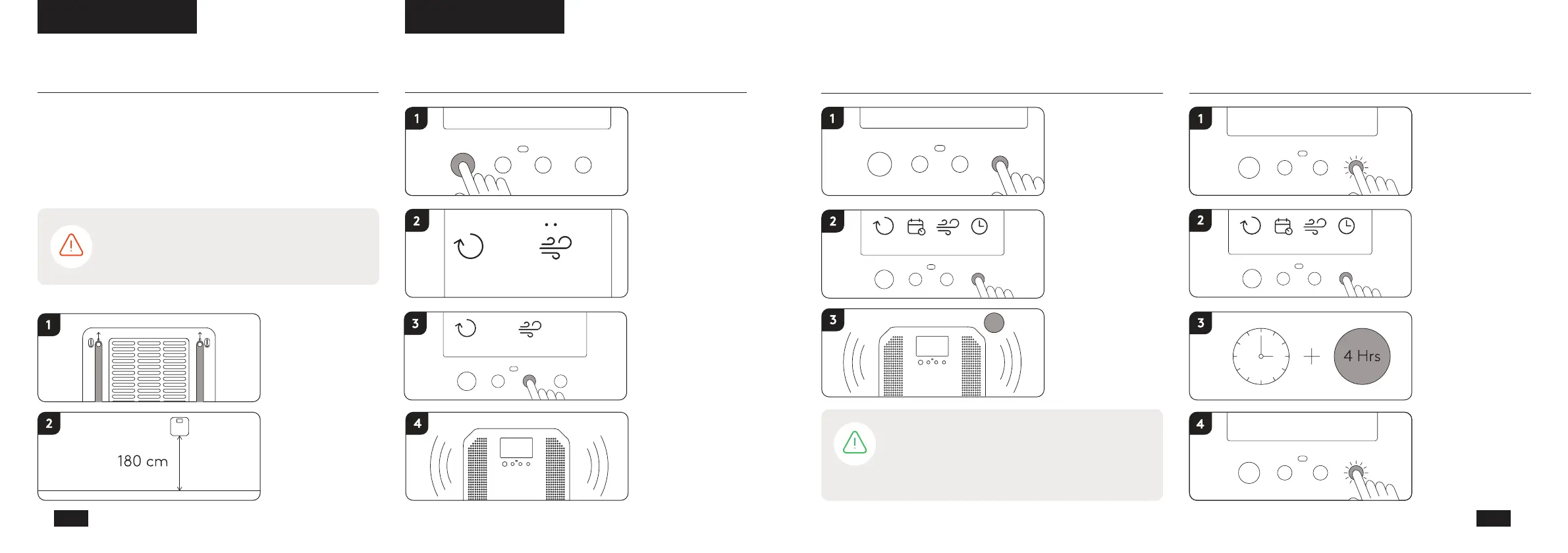
Remove /
attach stand
Wall mounted / at
bookshelf.
Recommended at
180 cm
WARNING! - Do not place the product so the air
intake or outlet is blocked, this may cause the product
to shut down.
The product can either be placed on a flat
surface with its stand or mounted on the wall by
removing the stand. The product should be placed
high, for example on a table or a bookshelf.
Push silver button
to activate purifier
Push to adjust
eect
Treatment starts
automatically after
a few seconds
Auto mode and
medium eect is
preselected
AUTO MODE
08
10
EN
NOTE - Ozoneair Purify uses photocatalysis which
can generate a scent that can be compared to light
metal or electricity. The scent appears initially when the
product reacts to large quantities of contaminants but
will decrease with time.
Push timer button
to activate timer
Keep pushing timer
button to select
hours
Treatment starts
automatically after
a few seconds and
runs selected hours
Timer function
auto eect
2
timereectdaily
2h
auto
timereectdailyauto
A
4
timer
delay
eectdailyauto
Hold timer button
to activate delay
function
Push to select
hours
Treatment starts
automatically after
selected hours
have passed
To deactivate the
delay function,
hold timer button
until delay has
disappeared
Delay function
timer
delay
eectdaily
auto
timer
delay
eectdaily
auto
eectauto



 To Next Page