The RailDriver Desktop Train Cab Controller is a specialized input device designed to enhance the realism and immersion of train simulation games. It functions as a physical control panel that mimics the layout and operation of a real train cab, allowing users to interact with their virtual locomotives through tactile levers, switches, and buttons rather than a standard keyboard and mouse. This controller is a product of P.I. Engineering, a company that also offers other user-programmable keyboards and input devices under the X-keys and Y-mouse brands, as well as various RailDriver-specific products like cyclopedias and manuals.
Function Description
The primary function of the RailDriver is to provide a more authentic and intuitive control experience for train simulation enthusiasts. It translates physical inputs from its various controls into digital commands that are recognized by compatible train simulation software. The device features a comprehensive set of controls, including:
- Reverser (39): A lever with a center detent, allowing for variable forward and reverse control of the locomotive.
- Throttle and Dynamic Brake (40): A combined lever with a "gate" center, used to control both the locomotive's power (throttle) and its dynamic braking system.
- Automatic Brake (41): A lever with a detent before the emergency brake position, controlling the train's automatic braking system.
- Independent Brake (42): A lever with a right motion for "bail-off," used for independent braking of the locomotive.
- Horn/Whistle Lever (38): Operates forward or back to activate the train's horn or whistle.
- Programmable Game Buttons (1-28): A bank of 28 buttons that can be assigned to various in-game functions, offering extensive customization.
- Rotary Wiper Switch (43) and Headlight Switch (44): Rotary controls for operating the train's wipers and headlights.
- LED Speedometer (31): Provides a visual indication of the train's speed.
- Four-way Panning Control (30) and Zoom/Rocker Button (29): For camera control within the simulation.
- Dedicated Switches: Including Gear Shift (32), Emergency Brake (33), Alerter (34), Sander (35), Pantograph (36), and Bell (37).
- Labeled Controls: Specific switches for Range (A), E-Brake (B), Alert (C), Sand (D), P (Pantograph) (E), Bell (F), Forward - N - Reverse (G), Dyn Brake - Throttle (H), EMG - CS - SUP - REL (I), Auto Brake - Ind Brake (J), Full - Rel (K), Wiper (L), and Lights (M). These labels are applied by the user using provided decals.
The device also incorporates sound and vibration features, specifically an internal subwoofer, to further enhance the immersive experience by providing tactile feedback and audio cues related to the train's operation.
Usage Features
The RailDriver is designed for ease of setup and integration with various train simulation platforms.
-
Physical Setup:
- Unpacking: Users are instructed to check for the RailDriver Control Unit, Power Supply (AC adapter), Label Sheets & Game Button Identification Strips, and the Operating Manual.
- Labeling Controls: Decals for the Reverser, Throttle, and Brake levers are applied by aligning the left end of the label with the top of the control lever. For wiper and light switch caps, a thin-bladed screwdriver is used to carefully pry up the cap for label placement. For function keys, the panel cover is carefully pried up, legend strips are placed above the keys, and the cover is snapped back into place. Printable versions of these legend strips are also available on the RailDriver website.
- Connecting Sound and Vibration: To enable the internal subwoofer, the RailDriver is connected to the computer's line out sound port. Existing speakers are then plugged into the RailDriver's pass-through sound port. Finally, the 12 VDC Power Supply is connected. The Amplitude control on the RailDriver should be set to a mid-level and adjusted as needed during simulation. It's noted that the RailDriver Desktop contains a magnetically shielded speaker to prevent color distortion on video displays, but users should still avoid exposing magnetic media to it.
-
Software Integration:
- Driver Download: The RailDriver requires specific software to interface with train simulation programs. Users are directed to raildriver.com/support to download and install the appropriate software for their chosen simulation.
- Supported Simulations: The device supports a wide range of popular train simulators, including Train Simulator (Dovetail Games), Trainz (N3V Games), Run8, Open Rails, World of Subways 2 & 3, and TrainMaster 4.3. Some of these programs (Run8, Open Rails, World of Subways 2 & 3) have native RailDriver support, meaning they do not require additional software downloads from P.I. Engineering.
- Customization: While the default control layout closely resembles a Dash 9 locomotive, the RailDriver can be configured to operate any type of engine. Users can select alternate control layouts or create custom layouts through the software's Help files or the Technical Support Page on the website.
Maintenance Features
The manual provides information regarding product support and warranty, which can be considered aspects of device maintenance and longevity.
- Technical Support: For assistance with installation or any issues, users can contact RailDriver technical support via email at tech@raildriver.com or by phone.
- Warranty: P.I. Engineering offers a one-year limited warranty for RailDriver products purchased and installed in the United States and Canada. This warranty covers defects in materials and workmanship under normal use and service. If a defect is discovered within the warranty period, users should contact Technical Support to obtain a Return Merchandise Authorization (RMA) number and instructions for shipping the product for repair or replacement. Users are responsible for shipping costs to P.I. Engineering and any loss or damage during transit. The warranty does not cover failures resulting from accident, abuse, mutilation, misuse, or unauthorized repair/modification. The warranty explicitly disclaims fitness for a particular purpose or merchantability and limits liability to the purchase price paid. This warranty is governed by the laws of the United States of America and the State of Michigan.
Overall, the RailDriver Desktop Train Cab Controller is a robust and customizable peripheral designed to elevate the train simulation experience through realistic physical controls and immersive feedback.

 Need help?
 General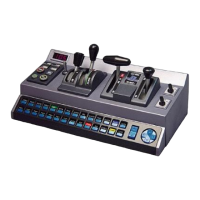

 To Next Page