Pacifi c Accessory Corporation - 1502 S. Santa Fe Street, Santa Ana, CA 92705
techsupport@pac-audio.com • Voice: 866-931-8021 • Fax: 714-835-3233 • www.pac-audio.com
Page 3
10-06-08
1. Turn ignition on. The red ignition LED inside the interface will turn on and the +12v accessory wire will turn on.
2. Turn on the radio and check balancing and fading. Note: The RPO code UQA (standard digital Bose® amplifi er) will not fade as the
rear outputs of aftermarket radio do not adjust the amplifi er.
3. Pressing the OnStar® button will turn off the rear speakers and allow the OnStar® audio to be heard in the two front speakers. The
OnStar® active red LED will also turn on. When OnStar® disconnects, the radio will un-mute or turn back on and the OnStar® LED will
turn off.
4. Turn off vehicle and remove key. RAP will be active and keep the radio on for 10 minutes or until the drivers door is opened.
5. The red ignition On LED and radio will turn off when RAP turns off or the drivers door is opened.
6. Pressing the Mute/OnStar® button on the steering wheel for 1.5 seconds will also activate Onstar®.
DISCLAIMER: Under no circumstances shall the manufacturer or the distributors of the OS-4 parts be held liable for consequential damages sustained
in connection with the OS-4. The manufacture and it’s distributors will not, nor will they authorize any representative or any other individual to
assume obligation or liability in relation to the OS-4 other than its replacement.
OnStar® is a registered trademark of OnStar® Corporation.
Bose® is a registered trademark of Bose®
Installation Notes
1. When the interface is connected to the vehicle for the fi rst time the car must be started so all vehicle features are recognized by the interface.
2. DO NOT cut the Brown loop on the SWC interface connector. Program the radio specifi c SWC Interface for version #2.
3. When the Rear Seat Audio jacks are activated in any vehicle OTHER than the Cadillac Escalade or a UQA amplifi ed vehicle the rear speakers will mute.
4. The headphone jacks will play the rear zone source selected by the head unit (refer to the new radios instruction manual for details on this feature if
equipped). Maximize the rear zone volume level (this will reduce unwanted noise). During an OnStar call the front speakers play OnStar, the rear speakers are
muted and the headphones will continue to play the rear zone audio source.
5. Using the Center and Sub cable for factory reverse camera retention.
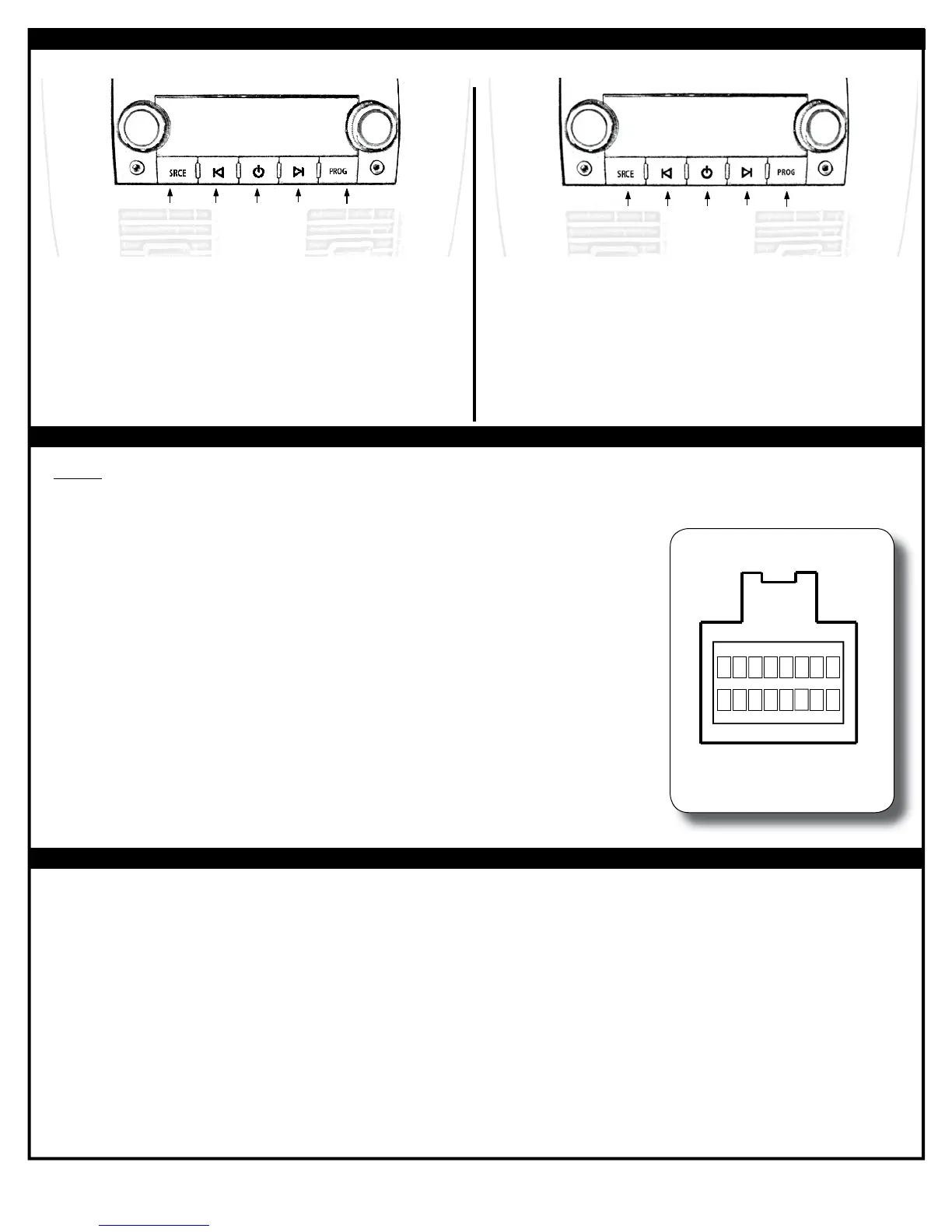
Using the Rear Seat Audio Controls
Testing and Verifying Operation
Radio
Turns the
Rear Seat
Controls On
or Off
Change between
Factory XM tuner
and Dual Zone
Radio Source
Controls the
Radio as
Programmed
by the SWC
interface (Mapped
to the Arrow
and Bar Button)
Controls the
Radio as
Programmed
by the SWC
interface (Mapped
to the Arrow
Down Button)
Controls the
Radio as
Programmed
by the SWC
interface (Mapped
to the Arrow
Up Button)
XM 16
Turns the
Rear Seat
Controls On
or Off
Change between
Factory XM tuner
and Dual Zone
Radio Source
Has No
Function
Seek to the
Next
Factory XM
Tuner Station
Seek to the
Previous
Factory XM
Tuner Station
Using the Radios Dual Zone Source Using the Factory XM Radio Tuner
• Press the power button to turn the RSE Controls on. When Radio is displayed on the RSE
Controls, the aftermarket radios rear speaker output will be heard through the headphone
jacks. Putting the aftermarket radio into dual zone mode should change the output level
of the rear speakers to a fi xed level. This allows precise user adjustment from the level
knobs on the RSE Controls (refer to aftermarket radio owners manual for model specifi c
dual zone operation).
• The seek arrows and PROG button will control the radio as programmed by the SWC
interface. These buttons are mapped to the SWC buttons as stated above.
• Pressing the SRCE button will toggle between the Factory XM tuner and the Radio as the
RSE source. Pressing the power button will turn the RSE Controls off as well as turning
the key off. The seek arrows and PROG button will continue to operate as stated (with the
exception of SRCE which has no function) when the Rear Seat Controls are turned off.
• Press the power button to turn the RSE Controls on. If Radio is displayed press the
SRCE button to select factory XM tuner mode. When XM followed by the channel number
is displayed factory XM tuner audio will be heard through the headphone jacks.
• The Seek arrows will control the factory XM radio tuner and select the desired station.
• The PROG button has no function.
• Pressing the SRCE button will toggle between the Factory XM tuner and Radio as
the RSE source. Pressing the power button or turning the key off will turn off the RSE
Controls.
• The factory XM tuner must remain serviced to take advantage of this feature. Visit www.
xmradio.com for a complete up-to-date channel listing and service options.
OnStar Level Control for Vehicles without SWC Buttons
• With the supplied brown connector NOT attached to the vehicles brown radio connector: lift the upper and
lower locking tabs near the wire insertion part of the supplied brown connector which houses the center and
sub RCA cables.
• Depress the silver exposed locking tabs on which ever RCA connector (center or sub) is not being used during
this installation.
• After removing both shield (black) and center conductor (red or white) pins - re-insert as follows (see image
aside).
• Pin 6 is the camera+ signal and Pin 7 is the camera- signal. After inserting the pins clasp the locking tab back
down to lock the moved pins into place.
• Fit the modifi ed brown connector into the vehicles brown connector and plug the moved RCA cable into the
aftermarket radios camera input (mark this RCA cable for future reference).
• Use the supplied reverse output wire (green wire in OS-NAV connector) for automatic switching when the
vehicle is put into reverse.
12
3
45
6
7
8
1112
10 9
9
16
Center and Sub
Brown Connector (supplied
with interface)
3: Center +
4: Sub +
6: Camera +
7: Camera -
11: Center -
12: Sub -
10
11
1213
14
15
Wire side view
X
X
X
X
X
X
6. DTS, Equinox, Torrent and Vue Installation Notes:
If the vehicle is equipped with a factory amplifi er other than a Bose amplifi er and OnStar audio is not heard
during operation the Black/White wire located in the OS-GMLAN29 harness needs to be cut in half and insolated
at both ends (c2 vehicle (16pin) connector pin 8) .


 To Previous Page
 Loading...