EasyManua.ls Logo

PAC GM1A-RST - User Manual

PAC GM1A-RST
7 pages
Print Icon
To Next Page IconTo Next Page
Loading...
GM1A-RST
Radio Replacement Interface with
Steering Wheel Control and Telematics Retention
for select General Motors Vehicles
with Class II Data-Bus
© 2018 AAMP Global. All rights reserved. PAC is a Power Brand of AAMP Global.
PAC-audio.com
Pacific Accessory Corporation
Rev: V6
Date: 100318
Page 1
Introduction and Features
Important Notes
1. The included chime speaker should be used when: The vehicle has a standard Bose system (UQ7), the vehicle does not have
a factory amplier at all, or if you are connecting an aftermarket amplier to the cabin speakers.
2. The Programming Button and Adjustment Dial on the side of the interface have multiple functions. Please see Page 3 for
more details.
3. Aftermarket radios with a 2-wire resistive based SWC circuit will not have default button assignments programmed. Please
refer to the owners manual of the radio you are installing to nd out the proper SWC programming procedure.
4. Compatible in both Premium Bose (Y91 / UQA) and Standard Bose systems.
5. Real time speaker fading on Premium factory amplied systems (Y91 / UQA) is only supported with the “amplied output”
connection of the GM1A-RST.
6. When using real time speaker fading (Premium Bose only), if the fader setting is biased more to the front or rear, as the radio
turns on the sound may begin at the default setting and then quickly transition to your custom setting.
7. Aftermarket radio features such as High Pass Filters (crossovers), DSP or “Network Mode” will interfere with proper fader
function (Premium Bose only). In order for the GM1A-RST’s fader function to work, the audio from the aftermarket radio’s
output must match so it can compare the front and rear audio levels and determine the proper fader setting for the factory
amplier.
8. When used in conjunction with the add on camera controller (VS41) the GM1A-RST will only provide Data-Bus controlled
automatic activation for the front camera. Please refer to the vehicle specic VS41 instructions for more detail.
Interface Connector 1
Expansion Port
Interface Connector 2 Interface Connector 3
Non-Amplied
Audio Output
LED 1
LED 2
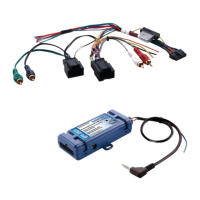
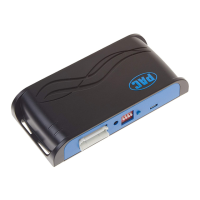
The GM1A-RST interface allows the replacement of a factory radio in select General Motors vehicles with the Class II Data-Bus.
Using this interface will retain factory features such as Steering Wheel Controls (SWC), Rear Seat Control (RSC), OnStar, warning
chimes and the factory Bose amplier when the original radio is removed. The GM1A-RST provides data bus driven outputs such
as retained accessory power (RAP), vehicle speed signal (VSS), illumination, reverse trigger and parking brake. You can also add
multiple camera inputs to your aftermarket radio with Data-Bus controlled automatic activation (front camera only) by connecting
a VS41 into the expansion port on the GM1A-RST.
USB PortRadio Select
DIP switches
Interface Connector 4
Adjustment Dial Programming Button
Module Layout
Amplied
Audio Output
Question and Answer IconNeed help?

Do you have a question about the PAC GM1A-RST and is the answer not in the manual?

Summary

Introduction and Features

Important Notes

Key usage notes and compatibility information for the GM1A-RST interface, including Bose systems.

Installation Steps

Wiring Harness Connections

Detailed guide for connecting the GM1A-RST harness to aftermarket and factory wiring.

Configuration Options

Steering Wheel Control Programming

SWC Programming Modes

Modes for SWC re-assignment, re-calibration, and chime volume adjustment.

Optional SWC Programming

Custom SWC Programming Procedure

Step-by-step guide to manually program custom steering wheel control functions.

Testing and Verification

SWC Functionality Check

Verifying proper operation of steering wheel controls and OnStar functions.

SWC Re-calibration Procedure

RadioPRO PC App Usage

RadioPRO PC App Adjustments

Firmware Updates

Updating GM1 A-RST Firmware

Procedure for updating the interface firmware using the RadioPRO PC app.

Summary

Introduction and Features

Important Notes

Key usage notes and compatibility information for the GM1A-RST interface, including Bose systems.

Installation Steps

Wiring Harness Connections

Detailed guide for connecting the GM1A-RST harness to aftermarket and factory wiring.

Configuration Options

Steering Wheel Control Programming

SWC Programming Modes

Modes for SWC re-assignment, re-calibration, and chime volume adjustment.

Optional SWC Programming

Custom SWC Programming Procedure

Step-by-step guide to manually program custom steering wheel control functions.

Testing and Verification

SWC Functionality Check

Verifying proper operation of steering wheel controls and OnStar functions.

SWC Re-calibration Procedure

RadioPRO PC App Usage

RadioPRO PC App Adjustments

Firmware Updates

Updating GM1 A-RST Firmware

Procedure for updating the interface firmware using the RadioPRO PC app.

Overview

The GM1A-RST is a radio replacement interface designed for select General Motors vehicles equipped with a Class II Data-Bus. Its primary function is to allow the installation of an aftermarket radio while retaining essential factory features such as Steering Wheel Controls (SWC), Rear Seat Control (RSC), OnStar, warning chimes, and the factory Bose amplifier. The interface also provides data bus-driven outputs, including retained accessory power (RAP), vehicle speed signal (VSS), illumination, reverse trigger, and parking brake. A notable feature is the ability to add multiple camera inputs to an aftermarket radio with Data-Bus controlled automatic activation (for the front camera only) by connecting a VS41 camera controller to the GM1A-RST's expansion port.

Technical Specifications and Features:

  • Compatibility: Designed for General Motors vehicles with a Class II Data-Bus. Compatible with both Premium Bose (Y91 / UQA) and Standard Bose systems.
  • Retained Features:
    • Steering Wheel Controls (SWC): Retains factory SWC functionality. Aftermarket radios with a 2-wire resistive-based SWC circuit may require specific programming.
    • Rear Seat Control (RSC): Retains functionality.
    • OnStar: Retains OnStar functionality. OnStar volume can be adjusted via the RadioPRO PC app.
    • Warning Chimes: Retains factory warning chimes. A chime speaker is included for vehicles with a standard Bose system, no factory amplifier, or when connecting an aftermarket amplifier to cabin speakers. Chime volume can be adjusted via the adjustment dial or the RadioPRO PC app (except for Premium Bose Y91/UQA systems).
    • Bose Amplifier: Retains factory Bose amplifier functionality. Real-time speaker fading on Premium factory amplified systems (Y91 / UQA) is supported only with the "amplified output" connection of the GM1A-RST. Aftermarket radio features like High Pass Filters (crossovers), DSP, or "Network Mode" may interfere with proper fader function.
  • Data Bus-Driven Outputs:
    • Retained Accessory Power (RAP): Provides power to the aftermarket radio for 10 minutes after the ignition is turned off or until a door is opened.
    • Vehicle Speed Signal (VSS): Provides a VSS output.
    • Illumination: Provides an illumination output.
    • Reverse Trigger: Provides a reverse output (+).
    • Parking Brake: Provides a parking brake output (-).
  • Camera Integration: Supports multiple camera inputs with Data-Bus controlled automatic front camera activation when a VS41 controller is connected to the expansion port.
  • Audio Output Options: Features both "Non-Amplified Audio Output" and "Amplified Audio Output" connections, catering to different vehicle audio configurations.
  • Connectivity: Includes multiple interface connectors (1, 2, 3, 4) and vehicle connectors (1, 2) for comprehensive integration. A USB port is available for PC connectivity.
  • Control Interface: Equipped with an "Adjustment Dial" and a "Programming Button" for various settings and modes. "Radio Select DIP switches" are used to configure the interface for specific aftermarket radio brands (Alpine, JVC, Kenwood/Lightning Audio, Clarion/Nakamichi, 2-Wire Resistive, Pioneer/Other, Sony, Fusion).

Usage Features:

  • Installation: Involves setting DIP switches according to the aftermarket radio, wiring the aftermarket radio to the GM1A-RST harness, plugging in interface connectors, and connecting vehicle connectors to the factory harness. The brown mute loop in Interface Connector 4 can be cut to connect to an aftermarket radio's mute input for OnStar muting.
  • Programming Button Functions: The programming button allows access to different modes by pressing and holding it until a specific LED pattern is observed. These modes include:
    • SWC Re-assignment (1 Chime, LED 1 green flash): Allows users to customize SWC button functions.
    • SWC Re-calibration (2 Chimes, LED 1 amber flash): For re-calibrating analog SWC if they become erratic (Corvette only).
    • Chime Volume Adjustment (3 Chimes, both LEDs green flash): Adjusts chime volume using the adjustment dial (not available for Premium Bose Y91/UQA amps).
    • Master Reset (4 Chimes, LED 1 red flash): Restores all settings to factory defaults, including SWC mapping, calibration, camera settings, infotainment settings, and interface user options.
  • RadioPRO PC App: A dedicated PC application (available for download) provides advanced configuration and maintenance features. It allows users to:
    • Configure user interface options: Factory amplifier settings (Bass, Mid, Treble, Gain, Fader, Balance), Chime Volume, Camera Settings, Telematics Volume.
    • Update product firmware.
    • Read firmware/hardware versions.
    • Adjust OnStar volume (Telematics Volume) and enable/disable real-time fade for amplified systems.
    • Note: Some features (Factory Amplifier Settings, Chime Volume, Telematics Volume) require the interface to be connected to the vehicle.

Maintenance Features:

  • Firmware Updates: The GM1A-RST can be updated with new firmware via the RadioPRO PC app and a USB connection. This ensures the device remains compatible with new radios and vehicles and benefits from performance improvements.
  • Troubleshooting: The manual provides detailed testing and verification steps to ensure proper functionality after installation, including checking chimes, volume, balance, fader, SWC, and OnStar. LED indicators (LED 1 and LED 2) provide visual feedback on the device's status and programming modes.
  • SWC Re-calibration: A specific procedure is outlined for re-calibrating SWC in Corvette models if they become erratic or unresponsive.
  • Master Reset: The master reset function allows users to revert all settings to factory defaults, which can be useful for troubleshooting or starting fresh with configurations.

The GM1A-RST is a comprehensive solution for integrating aftermarket radios into compatible GM vehicles, preserving critical factory functionalities and offering extensive customization and maintenance options through its physical controls and the RadioPRO PC app.

PAC GM1A-RST Specifications

General IconGeneral
BrandPAC
ModelGM1A-RST
CategoryAutomobile Accessories
LanguageEnglish

Related product manuals