17
DC900X INSTALLER’S MANUAL (501-3434310) RELEASE 30th Oct. 2009
USING DIAGNOSTICS SCREENS TO CHECK THE NETWORK (cont.)
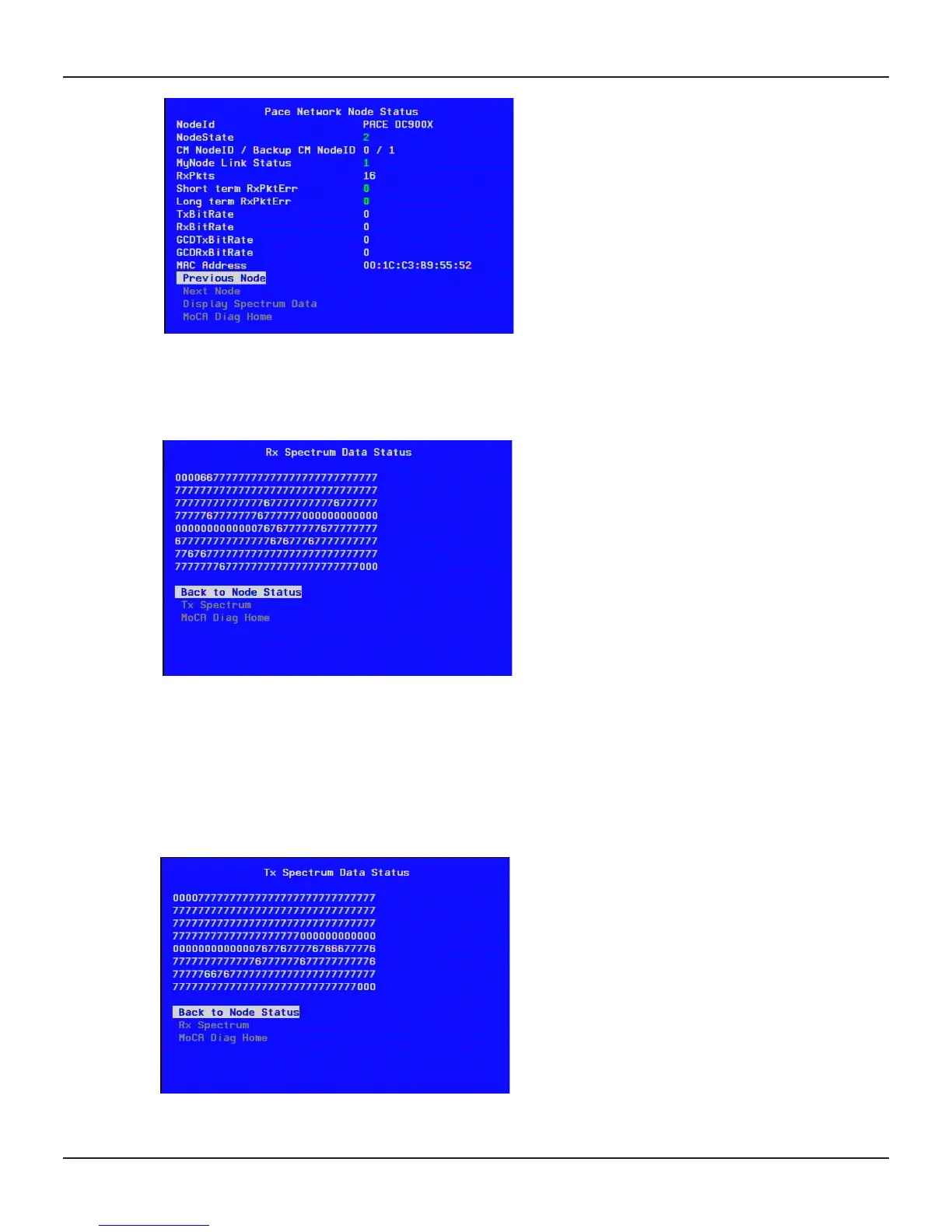
When the node ID is the NAS (DC900X), the Bit Rate figures should show zero, as there is no MoCA
connection between the NAS and itself.
To see the Spectrum Data for a node, use the U or D button to highlight Display Spectrum Data, then
press OK/Select. The Rx (Receive) Spectrum Data Status screen will be displayed.
This screen relates to the signal strength of the MoCA signals and not to the in-band or out-of-band signals
on the coaxial cable. It is another representation of the Bit Rates in the Node Status screens.
For non-NAS nodes, the status is good if the numbers on this screen are 0 at the beginning, middle and end
and are 6 or 7 in between. If zeros appear elsewhere, or if the numbers are 1 to 5, there is a problem. This will
also have given yellow Bit Rate figures in the Node Status screen. See the suggested checks on page 16.
To see the Transmit Spectrum Data Status screen for a node, use the U or D button to highlight Tx
Spectrum, then press OK/Select.
To redisplay earlier screens, such as Pace Network Node Status or Pace MoCA Diagnostic, use the U or D
button to highlight their titles, then press OK/Select.


 To Next Page