18
DC900X INSTALLER’S MANUAL (501-3434310) RELEASE 30th Oct. 2009
USING DIAGNOSTICS SCREENS TO CHECK THE NETWORK (cont.)
Using NAS Diagnostics
You can use the NAS Diagnostics menu to find out information about the NAS itself and the client set-top
connected to it by a direct Ethernet connection.
Displaying the NAS Diagnostics menu
There are two ways to do this. You can either:
At the DIAGNOSTICS DASHBOARD, highlight (>) HCS, then press OK/Select.
Or:
At the DIAGNOSTICS MAIN MENU, highlight 26 HCS, then press OK/Select or R.
If you choose this second method, the HCS (Home Content Sharing) sub-menu is displayed.
Use the U or D button to highlight (>) NAS, then press OK/Select.
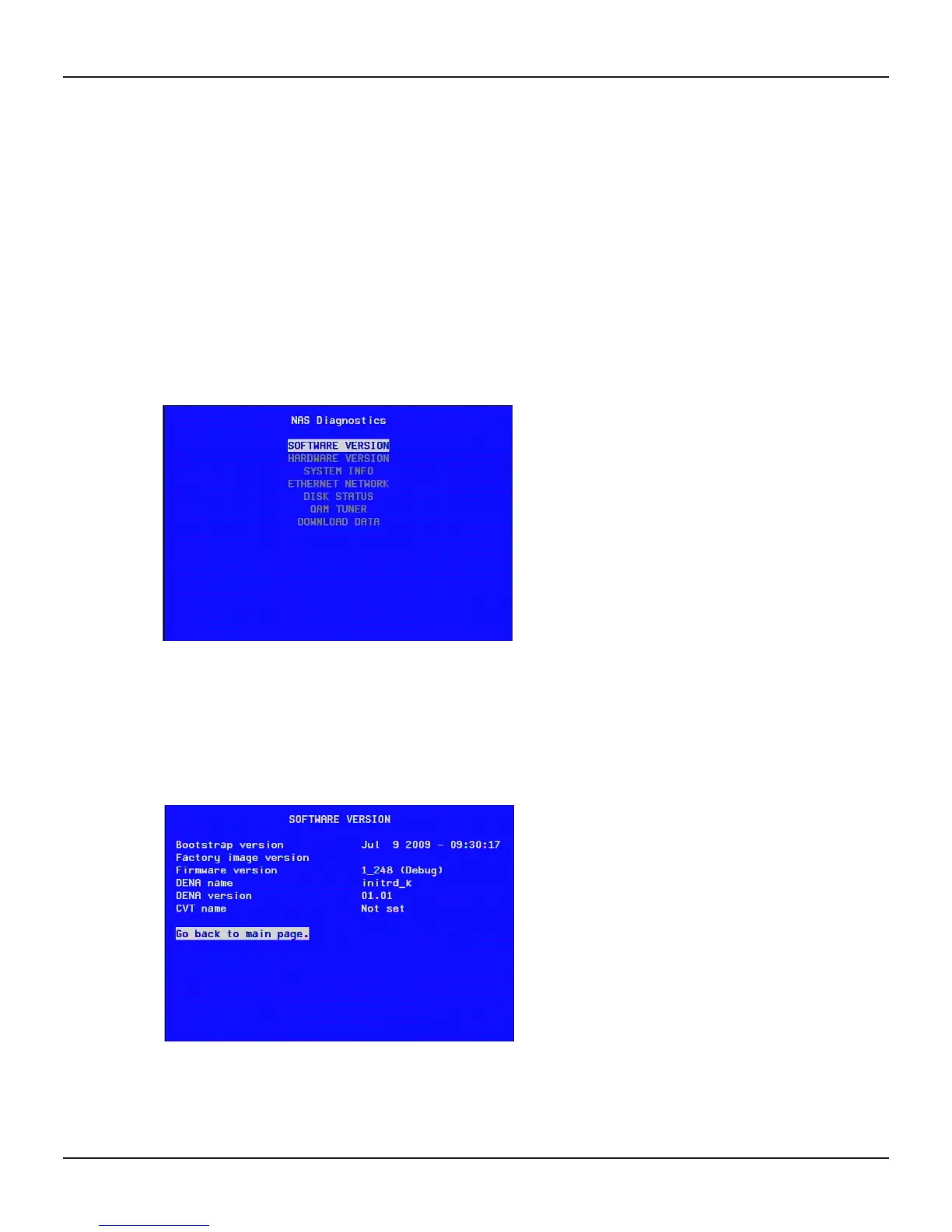
The NAS Diagnostics screen will then be displayed on the TV.
Displaying the NAS Diagnostics screens
At the NAS Diagnostics menu, use the U or D button to highlight the screen’s name, then press OK/Select.
All screens show information that may be useful.
When you have read the information, press OK/Select to redisplay the main NAS Diagnostics screen.
SOFTWARE VERSION screen
This screen shows the versions of code present in the NAS. If you encounter problems during an installation,
you may need the information from this screen.


 To Next Page