21
DC900X INSTALLER’S MANUAL (501-3434310) RELEASE 30th Oct. 2009
OTHER RELEVANT DIAGNOSTICS SCREENS
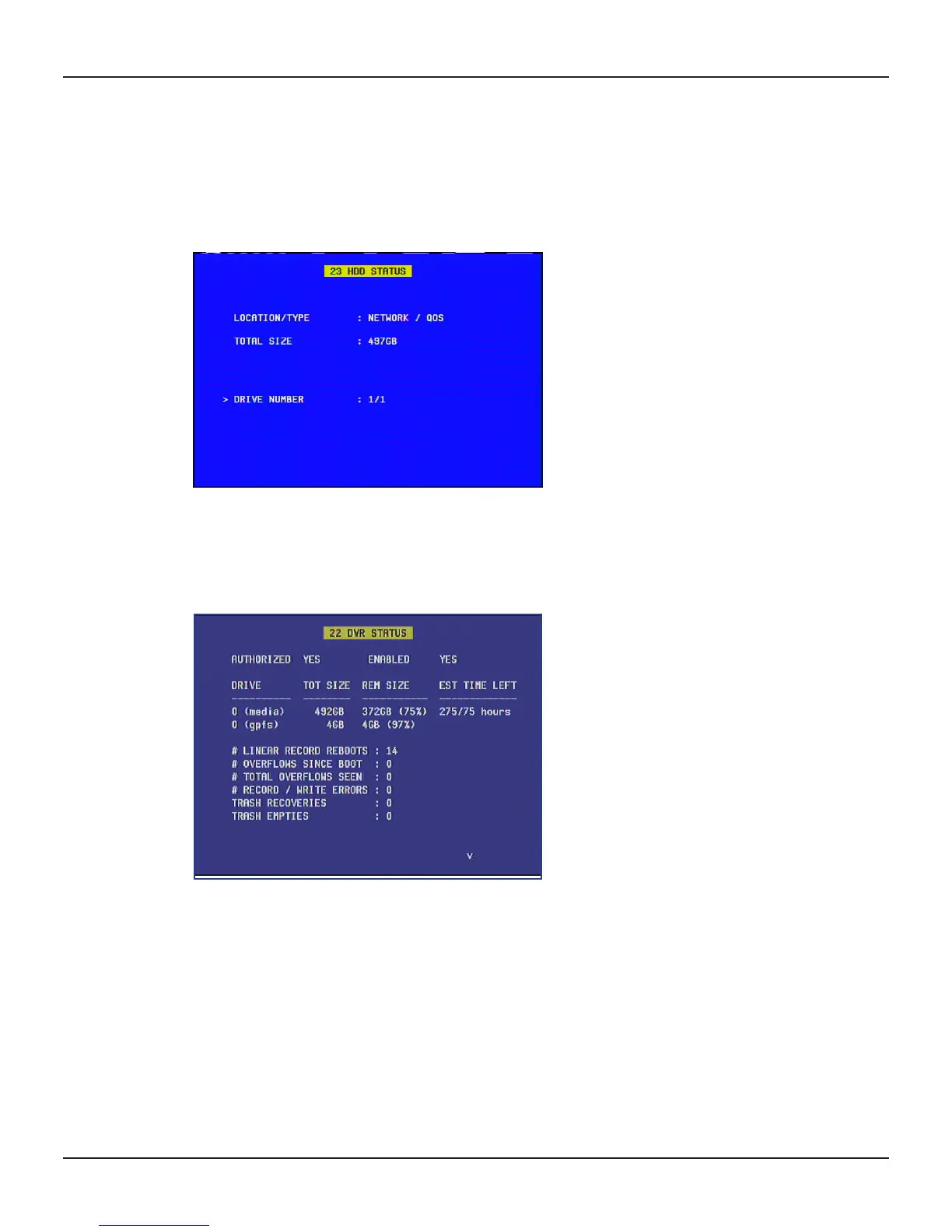
Using the HDD STATUS menu
Displaying the HDD STATUS menu
To display the HDD STATUS sub-menu, highlight (>) HDD Health on the DIAGNOSTICS DASHBOARD (or
23 HDD STATUS on the DIAGNOSTICS MAIN MENU) and then press OK/Select.
The Hard Disk Drive (HDD) Status Menu is displayed on screen, with the DRIVE NUMBER field marked with >,
as shown below.
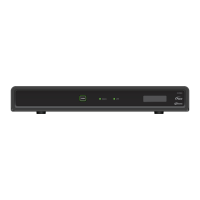
Using the DVR Status screen
To display the DVR STATUS sub-menu, highlight (>) DVR Status on the DIAGNOSTICS DASHBOARD (or 22
DVR STATUS on the DIAGNOSTICS MAIN MENU) and then press OK/Select.
This screen allows you to see statistics relating to the hard disk in the NAS.


 To Next Page