9
RNG110 OPERATOR’S MANUAL (501-3438000)
OPERATING YOUR SET-TOP
Turning your set-top on and off
After you have connected your set-top’s power supply unit to the wall AC outlet (and switched this outlet ON,
if it has a switch), press the POWER button on your remote control to turn your set-top on (making sure the
remote control is set to control your set-top). The POWER light on your set-top’s front panel should light up
green, to show that your set-top is on.
To turn your set-top on or off at any time, press the POWER button on your remote control.
Never turn off your set-top by simply disconnecting it from the power supply. If you need to disconnect your
set-top, turn off your set-top by pressing the POWER button on your remote control, so that the POWER
light is switched off. Then wait a few seconds before removing the power supply unit from the wall AC outlet.
Power Saving: To save power and money, and to reduce greenhouse gas emissions, turn off
your set-top, using the POWER button on your remote control, when it is not in use.
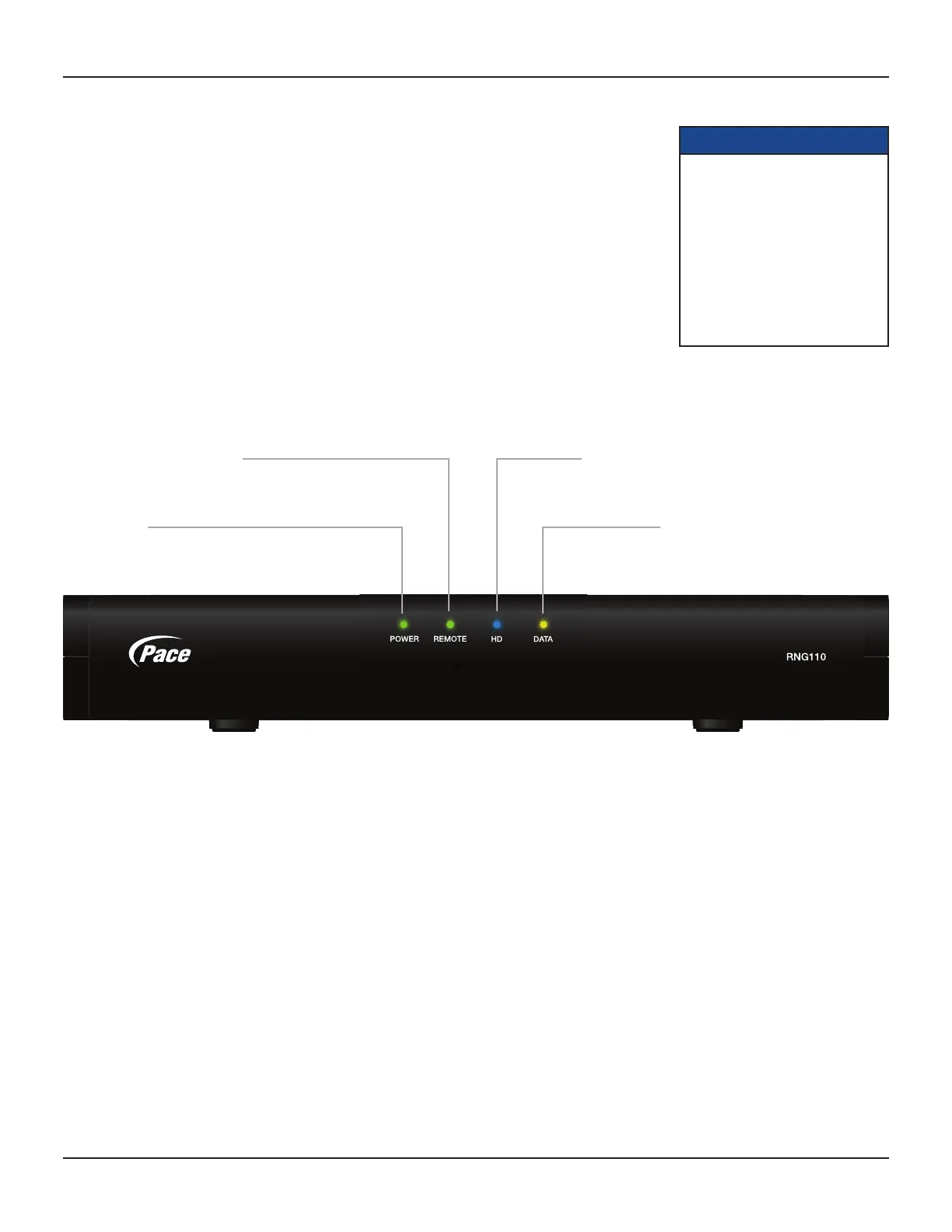
Your set-top’s front-panel
POWER light
Lights green when your set-top is on; not lighted when your
set-top is in standby or is disconnected from the power supply
REMOTE light
Lights green when your set-top is receiving
a signal from your remote control
HD light
Lights blue when your set-top is receiving
High-Definition Television (HDTV) content
DATA light
Lights yellow when your set-top is receiving
data and when there is an unread message
Lightning storms
Disconnect your set-top from the power supply during lightning storms. A lightning storm may affect your
set-top, if it is on during the storm. It may appear that it has stopped working, but you can easily restore its
operation as follows:
Unplug your set-top’s power supply unit from the wall AC outlet. Then plug this power supply unit in again at
the wall AC outlet (and, if there is a switch by this outlet, switch it to its ON position).
Using your remote control
Your cable TV service-provider determines the digital channels, services, and screen information that you see
on your TV when you use your set-top and its remote control.
Consult the information supplied by your cable service-provider for details on how to make the most of the
digital cable services. Also read the operating instructions that are supplied with your remote control.
NOTES
IMPORTANT: Unless there is a
lightning storm or you will be
away from your home for a long
time, do not unplug your set-top’s
power supply unit at the wall AC
outlet (or do not switch it off there,
if the outlet has a switch). Your
set-top cannot be updated with
new features, through the cable, if
it is disconnected from the power
supply.



 To Next Page