6
Pace Xi5 (PX051AEI) USER GUIDE (DRAFT-160208)
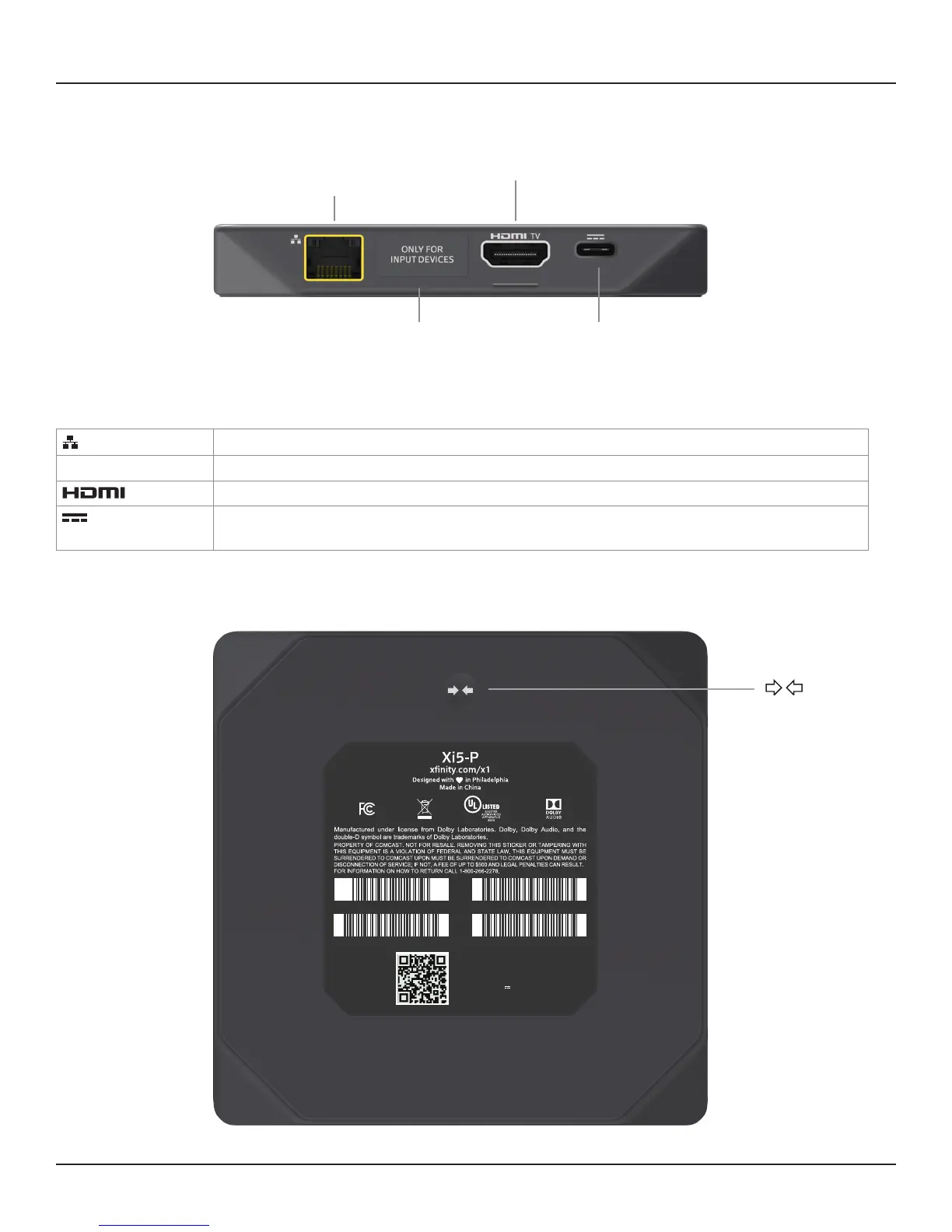
REAR PANEL AND BASE
POWER
(Make this
connection
last of all)
ETHERNET
From your home network
(optional)
INPUT
HDMI input (under
label). For future use.
HDMI TV
HDMI output to your TV
Ethernet
Connect to your home network (optional).
INPUT (behind label)
Connect another optional HDMI device (allowing the device’s output to loop through the set-top box to the TV).
TV
Connect to the HDMI input on your HDTV.
Power
Connect your set-top box’s power supply unit here. Only with the Pace-approved power supply unit provided.
Make this connection last of all.
Base
Model: Pace PX051AEI
FCC ID: NQ8PX051AEI
Input: 5V 3.0A
yymmddXXXX
ETH MAC: 12:AB:34:CD:56:EF
SN: PAW400000001eSTB MAC:A1:B2:C3:D4:E5:F6
WiFi MAC:1A:2B:3C:4D:5E:6F
WPS button
Rear panel



 To Next Page