5
ENGLISH
3-4. Connecting the monitor
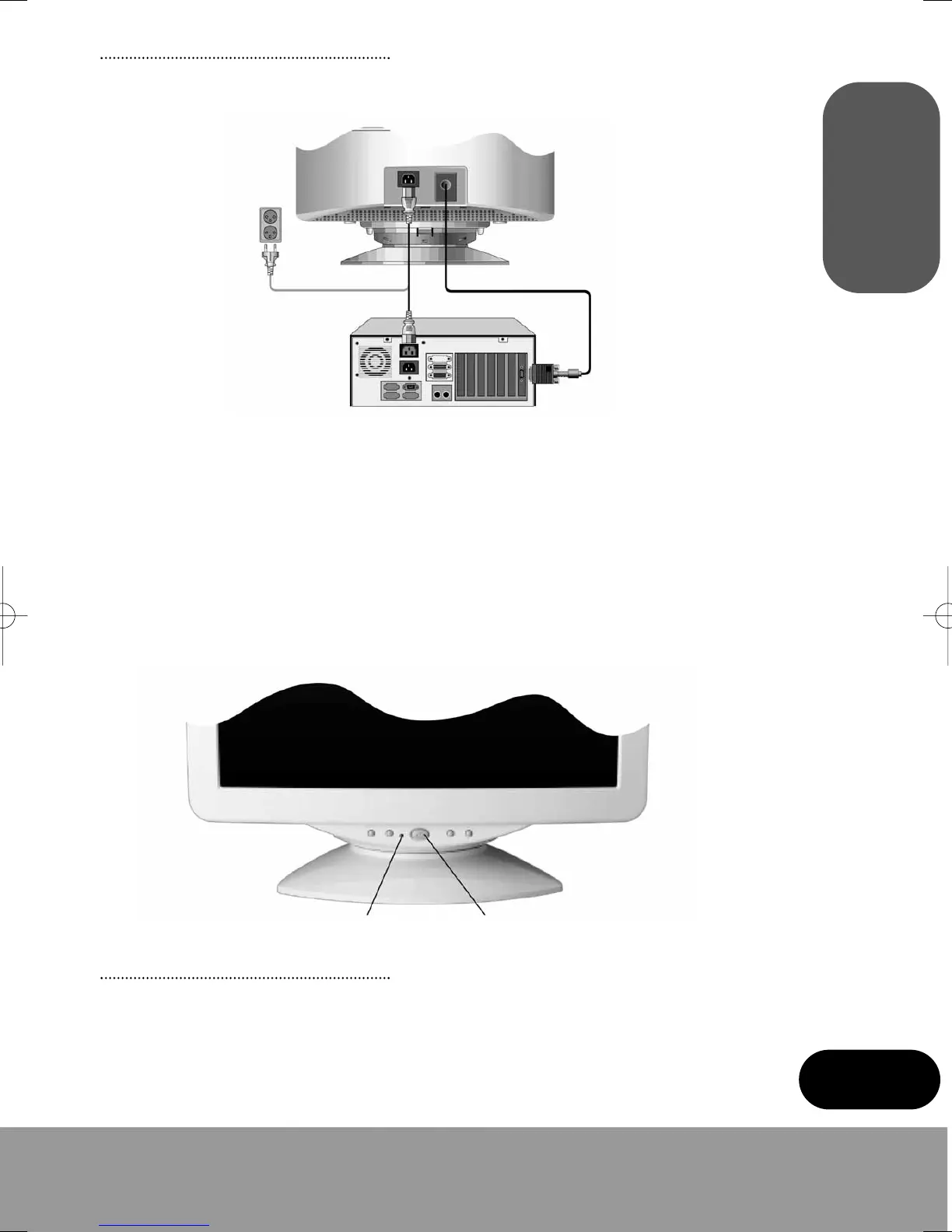
Before you start cabling your monitor, check that the power is off on all units. To avoid any
possibility of electric shock, always connect your equipment to properly earthed outlets.
1. Insert the 15-pin signal cable connector to the VGA connection on your computer and
screw it down.
2. Plug the display unit’s power cable first to the back of the display unit.
3. Then plug the power cable to a 100V - 240V earthed electrical outlet or to the system unit,
if it has an outlet for the display power cable.
4. Turn on the display unit using the Power switch and check that the power LED is on. If
not, repeat steps 2, 3 and 4 or refer to the Troubleshooting section of this guide.
5. Turn on the power to the computer. The picture will appear within about 15 seconds.
Adjust the picture to obtain optimum picture quality. See the section Adjusting the picture
in this guide for more information.
Power LED Power Switch
3-5. Setting the refresh rate
Follow the instructions below to set your refresh rate in Windows 98/ME/XP/2000.
1. Go to the configuration window (Start-Settings-Configuration window).
2. Double click on the “Display” icon.
monitor_guide_6908470000.qxd 27/05/03 15:56 Page 5



 To Next Page