6
ENGLISH
3. Click on the “Settings” tab.
4. Click on the “Advanced” button.
5. Click on “Adapter” and select 85Hz from the list.
6. Click on “Apply” to accept the selected value.
The recommended setting is a resolution of 1024x768 and a refresh rate of 85Hz.
Preset Timing Table
* Recommended primary mode.
4. ADJUSTING THE PICTURE
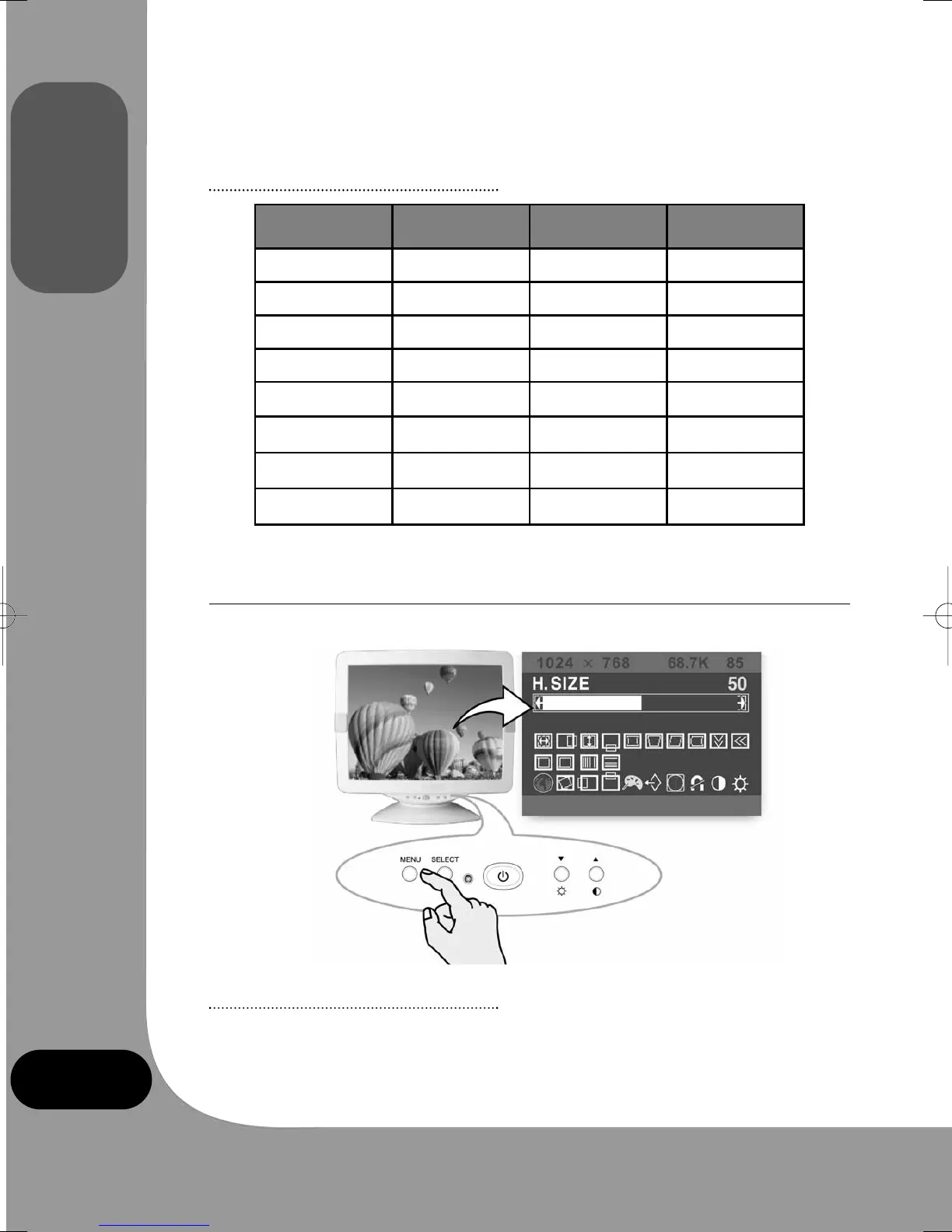
You can adjust the screen display by using the buttons located below the screen.
4-1. Using the On Screen Display
1. Push the MENU button to open the OSD. The resolution and frequency are displayed at
the top of the menu box for your information.
No. Resolution
Horizontal
Frequency
Refresh Rate
1 720 x 400 31.5 KHz 70 Hz
2 640 x 480 43.3 KHz 85 Hz
3 640 x 480 50.6 KHz 100 Hz
4 800 x 600 46.9 KHz 75 Hz
5 800 x 600* 53.7 KHz 85 Hz
6 800 x 600 63.9 KHz 100 Hz
7 1024 x 768 60.0 KHz 75 Hz
8 1024 x 768* 68.7 KHz 85 Hz
monitor_guide_6908470000.qxd 27/05/03 15:56 Page 6



 To Next Page