RX3i Ethernet NIU 5
GFK-2419M
Serial Cable Lengths and Shielding
The connection from a NIU serial port COM1 to the serial
port on a computer or other serial device requires a serial
cable. This connection can be made with the
IC200CBL001 cable kit or you can build cables to fit the
needs of your particular application. See the Ethernet NIU
Reference Manual, GFK-2296 for more information on
serial communications, cables, and converters.
Maximum cable lengths (the total length from the NIU to
the last device attached to the serial cable) are:
•
Port 1 (RS-232) – 15 meters (50 ft.), shielded cable
optional
• Port 2 (RS-485) – 1200 meters (4000 ft.), shielded
cable requi
red
Configuration
The RX3i NIU and I/O system is configured with Machine
Edition Logic Developer programming software.
Machine Edition automatically populates the Ethernet NIU
target in the folder with the required application code blocks,
and partially prepoulates the EGD Exchanges that are
required for ENIU operation.
The NIU verifies the actual module and backplane
configuration at power-up and periodically during operation.
The actual configuration must be the same as the
programmed configuration. Deviations are reported to the NIU
alarm processor function for configured fault response. Refer
to the Proficy Machine Edition Logic Developer Getting
Started Manual, GFK-1918 and the online help for a
description of configuration functions.
LED Operation
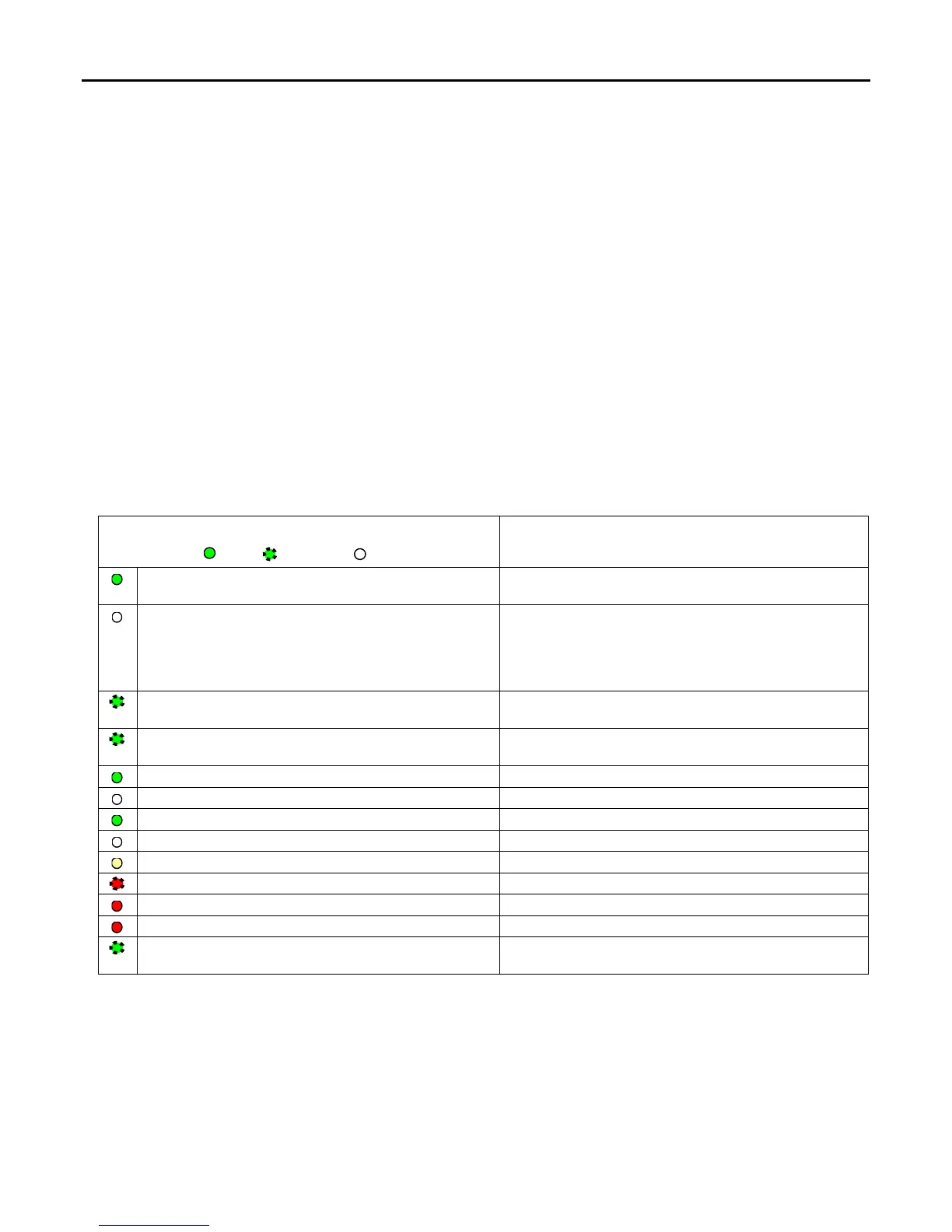
The following table lists the NIU LED functions during normal operation (after initialization sequence is complete).
LED State
On
Blinking Off
NIU Operating State
NIU OK On
NIU has passed its powerup diagnostics and is
functioning properly.
NIU OK Off
NIU problem. RUN and OUTPUTS ENABLED LEDs
may be blinking in an error code pattern, which can be
used by technical support for troubleshooting. This
condition and any error codes should be reported to
your technical support representative.
NIU OK, OUTPUTS ENABLED, NIU SCANNING I/O
Blinking in unison
NIU is in boot mode and is waiting for a firmware update
through serial port.
NIU OK Blinking. Other LEDs off.
CPU in Stop/Halt state; possible watchdog timer fault.
Cycle power in Stop mode and refer to fault tables.
NIU SCANNING I/O On
NIU is in Run mode
NIU SCANNING I/O Off
NIU is in Stop mode.
OUTPUTS ENABLED On
Output scan is enabled.
OUTPUTS ENABLED Off
Output scan is disabled.
I/O FORCE On
Override is active on a bit reference.
BATTERY Blinking
Battery is low.
BATTERY On
Battery is dead or not attached.
SYSTEM FAULT On
NIU is in Stop/Faulted or Stop/Halted mode.
COM1 Blinking
COM2
Blinking
Signal activity on port.


 To Next Page