6
Handling and Operation
20
ubject to change without notice
6 Handling and Operation
6.1 Operating controls
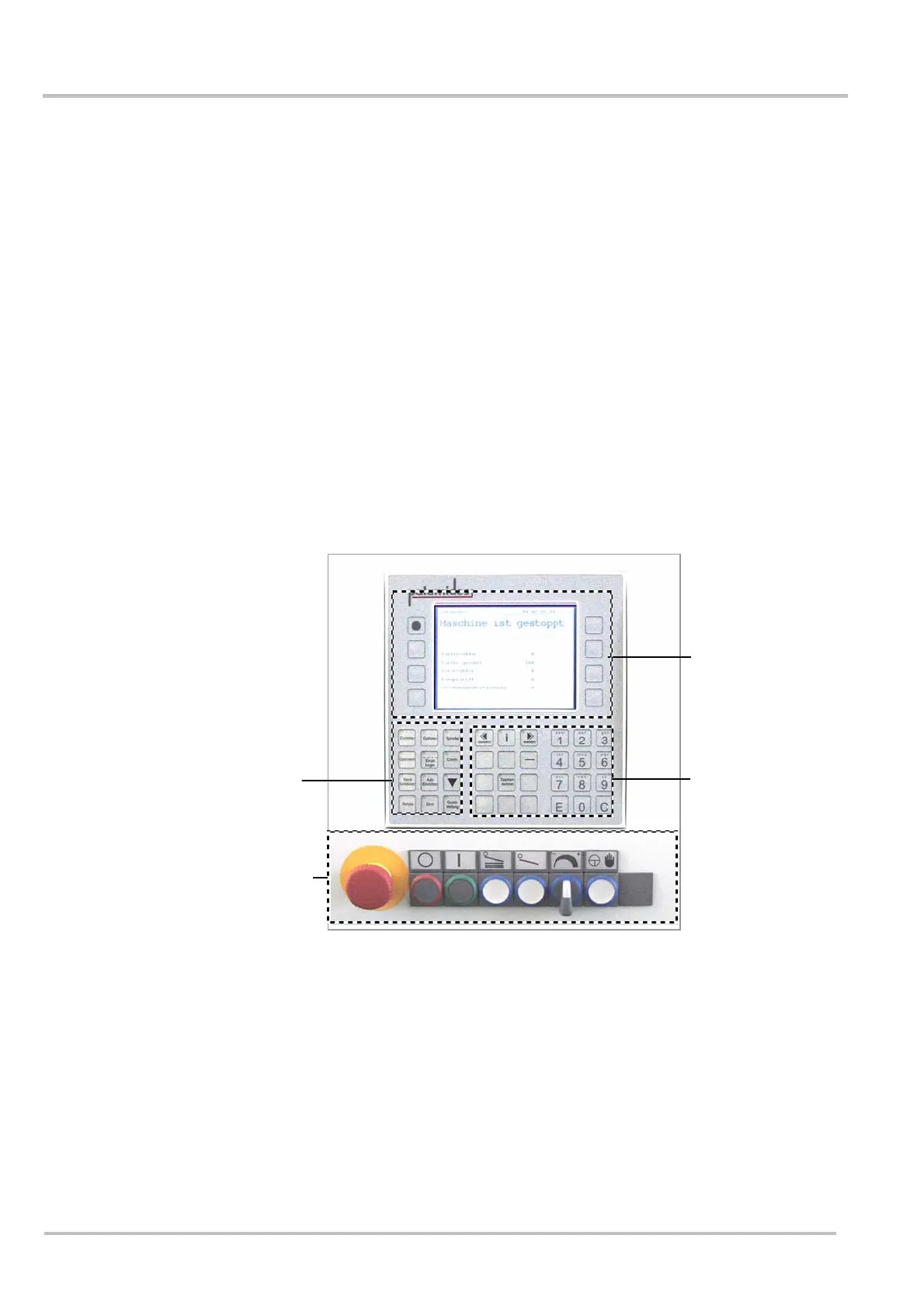
The operating controls have the following functions:
• Operating the machine
• Adjusting the machine
• Information for machine operators
• Information for maintenance personel
• Information for service technicians
The machine is operated with the assistance of the menu guide on the display. If a key is lit
up, this option is activated. If the key flashes, it is waiting for input. The display shows which
inputs can be made. Confirm with enter. Repeatedly pressing the option key will lead back
to the main menu. Those authorised to service the machine and service engineers have
access to certain machine data via submenus.
Abb.497
Group 1 Switching on and operating the machine
rotary switches - speed
Group 2 Function menu
Group 3 Display
Group 4 Numeric pad, keys for scrolling further menu
guide
Group 1
Group 3
Group 2
Group 4


 To Next Page