Rear Panel
7
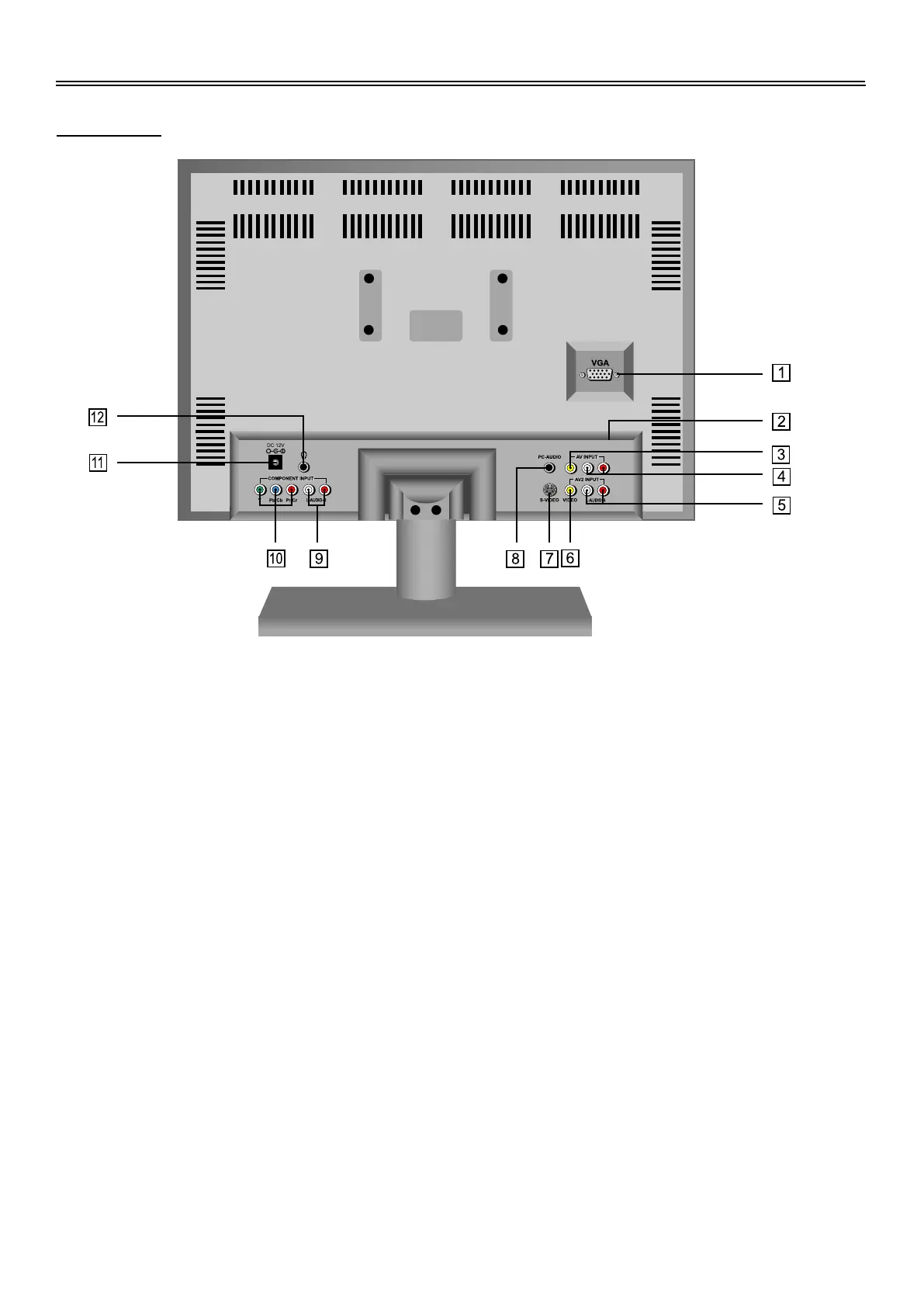
Rear View
1.
2.
3.
4.
5.
6.
VGA Input Jack
Connected to the VGA output jack on a
personal computer.
Antenna Input Jack
Connected to external antenna to receive
the TV program in TV mode.
Video Input Jack
In AV1 mode, connecting for the external
video signal input.
L/R Audio Input Jack
Connected to the L/R audio signal input in
AV1 mode.
L/R Audio Input Jack
In AV2 or S-VIDEO mode, connecting for
L/R audio signal input.
VIDEO Input Jack
In AV2 mode, connecting for the external
video signal input.
7.
8.
9.
10.
11.
12.
S-VIDEO Input Jack
Connecting for S-VIDEO signal input.
PC Audio Input Jack
Connected to the audio output jack on a
personal computer.
L/R Audio Input Jack
Connecting for the L/R audio input in
Component, mode.
Y/Pr(Cr)/Pb(Cb) Input Jack
Connecting for the Y/Pr(Cr)/Pb(Cb) input
in Component mode.
DC 12V In Jack
Connected to power adapter.
Earphone Jack
When connected to earphone, the
internal speakers will automatically turn
off.


 To Next Page