Page 5 PALSTAR
TUNING INSTRUCTIONS
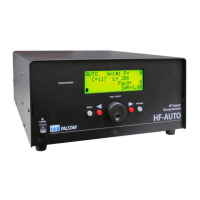
The HF-AUTO is an automatic tuner for matching a transmitter to a
nonresonant antenna. It was designed to ll the role of a dierential tuner
using an air variable capacitor and roller inductor both driven by stepper
motors. It stores the C and L settings for memorized frequencies and
memorizing can be automatic or manual.
Automatic tuning and memorizing:
Turn ON Auto Store in the Set-Up menu. Apply RF (2-200 watts) and allow
the tuner to make the match. Once the lowest SWR achievable is found and
that value is below the Tuning Level (usually 1.50) those settings are
automatically memorized.
NOTE: When in AUTO mode, and RF is applied with a frequency that has been
previously memorized, once the settings are achieved if the SWR is below that
set in Tuning Level (Set-Up), the tuner will not initiate a tuning cycle. If the
SWR is above that dened in Tuning Level, the tuner will retune for a better
match.
If Auto Store is OFF the tuner will automatically tune to the lowest achievable
SWR but will not memorize the settings. At this point one can memorize the
settings as described in Manual Memorizing below.
Manual Tuning and Memorizing:
To put the tuner in Manual mode push the tuning knob to select the roller
inductor (L). Rotate the tuning knob while watching the SWR reading for a
dip. Then push the tuning knob again to select the dierential capacitor (C)
and rotate it to obtain a deeper SWR dip. Continue the process back and forth
until a SWR value is achieved that suits your needs. Exact match usually can
be found, but takes longer to set.
A quicker option is to put the tuner in Auto mode and let it nd the match.
Then put it in Manual mode and use the manual process to improve the SWR
reading.
NOTE: When in Manual mode, the Left Arrow button will switch directly back
to Auto mode.
Manually memorizing: once the SWR value for the frequency selected is
achieved, with the tuner in Manual mode continue to apply RF (20-40 watts
recommended) then hold the Right Red Arrow button until Settings
Changed appears on the display. Now the settings have been memorized.
Relsease the button and stop applying RF to the tuner.
NOTE: When in Manual mode, the Left Arrow button will switch directly
back to Auto mode.
Antenna Selection: With Auto Antenna Switch ON, the antenna port (1-3) is
selected based upon the amateur band for each antenna port that was
dened in Set-Up. New in 1.29. With Auto Antenna Switch OFF, the port
selection is manual using the gray Antenna button.
Bypass mode bypasses the matching network. Some users have the tuner in
Bypass allowing them to use their radio’s internal antenna tuner. Caution is
needed in this last case if an amplier is in the circuit and turned o or in bypass.
The standing waves (SWR) will potentially have high voltage nodes that can
cause damage to the bypass components in the amplier.
Note: The SWR and Power Output display will not be accurate in this mode.
The Auto Antenna Switch, if ON, works in Bypass mode.


 To Next Page
 Loading...