EasyManua.ls Logo

Panasonic AG-4700E - Basic Controls

Panasonic AG-4700E
52 pages
Print Icon
To Next Page IconTo Next Page
To Previous Page IconTo Previous Page
Loading...
(40)
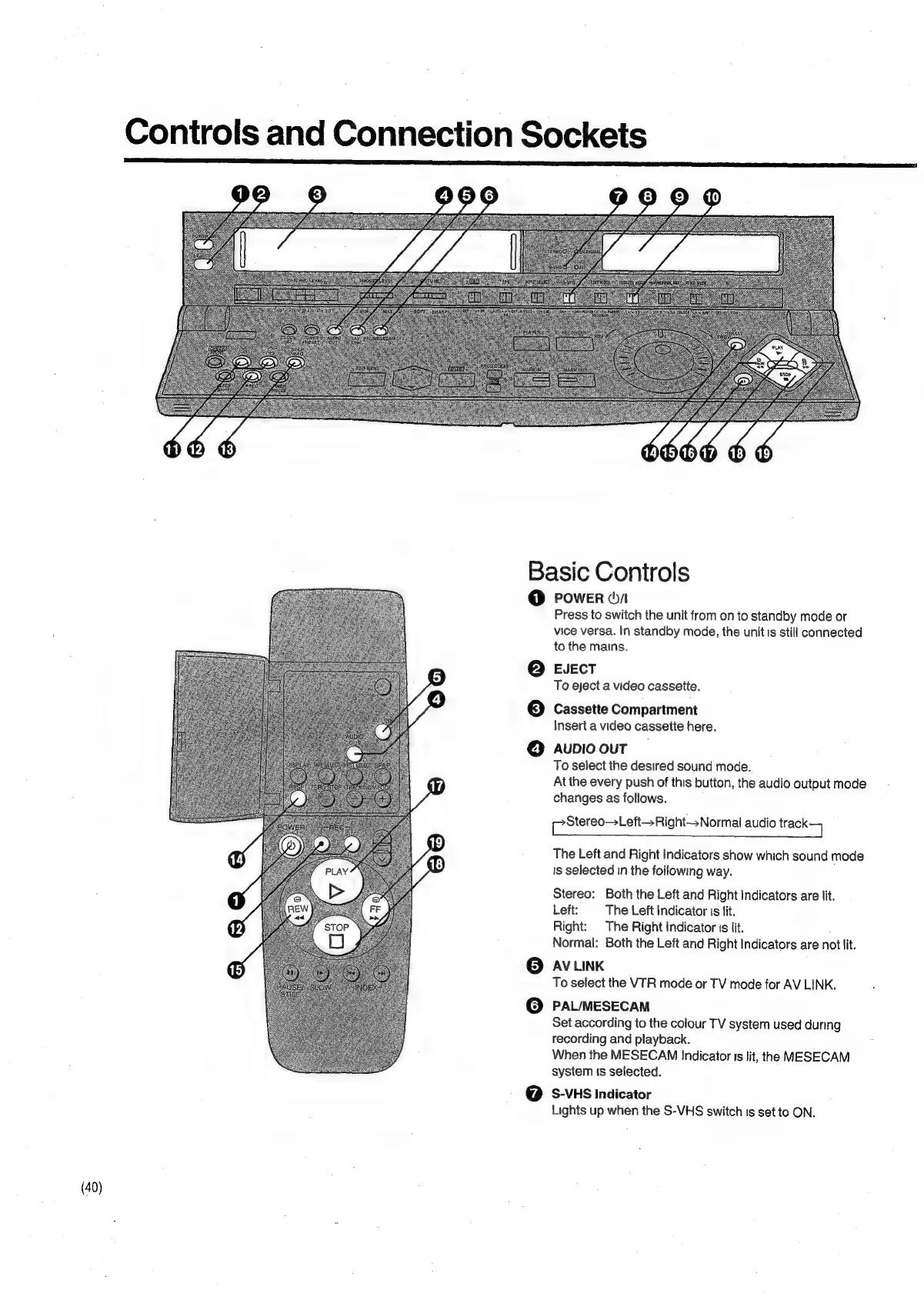
Controls
and
Connection
Sockets
PLAN.
-
‘stor
Las
ax
-
Basic
Controls
0
{2)
3)
cs)
©
oO
POWER
(/
Press
to
switch
the
unit
from
on
to
standby
mode
or
vice
versa.
In
standby
mode,
the
unit
is
still
connected
to
the
mains.
EJECT
To
eject
a
video
cassette.
Cassette
Compartment
Insert
a
video
cassette
here.
AUDIO
OUT
To
select
the
desired
sound
mode.
At
the
every
push
of
this
button,
the
audio
output
mode
changes
as
follows.
[?Stereo—
Left—Right—sNormal
audio
track
The
Left
and
Right
Indicators
show
which
sound
mode
Is
selected
in
the
following
way.
Stereo:
Both
the
Left
and
Right
Indicators
are
lit.
Left:
The
Left
Indicator
is
fit.
Right:
The
Right
Indicator
is
lit.
Normal:
Both
the
Left
and
Right
Indicators
are
not
lit.
AV
LINK
To
select
the
VTR
mode
or
TV
mode
for
AV
LINK.
PAL/MESECAM
Set
according
to
the
colour
TV
system
used
during
recording
and
playback.
When
the
MESECAM
Indicator
is
lit,
the
MESECAM
system
is
selected.
S-VHS
Indicator
Lights
up
when
the
S-VHS
switch
is
set
to
ON.