-Officer/Admin Information Set up by Control Panel-
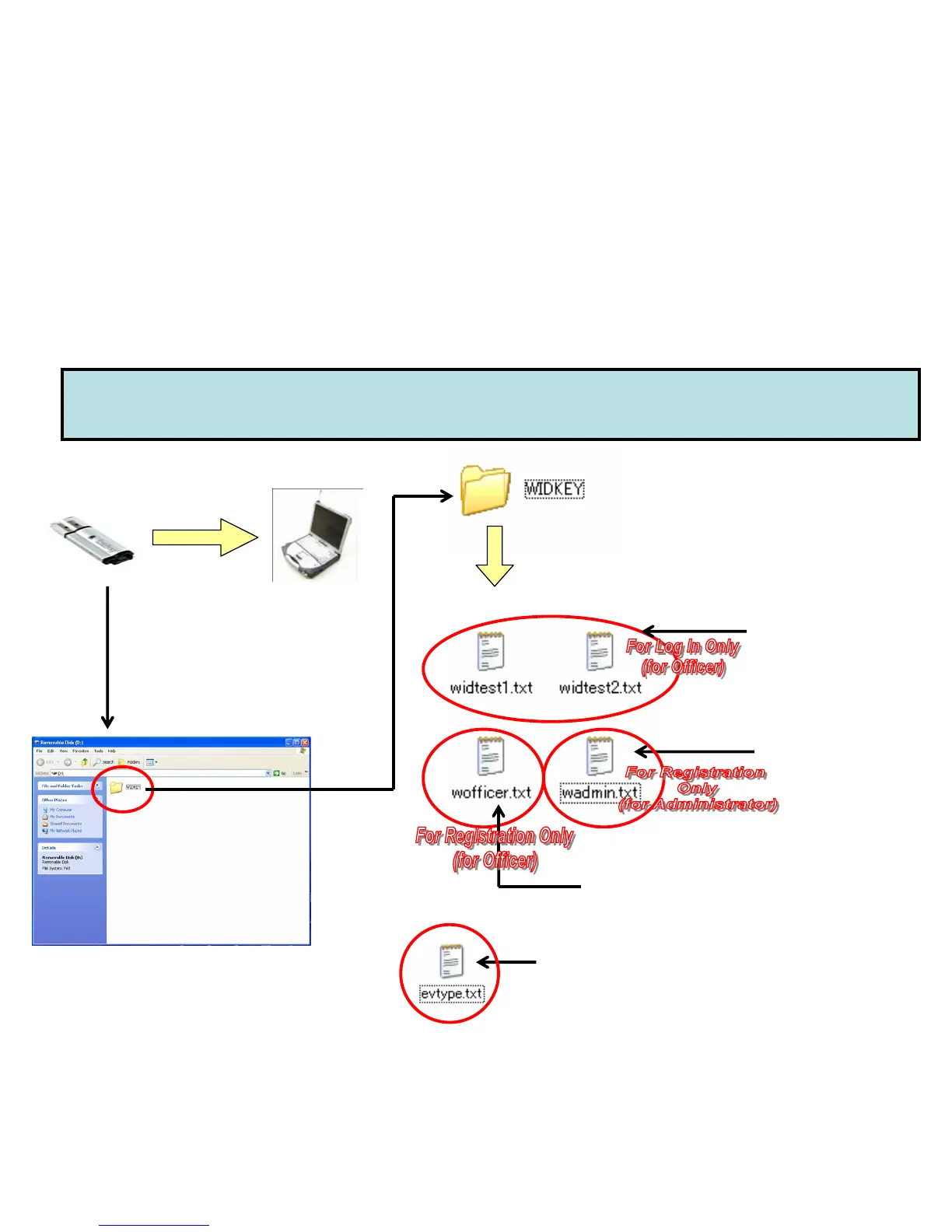
Admin Set up (1) Creating Text Files and Saving in USB memory
(1) Officer Data File:
“wid*****.txt “
(Up to 8 characters
for file name,
1 text file per officer,
Max 2 text files)
USB
Memory
(3) Administrator
Registration File
“wadmin.txt”
(Max. 10 Administrators)
Create “WIDKEY”
under root directory
By PC
(2) Officer Registration File “wofficer.txt”
(Max. 500 Officers)
**Necessary only when using “Officer List” mode
Create the following text files under
“WIDKEY” directory:
(1) Officer Data File
(2) Officer Registration File
(3) Administrator Registration File
(4) Event Type File
(see “Event Type for Bookmark”)
Plug USB
memory
to PC
(4) Event Type File “evtype.txt” For Bookmark
(See “Event Type for Bookmark)
(Up to 99 characters for each type,
Max 10 event types in the “evtype.txt”)


 To Next Page