How to register the Officers information at the beginning of the shift?
(1) Plug USB memory saved the Officer information as the file “wid*****.txt”
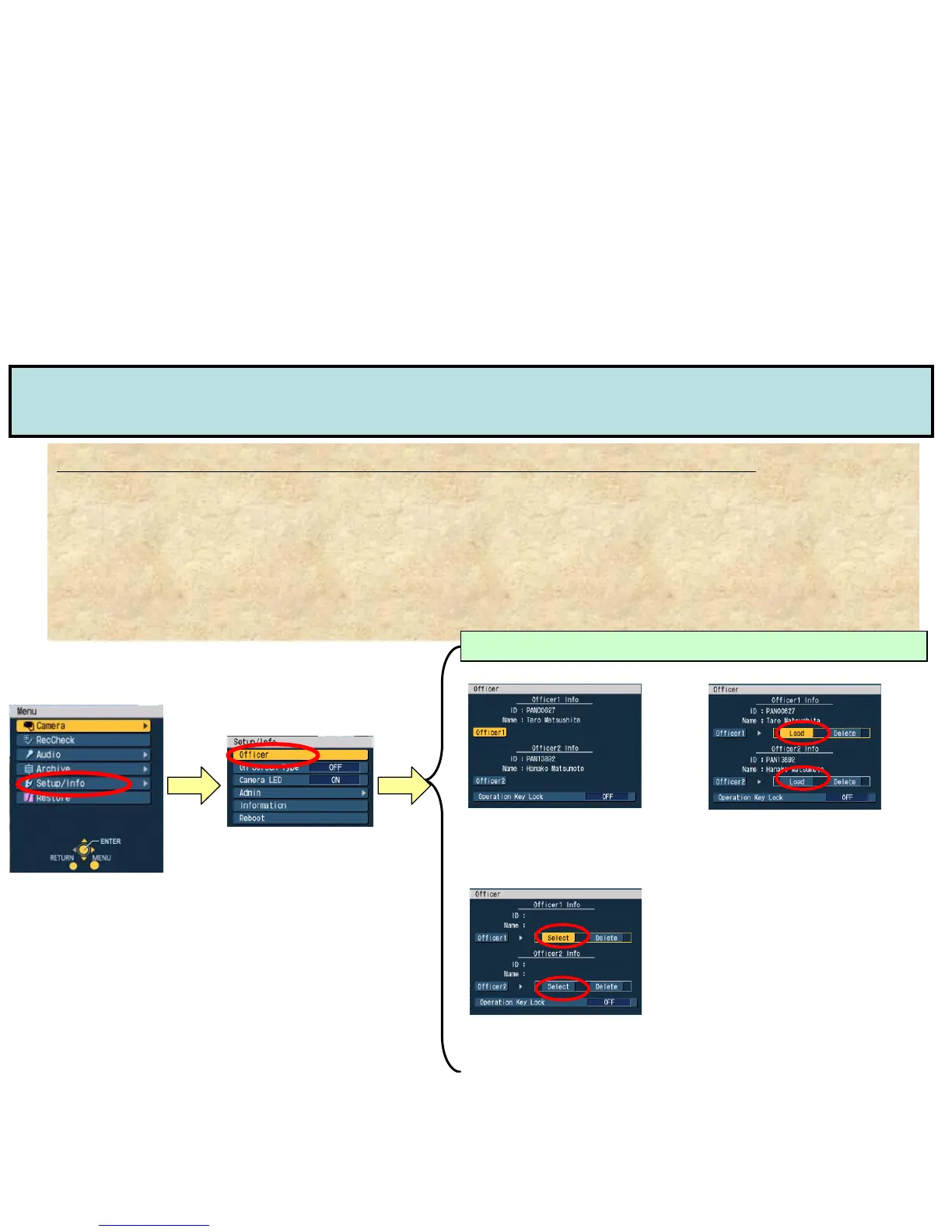
(2) Go to “Officer” by Control Panel menu and Officer Data will be registered according to the
“Management Mode” set up by Administrator
NOTE1: ”Management Mode” in “Admin” menu needs to be set as “Auto”, “Manual” or “List” by Administrator
(See “Admin Set up (2)”)
NOTE2: “Auto” will be loaded the first 2 files in ascending order if there exists some files in USB memory.
“Manual” will be loaded the first file only in ascending order. If there are 2 officers to load, it’s necessary to have 2 USB
memories.
[Setup/Info]
-Officer/Admin Information Set up by Control Panel-
Officer Set up (1) How to register Officers info at the beginning of shift?
“AUTO” mode is to loads the
max 2 Officer Data Files from
a USB memory automatically
“MANUAL” mode is to be used
when Officer 1 and 2 data needs to
be loaded by 2 different USB
memories
“LIST” mode is to list and select
the officer data that had already
registered in VPU.
Officer Info Registration according to “Management Mode”
[Auto] [Manual]
[List]
[Top Menu]


 To Next Page