★
Configuring AW-RP50
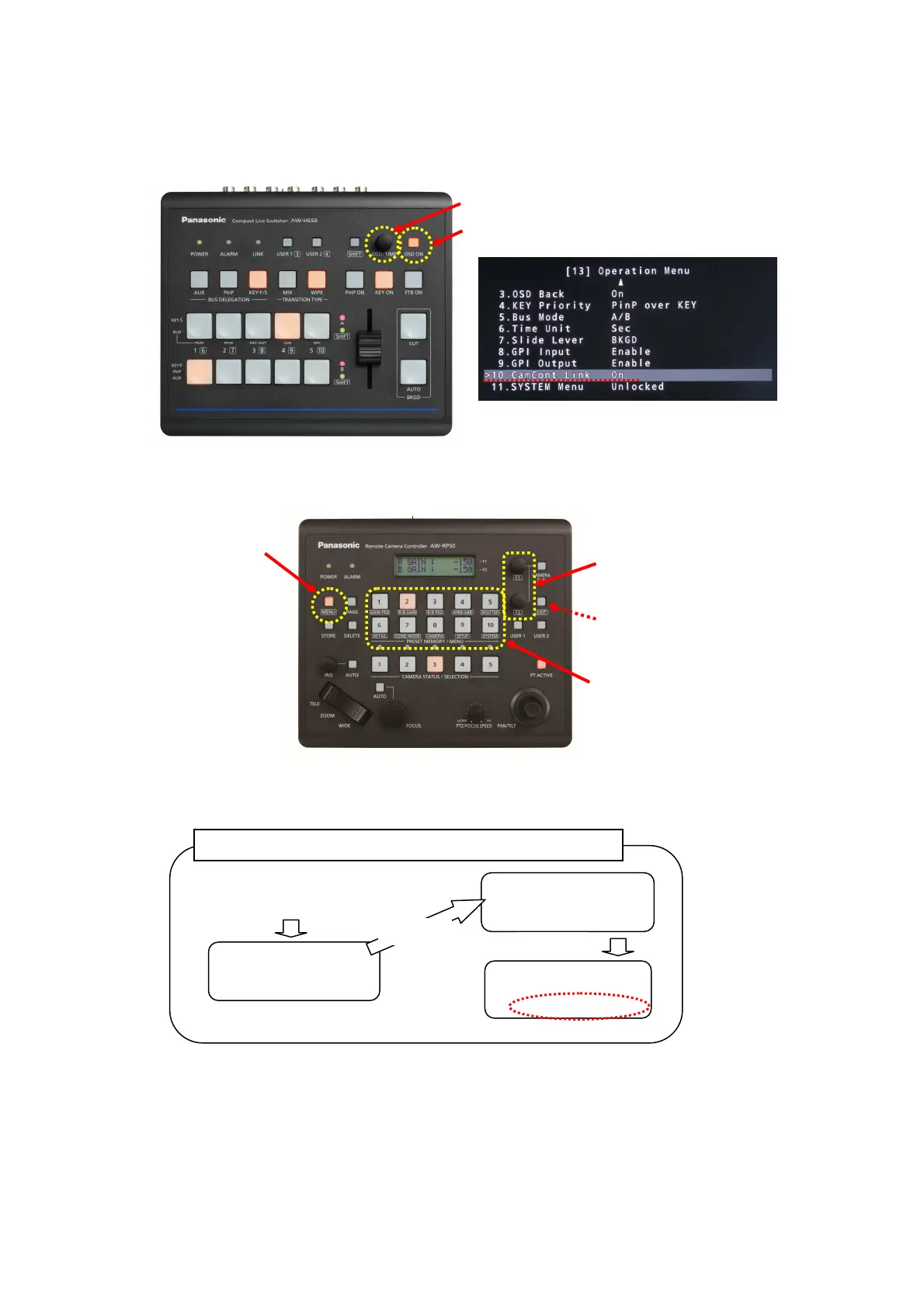
① Set the IP address of AW-HS50. * Default IP address for AW-HS50: (192. 168. 0. 8)
Menu: (10) SYSTEM > [9] SW IP ADR => [IP address of AW-HS50] * Default (192. 168. 0. 8)
3
Change the setting values
using F1 & F2 dials.
1
Press MENU button.
(LED lights up.)
2
Select the Target buttons.
(LED lights up.)
(Figure 1: AW-HS50 Control Panel)
(
A
)
(
B
)
(Figure 2: AW-HS50 Menu Display Screen)
(Figure 3: AW-RP50 Control Panel)
* If returning to a previous level of
the menu, press EXIT button.
[
1
]
CAMERA
CTL
1 Press MENU button.
2 Press Target button [10] SYSTEM.
[
9
]
SW IP ADR
Use F2 dial to set and determine.
Turn F1
[
9
]
SW IP ADR
Press F1
(Procedure) * Also at the following steps, perform the operations like this.














 To Next Page