EasyManua.ls Logo

Panasonic C1381 - Page 11

Panasonic C1381
51 pages
Print Icon
To Next Page IconTo Next Page
To Previous Page IconTo Previous Page
Loading...
2.
3.
a)
b)
d
e)
f)
g)
h
i)
x
m})
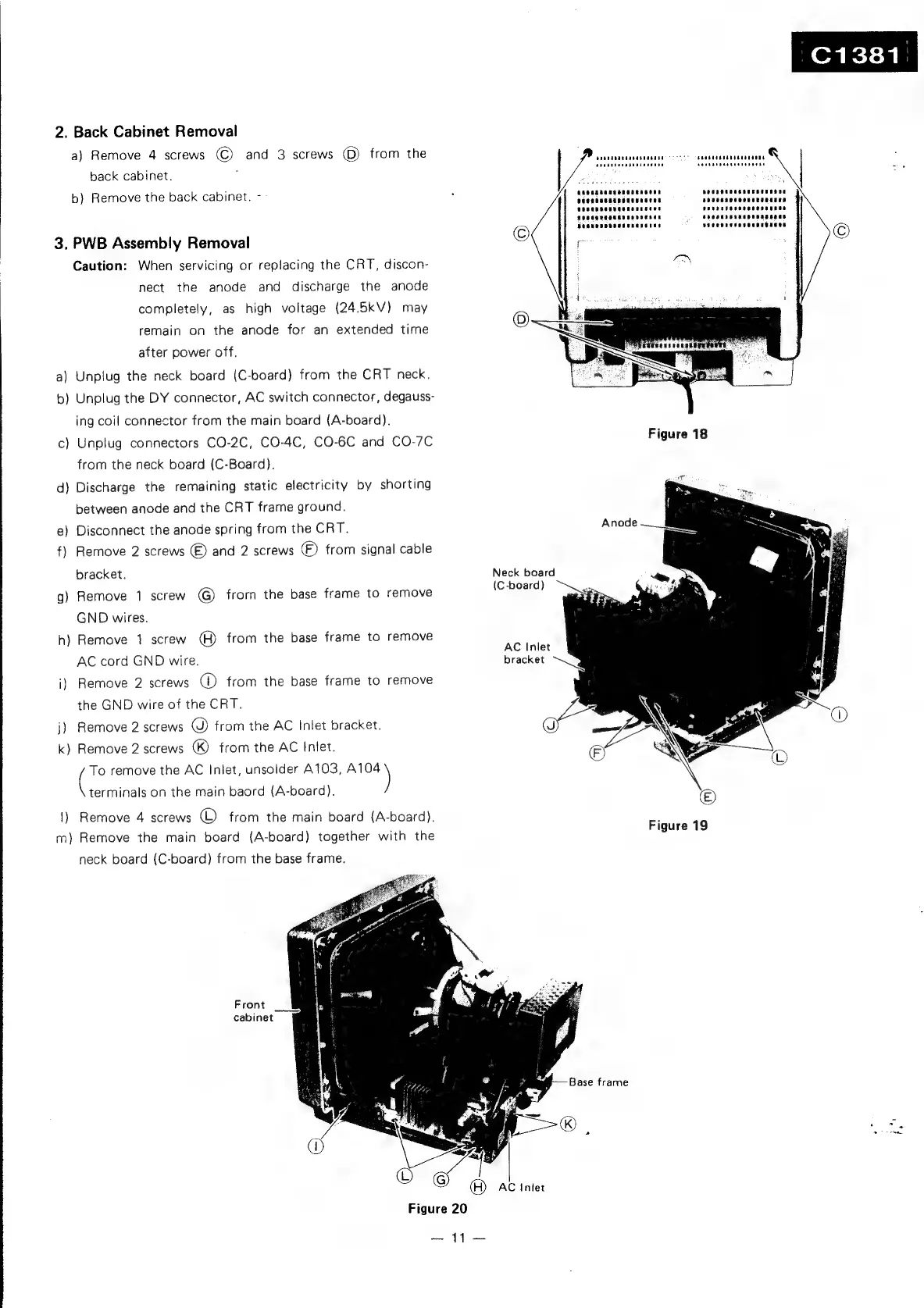
Back
Cabinet
Removal
a)
Remove
4
screws
©
and
3
screws
©)
from
the
back
cabinet.
:
b}
Remove
the
back
cabinet.
-
PWB
Assembly
Removal
Caution:
When
servicing
or
replacing
the
CRT,
discon-
nect
the
anode
and
discharge
the
anode
completely,
as
high
voltage
(24.5kV}
may
remain
on
the
anode
for
an
extended
time
after
power
off.
Unplug
the
neck
board
(C-board)
from
the
CRT
neck.
Unplug
the
DY
connector,
AC
switch
connector,
degauss-
ing
coil
connector
from
the
main
board
(A-board).
Unplug
connectors
CO-2C, CO-4C,
CO-6C
and
CO-7C
from
the
neck
board
(C-Board).
Discharge
the
remaining
static
electricity
by
shorting
between
anode
and
the
CRT
frame
ground.
Disconnect
the
anode
spring
from
the
CRT.
Remove
2
screws
®
and
2
screws
(F)
from
signal
cable
bracket.
Remove
1
screw
G)
from
the
base
frame
to
remove
GND
wires.
Remove
1
screw
(H)
from
the
base
frame
to
remove
AC
cord
GND
wire.
Remove
2
screws
oO
from
the
base
frame
to
remove
the
GND
wire
of
the
CRT.
Remove
2
screws
©)
from
the
AC
Inlet
bracket.
Remove
2
screws
)
from
the
AC
Inlet.
To
remove
the
AC
Inlet,
unsolder
A103,
7
aa
on
the
main
baord
(A-board).
Remove
4
screws
(L)
from
the
main
board
(A-board).
Remove
the
main
board
(A-board)
together
with
the
neck
board
(C-board)
from
the
base
frame.
Front
cabinet
©
Figure
20
Neck
board
(C-board)
AC
Inlet
bracket
()
AC
inter
Pa
bs
foe
Ovenneee
Anode
seeageceemaaaneeaan
"s
Seeuenneestunanetas
SUCSROeNESOCOReAESS
depeune
=
aes
bansaoueer
seeasasen
opocese
petncsaee
sdeanasnaeenanseeas
Figure
19
i,

Related product manuals