CQ-C8403N
17
English
Sound Control
The equalizer curve is selectable from among preset 6
types (FLAT, ROCK, POP, VOCAL, JAZZ, and CLUB)
depending on your listening category.
Note: SQ is not changeable when SRS WOW is enabled.
(a page 16)
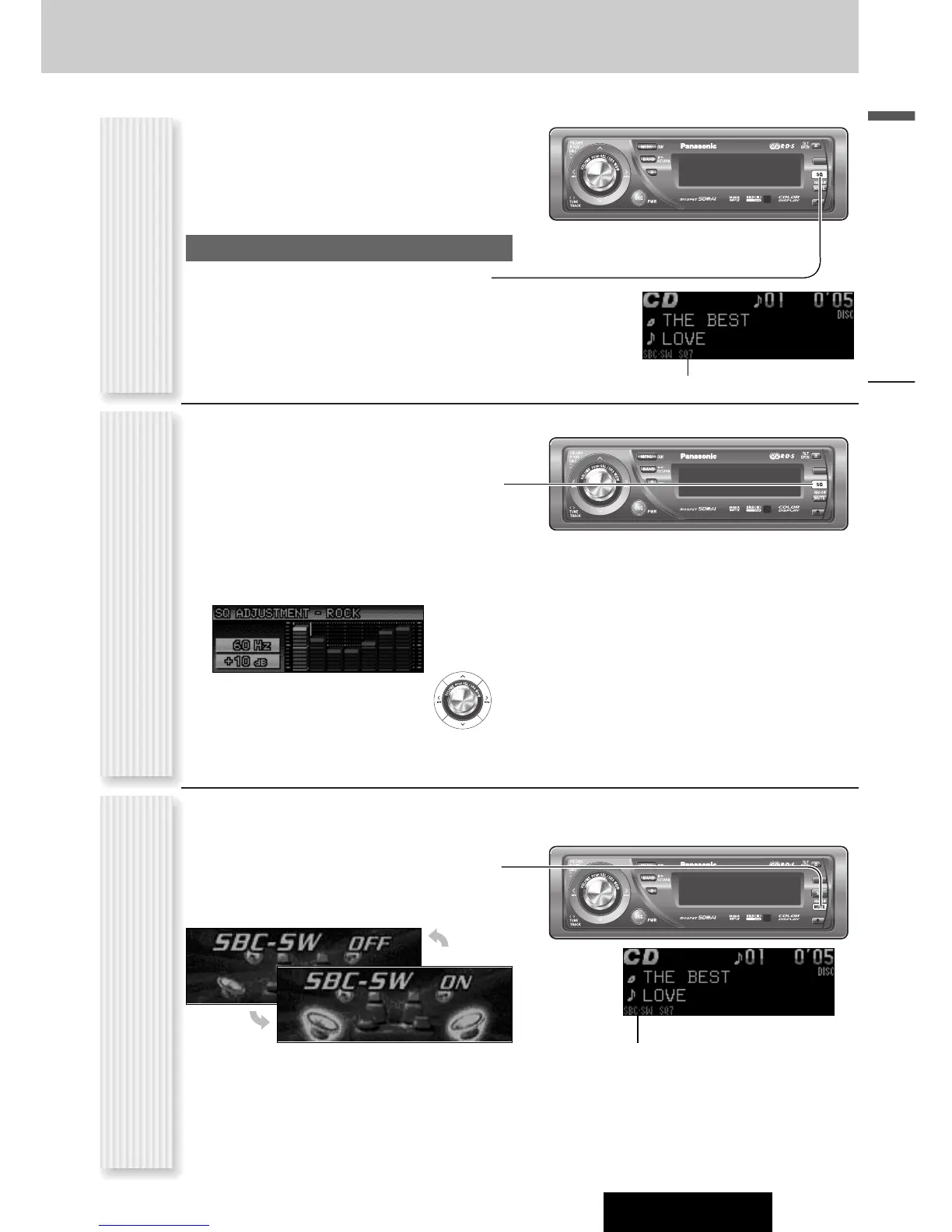
SQ changeover
The SQ category is changed every time [SQ] (Sound
Quality) is pressed.
Note: Setting of SQ, bass/treble and volume are
influenced one another. If the influence mentioned above
causes distortion to the audio signal, readjust bass/treble
or volume. (a page 30)
SQ is adjustable in accordance with your taste.
1
Hold down [SQ] (SOUND QUALITY) for 2
sec. or more when SRS WOW is disabled.
2
Press [BAND].
The targeted SQ preset appears.
3
Adjust each band.
Band: 60, 160, 400, 1 k, 3 k, 6 k, 16 k (Hz)
[]] [[]: Band selection
[}] [{]: Level up/down
4
Press [BAND] to determine the adjust-
ment.
The screen of Step 1 appears again.
5
Press [D] (DISP: DISPLAY).
The regular screen appears again. “USER” appears
in the category name after adjustment.
Note: If you hold down [BAND] for 2 sec. or more
on the SQ call-up screen, the presetting that is called
up can be turned into the default.
The rear speaker can be used as a substitutional
subwoofer when a subwoofer is not connected.
Holding down [MUTE] (SBC-SW) for 2 sec.
or more toggles SBC-SW on and off.
Lights when SBC-SW is activated.
Off (default)
On
SQ Selection Based on Genre
(SQ: SOUND QUALITY)
SQ adjustment
(USER)
Substitutional Subwoofer
(SBC-SW: SUPER BASS CONTROL-SUBWOOFER)
Notes:
¡ If ON is selected, the settings of subwoofer level
adjustment and subwoofer low pass filter are activat-
ed. (a page 30)
¡ SBC-SW is not changeable when SRS WOW is
enabled. (a page 16)
Lights when SQ is activated.



 To Next Page