14
CQ-C8803N/C8403N
Hands-Free Phone System
Preparation
Connecting Hands-Free Phone System
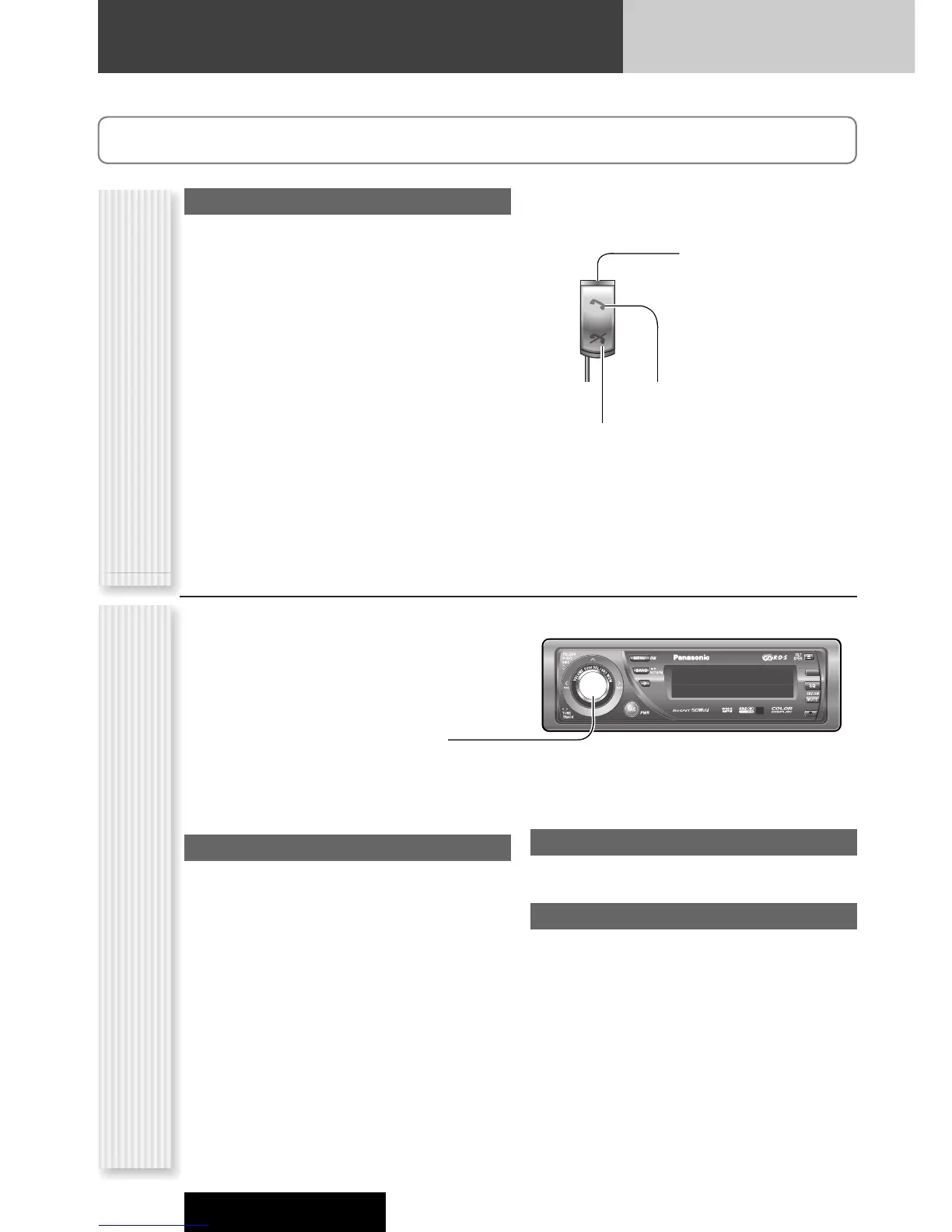
Connect the Hands-Free Phone System (CY-BT100N) and
establish the pairing. Refer to the instruction manual for
the Hands-Free Phone System for further information.
Note: This unit is designed only for receiving calls.
It cannot send calls.
1
Press [Hang-on] on the Hands-Free
Phone System and pick up the phone.
The phone is in the incoming state.
2
Adjust the volume if necessary.
3
Press [Hang-up] on the Hands-Free
Phone System and hung up the phone.
Adjust the ring volume
The ring volume is adjustable from this unit.
(Setting range: OFF/LOW/MID/HIGH, Default: MID)
[}]:
up
[{]:
down
Notes:
¡ The ring volume is adjustable only when receiving
calls.
¡ The ring volume is adjustable only when the phone
ring comes out of the main unit.
Reject calls
Pressing [Hang-up] allows users to reject a call when
the call is coming in.
Bluetooth disconnection/reconnection
Pressing [Hang-up] allows users to temporarily
disconnect when the phone is in the waiting state.
Pressing [Hang-up] allows users to reconnect when the
Bluetooth unit is temporarily disconnected.
Operation Flow
Status indicator (Blue LED)
Lights: Call waiting/Talking
Stays out: Not connected
Blinks rapidly: Receiving a call
Blinks slowly:
Pairing/Reconnecting
[Hang-on]/Blue LED
[Hang-up]/Red LED
Switch unit



 To Next Page