− Release the generator complete wire (green and red).
(Fig. 8)
− Remove 2 screws on the right and 1 screw at the left
side of the control board. (Fig. 7)
− Press down the hook on the left side of control board.
(Fig. 7)
− Then pull out the Control Board Complete from the unit.
(Fig. 7)
Fig. 9
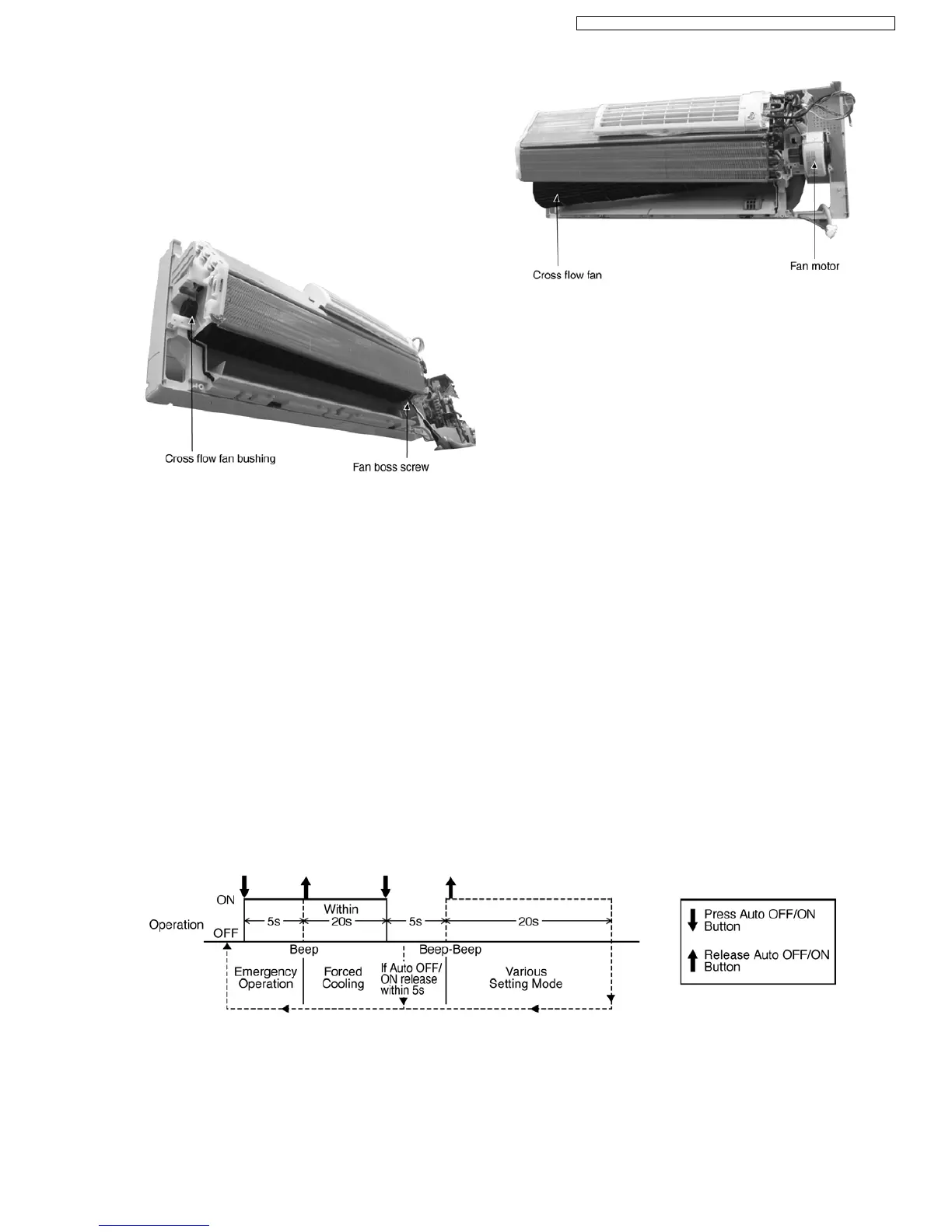
− Remove the cross flow fan bushing from the chassis.
(Fig. 9)
− Loosen the fan boss screw at the cross flow fan. (Fig. 9)
Fig. 10
− Push up the evaporator and remove cross flow fan by
pulling both cross flow fan and fan motor. (Fig. 10)
12.4. Auto OFF/ON Button
• The “Auto OFF/ON Button” (behind the front grille) is used to operate the air conditioner if remote control is misplaced or
mulfunctioning.
• Forced cooling operation is possible by pressing the “Auto OFF/ON Button” for more than 5s where “beep” sound is heard then
release the button.
• User able to select remote control transmission code and toggle remote control signal receiving sound under various setting
mode.
• To enter various setting mode:
− Press the “Auto OFF/ON Button” continuously for 5s (“beep” sound is heard) and release.
− Within 20s, press the “Auto OFF/ON Button” continuously for 5s again (2 “beep” sound is heard) and release.
− Various setting mode has limit up to 20s. Then return to normal operation.
12.4.1. Toggle Remote Control Signal Receiving Sound
• Under various setting mode, press the “Auto OFF/ON Button” to toggle the remote control sound.
− Short “beep”: Turn ON remote control signal receiving sound.
65
CS-A7DKD CU-A7DKD / CS-A9DKD CU-A9DKD / CS-A12DKD CU-A12DKD /



 To Next Page