EasyManua.ls Logo

Panasonic CS-BE25TKE - Quick Guide; Inserting the batteries; Clock setting

Panasonic CS-BE25TKE
80 pages
Print Icon
To Next Page IconTo Next Page
To Previous Page IconTo Previous Page
Loading...
2
Provides maximum comfort and clean air
with optimal energy saving methods.
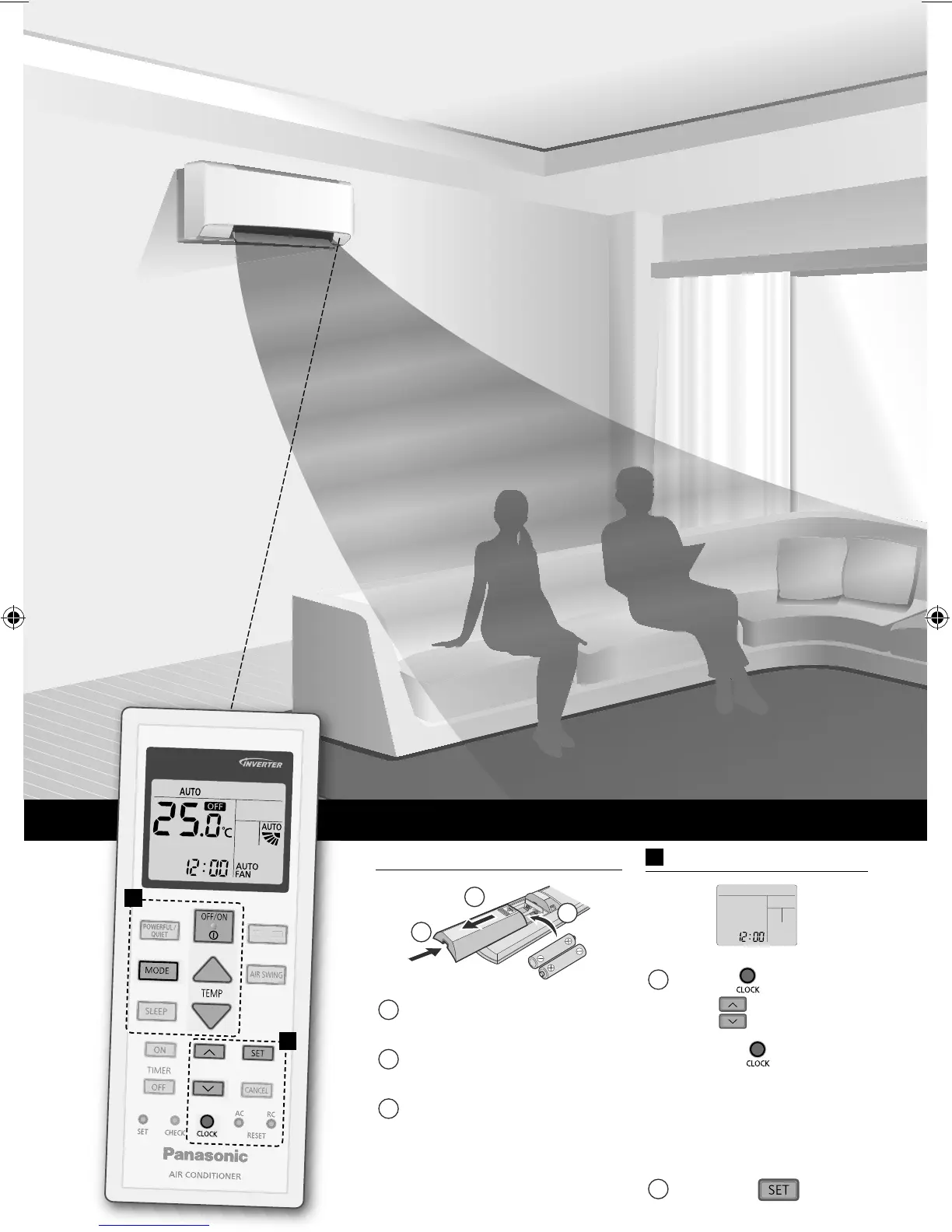
Use remote
control within 8 m
from the remote
control receiver of
the indoor unit.
Quick Guide
Inserting the batteries
1
2
3
1
Pull out the back cover
of remote control.
2
Insert AAA or R03
batteries.
3
Close the cover.
A
Clock setting
1
Press and
set the
time .
• Press and hold
for approximately
5 seconds to show
time in 12-hour
(am/pm) or 24 hour
indication.
2
Con rm .
FAN SPEED
FAN SPEED
A
B
ACXF55-05600_01EN.indd 2ACXF55-05600_01EN.indd 2 1/25/2017 10:03:28 AM1/25/2017 10:03:28 AM

Other manuals for Panasonic CS-BE25TKE

Related product manuals