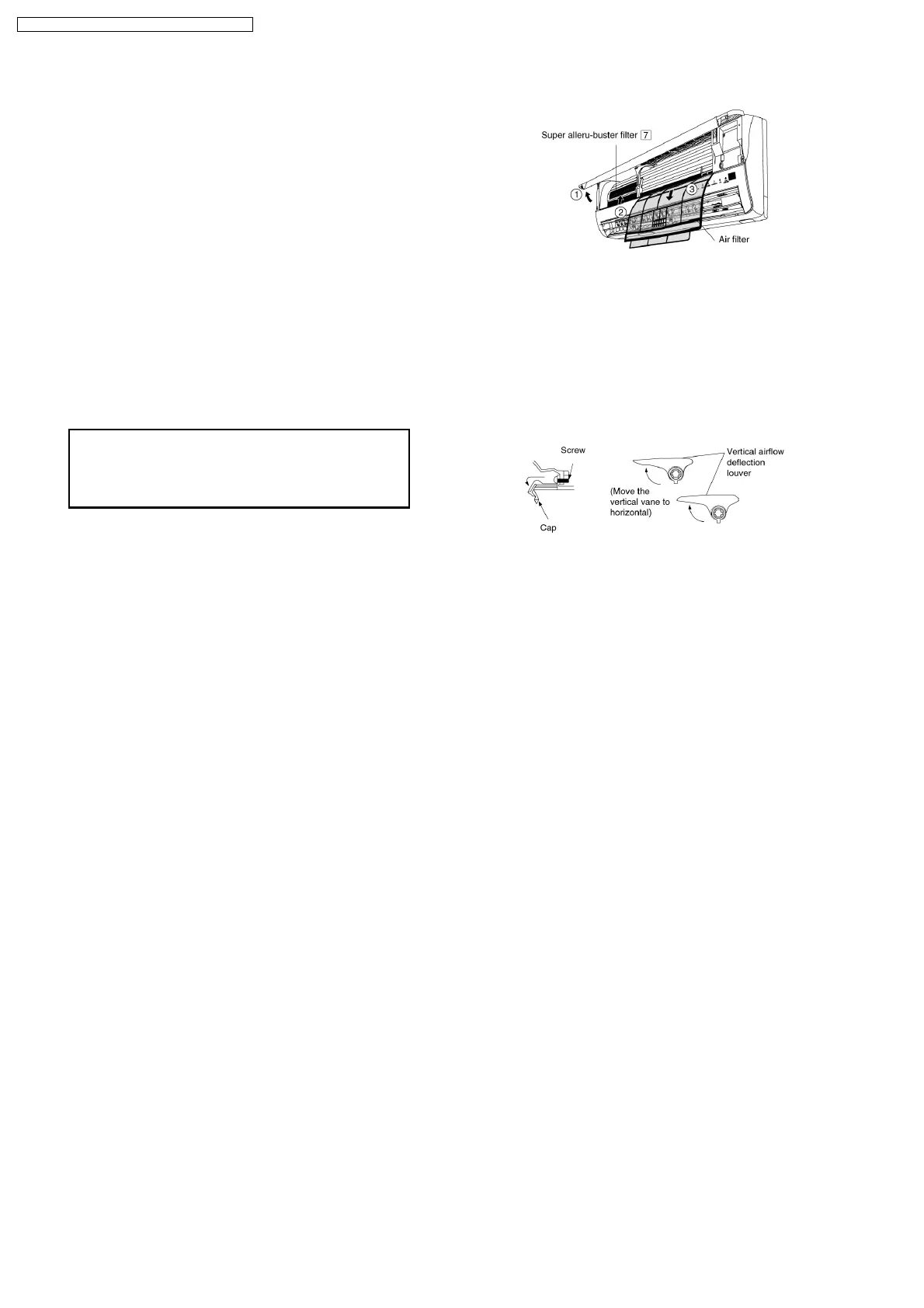
1. Open the front panel.
2. Remove the air filter.
3. Put Super alleru-buster filter into place as shown in
illustration at right.
When reinstalling the front grille, first set the vertical
airflow direction louvers to the horizontal position and
then carry out above steps 2 - 3 in the reverse order.
9.2.5. INSTALLATION OF SUPER ALLERU-BUSTER FILTER
9.2.6. HOW TO TAKE OUT FRONT GRILLE
Please follow the steps below to take out front grille if necessary such as when servicing.
1. Set the vertical airflow direction louvers to the horizontal position.
2. Slide down the 3 caps on the front grille as shown in the illustration below, and then remove the 3 mounting screws.
3. Pull the lower section of the front grille towards you to remove the front grille.
22
CS-E18EKK CU-E18EKK / CS-E21EKK CU-E21EKK



 To Next Page