- 12 -
T
ROUBLESHOOTING
/ L
OCALIZACIÓN
DE
F
ALLAS
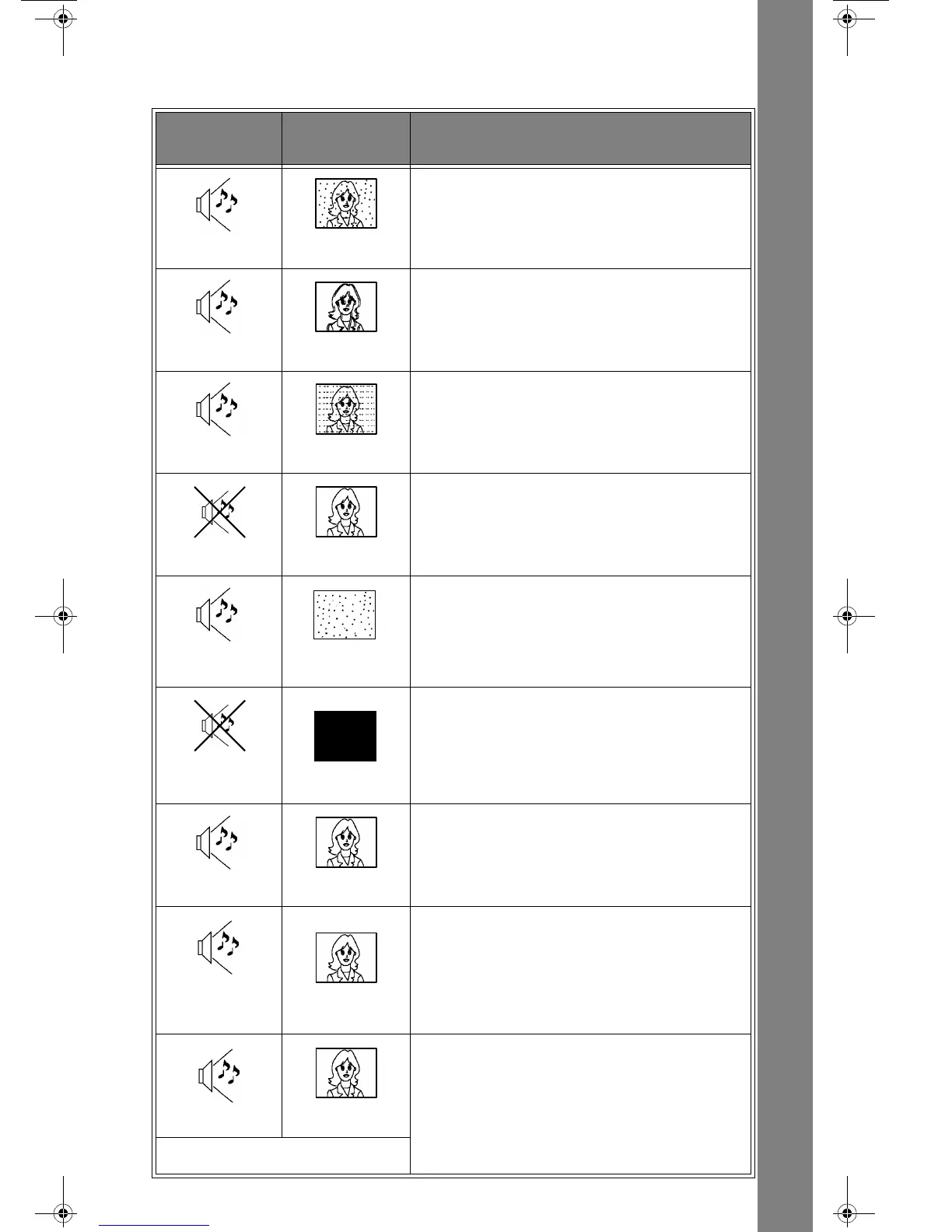
Troubleshooting Chart / Tabla de Localización de Fallas
Before you call for service, determine the symptoms and make a few simple checks shown below.
Antes de solicitar servicio, establezca los síntomas y lleve a cabo las sencillas pruebas
de verificación que se indican a continuación.
S
OUND
S
ONIDO
P
ICTURE
I
MAGEN
C
HECK
V
ERIFICACIÓN
Noisy Sound
Sonido Ruidoso
Snowy Picture
Imagen Moteada
- Antenna Location and/or Connection
- Ubicación y/o Conexión de la Antena
Noisy Sound
Sonido Ruidoso
Multiple Image
Imagen Múltiple
- Antenna Direction and/or Location
- Antenna Lead-in Wire
- Ubicación y/o Dirección de la Antena
- Cable de Entrada de la Antena
Noisy Sound
Sonido Ruidoso
Interference
Interferencìa
-
Electrical Appliances, Lights, Cars, and Trucks
- Diathermy and Other Medical Equipment
- Aparatos Electrodomésticos, Iluminación,
Automóviles y Camiones
- Diatermia y Otro Equipo Médico
No Sound
Sin Sonido
Normal Picture
Imagen Normal
- Volume Control Setting
- Mute Control (If Applicable)
- Try Another Channel
- Graduación del Control del Volumen
- Mando de Silencio (Si Corresponde)
- Intente Otro Canal
Noisy Sound
Sonido Ruidoso
No Video
Sin Imagen
Con Motas
-
TV or Cable Tuning Mode Set to Proper Setting
- Antenna Input Correct (If Applicable)
- Modalidad Ubicada Propiamente
en Televisión o en Cable
- Selección Correcta de la Entrada
de Antena (Si Corresponde)
No Sound
Sin Sonido
No Picture
Sin Imagen
-
Chec
k that AC Power Cord is Plugged into AC Outlet
- Brightness and Audio Controls Set Properly
- Try Another Channel
- Cable de Corriente Alterna Enchufado Correctamente
al Tomacorriente (de Corriente Alterna)
- Controles de Brillo y Audio Ajustados Correctamente
- Intente Otro Canal
Normal Sound
Sonido Normal
No Color
Sin Color
- Color Control Settings
- Try Another Channel
- Graduación del Control del Color
- Intente Otro Canal
Audio Does Not Match
Video
Si el Audio y Vídeo no
Están de Acuerdo
Normal Picture
Imagen Normal
- Change Audio in Main Menu to STEREO or MONO, not SAP
- En el MENU PRINCIPAL Ajustar el Audio a STEREO o MONO,
no a SPA
Normal Audio
Sonido Normal
Normal Video
Imagen Normal
- Replace Remote Control Batteries
- Reemplace las Bateria del Control Remoto
Intermittent Remote Control Operation
Operación Intermitente del Control Remoto



 To Previous Page