- 5 -
LOCK
Refer to your V-CHIP manual for the operation of
LOCK menu.
FM Radio Operation
(Models
CT-13R32, CT-13R42, CT-2006S,
CT-2006S,CT-2016S, CT-20D11, CT-20G6, CT-25G6)
Some televisions have built-in FM tuner. You can pre-
program up to 9 different FM stations for easy access.
Procedure
1. Press TV/VIDEO button on the remote control
twice to get into FM mode.
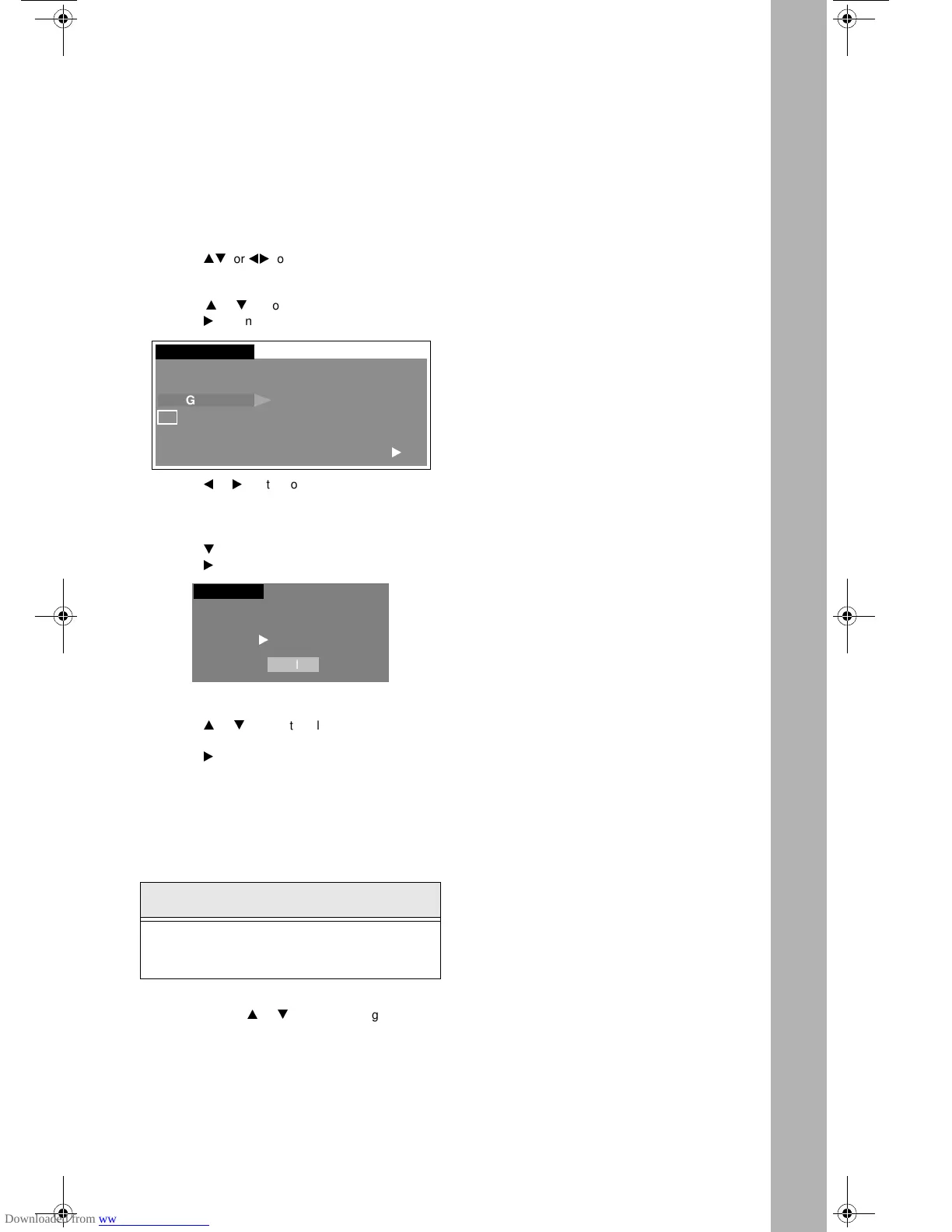
2. Press ACTION button to display MENU Icons.
3. Press
pq
or
tu
to highlight the SET UP icon.
4. Press ACTION button to display the SET UP
menu.
5. Press
p
or
q
button to highlight PROG CHAN.
6. Press
u
button to highlight FM ANTENNA.
7. Press
t
or
u
button to select INT (INTERNAL)
or EXT (EXTERNAL).
• INT - For Cable TV users.
• EXT - For Antenna users.
8. Press
q
button to highlight FM Program.
9. Press
u
button to display FM PROGRAM screen.
10. Press numeric keys 1 through 9 on the remote
control to select the appropriate FM position.
11. Press
p
or
q
button to select the desired FM
frequency.
12. Press
u
button to add the station to memory.
13. Repeat steps 10 through 12 until all 9 positions
have been programmed into memory.
14. Press ACTION button to exit the programming
menu.
You can select any of the 9 stations by pressing the
appropriate number button on the remote control, while
in FM mode.
Tuning FM station manually
In FM mode, press
p
or
q
button to change the
station frequency.
Note: While in FM mode, press R-TUNE button to
toggle between TV and FM radio mode.
Helpful Hint:
In FM mode, at no volume or in Mute mode, there is
no indication of the set being ON. Volume shoud be
kept at audible level.
SET UP
FM ANTENNA INT
FM PROGRAM
u
IDIOMA/
LANGUE
PROG CHAN
CC
OTHER ADJ
SET UP
FM PROGRAM
FM POSITION 1 87.5 MHZ
u
TO ADD
PRESS ACTION TO EXIT
M
AIN
M
ENU
l
R
EMOTE
C
ONTROL
l
S
PECIAL
F
EATURES
l
L
ANGUAGES
l
T
IMER
l
C
HANNEL
C
APTION
l
F
M
R
ADIO
O
PERATION
l
0388 prod 020701.fm Page 5 Tuesday, February 27, 2001 1:15 PM



 To Next Page