- 3 -
Procedure
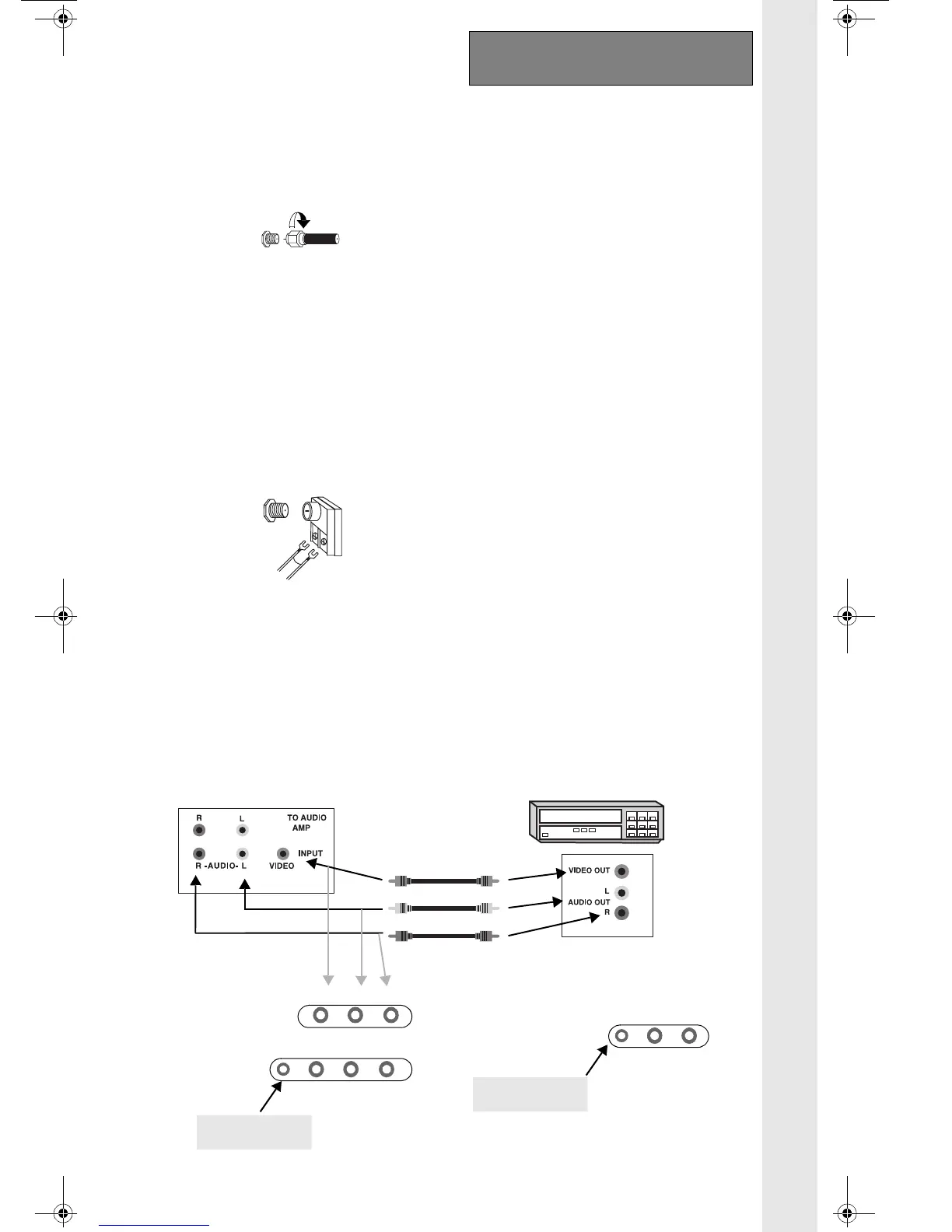
1. Connect equipment as shown to front or
rear Audio/Video input jacks.
Note: Front and rear Audio/Video
connections cannot be
operated at the same time.
2. Select the Video mode by pressing TV/
VIDEO button.
3. Operate optional equipment as instructed
in equipment manual.
Note: VCRs, video disc players, video game
equipment, and DSS equipment can also
be connected to the antenna input
connection. (See your equipment
manual).
To Audio Amplifier (some models)
Connect to an external audio amplifier input for
listening to sound from a stereo system.
Note: TO AUDIO AMP terminals cannot be used
directly for external speakers.
Audio Adjustments
1.
Select TV SPEAKERS ON from AUDIO
menu.
2. Set amplifier volume to minimum.
3. Adjust TV volume to desired level.
4. Adjust amplifier volume to match the TV.
5.
Select OFF&VAO from AUDIO menu.
6. Volume and mute are now selected using
the TV controls.
Note: In OFF&FAO the volume is controlled by
the external amplifier.
O
PTIONAL
E
QUIPMENT
C
ONNECTIONS
Cable / Antenna
For proper reception, either a cable or antenna
connection are required.
Cable Connection
Connect the cable supplied by your local
cable company.
A cable converter box may be required for
proper reception. Check with your local
Cable company for compatibility
requirements.
Antenna Connection
• For proper reception of VHF/UHF
channels, an external antenna is required.
For best reception an outdoor antenna is
recommended.
• Antenna Mode must be set to TV.
VHF/UHF Antenna
A VHF/UHF antenna and transformer are
supplied in some models. Attach to the TV,
adjust the antenna until the picture is clear.
(See Antenna Connection).
Note:
Cable Mode is preset at the factory.
Antenna users must change to Antenna
Mode in the Set Up Menu.
75 Ohms VHF/UHF
on back of TV
Incoming Cable from Cable Company
Incoming Cable from Home Antenna
(some models)
Jack used for
1/8” earphone plug
(some models)
Jack used for
1/8” earphone plug
(some models)
Jack used for
1/8” earphone plug
(some models)
Jack used for
1/8” earphone plug
(some models)
Jack used for
1/8” earphone plug
(some models)
Jack used for
1/8” earphone plug
(some models)
Jack used for
1/8” earphone plug
(some models)
Jack used for
1/8” earphone plug
(Cables not supplied)
Terminals on front of TV (some models)
Terminals on back of TV (some models)
Terminals on back of VCR
VCR or Video Disc
STEREO MODELS
VIDEO AUDIO
MONO MODELS
VIDEO L -AUDIO- R
VIDEO L -AUDIO- R



 To Next Page