REMOTE CONTROL OPERATION
Remote Control Operation
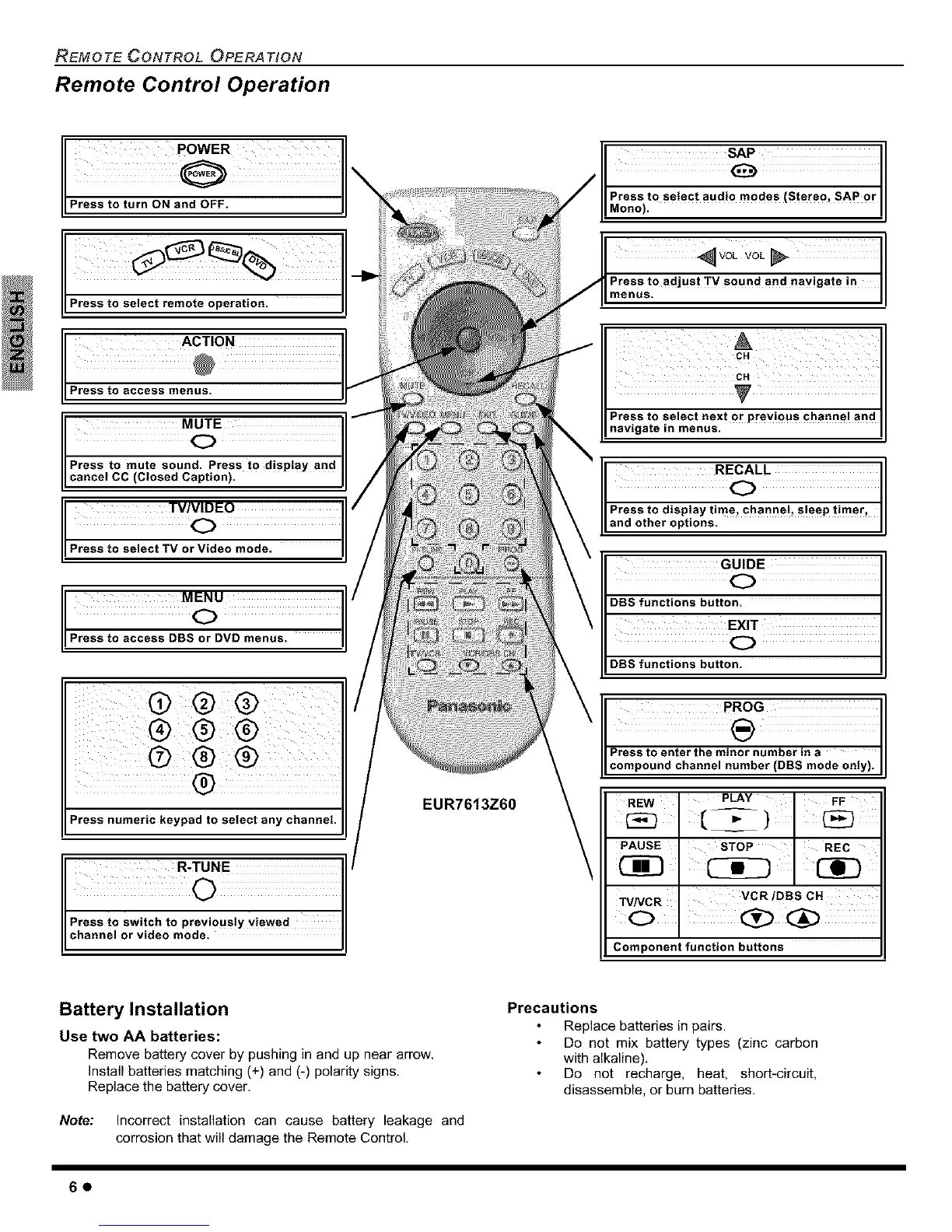
LIPress to turn ON and OFF.
Press to select remote operation.
ACTION
Press to access menus.
cPrenssl'gC_lesS_tU_dptiPrne)ts to disp,ay and
%Eo
P_
P__
Press numeric keypad to select any channel.
Press to switch to previously viewed
II channel video mode.
or
EUR7613Z60
Mono).
_vo_ vo_
Press to adjust TV sound and navigate in
menus.
cN
CH
Press to select next or previous phaane I and
navigate in menus.
GUIDE
C)
DBS functions button=
EXIT
C)
DBS functions button.
REW
PLAY FF
PAUSE STOP REC
Cig3
TVNCR VCR/DBS CH
Component function buttons
Battery Installation
Use two AA batteries:
Remove battery cover by pushing in and up near arrow.
Install batteries matching (+) and (-) polarity signs.
Replace the battery cover.
Note: Incorrect installation can cause battery leakage and
corrosion that will damage the Remote Control.
Precautions
Replace batteries in pairs.
Do not mix battery types (zinc carbon
with alkaline).
Do not recharge, heat, short*circuit,
disassemble, or burn batteries.
60



 To Next Page