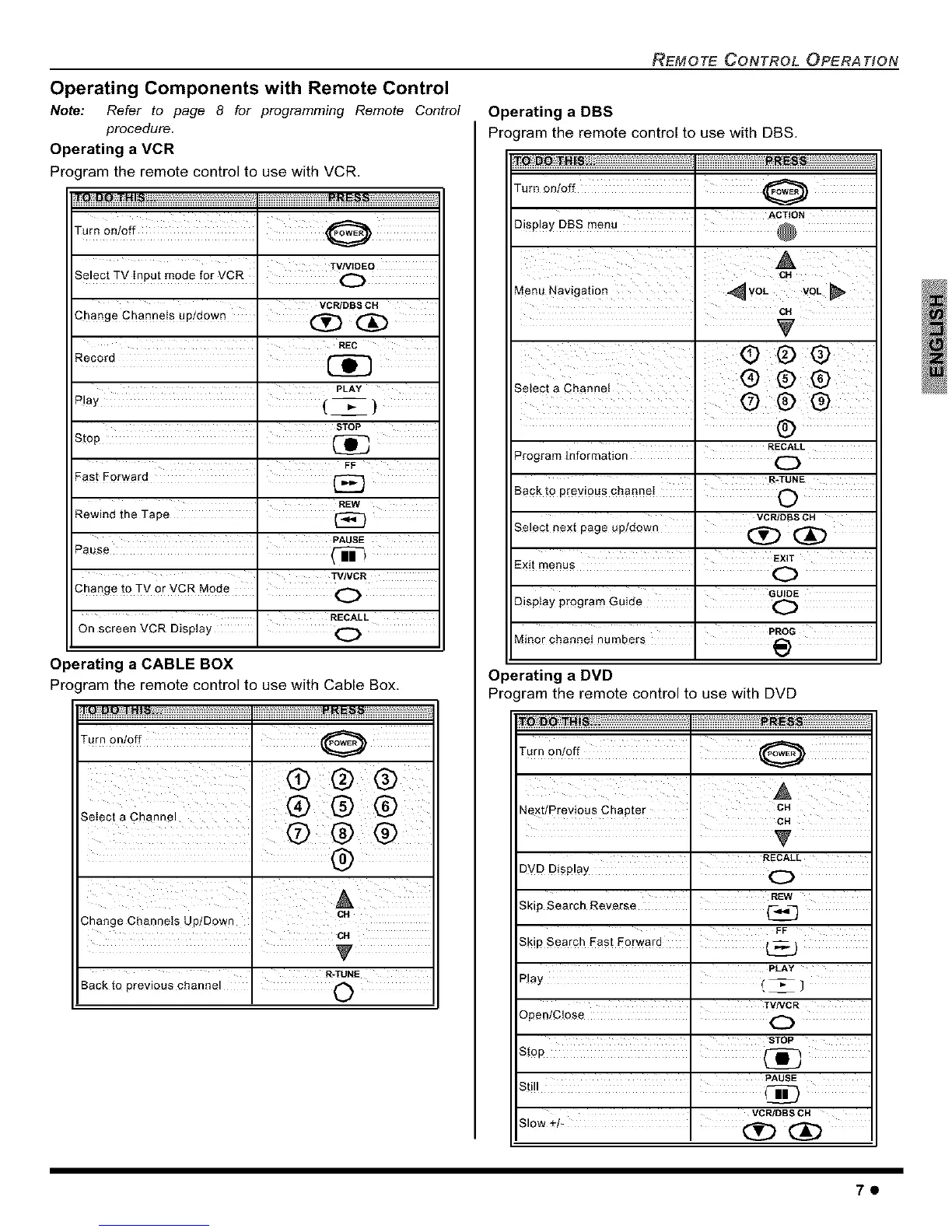
Operating Components with Remote Control
Note: Refer to page 8 for programming Remote Control
procedure.
Operating a VCR
Pro( ram the remote control to use with VCR.
o Q HI ....
TVNIDEO
Select TV Input mode for VCR . O
VCR/DBS CH
Change Channels up/down I _
REC
PLAY
Play . (_}
aTOP
REW
Rewind the Tape . _}
PAUSE
Pause .
TV/VCR
Change to TV 0r VCR M0de I O
RECALL
On screen VCR Display " O
Operating a CABLE BOX
Pro( ram the remote control to use with Cable Box.
,tnonJoff ,
(9
, ® @ ®
Select a Channel
@ ®
ca
3hange Channels Up/Down
R-TUNE
Back to previous channel '
REMOTE CONTROL OPERATION
Operating a DBS
Program the remote control to use with DBS.
fro DQ 3"HISs,. ....................... PRESS
Turn on/off I
ACTION
CH
Menu Navigation ' ,_ VOL VOL _,
i
G©@
Select a Channei _) @ @
i @®®
I RECALL
Program Information . O
R-TUNE
Sack to previous channeI I O
VCR DBa CH
Select next page up/down I (_ _)
Exit menus EXIT
O
Display program Guide I G_
' PROG
Minor channel numbers I _)
Operating a DVD
Program the remote control to use with DVD
T,rn 0n!0ff i
Chapter
Next/Previous
' RECALL
DVD Display I O
Skip Search Reve[se ' 1_<_
FF
Skip Search East E0rward I (_
PLAY
Play I (_]
TVNCR
Open/CJose I
' aTOP
Still I _
VCPJDBS CH
70



 To Next Page