REMOTE CONTROL OPERATION
7 z
ENGLISH
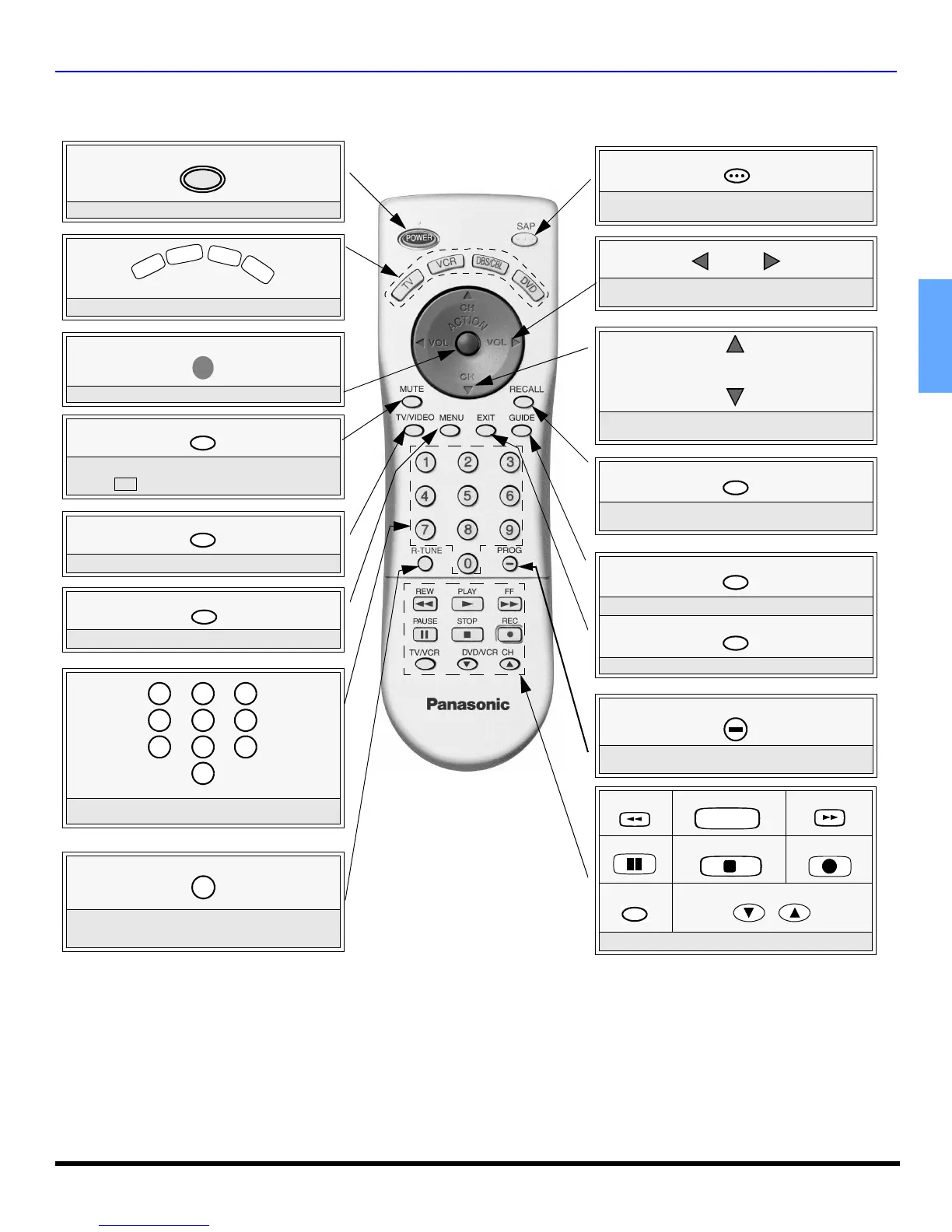
Remote Control Operation
POWER
Press to turn ON and OFF.
POWER
MUTE
Press to mute sound. Press to display and
cancel (Closed Caption).
CC
SAP
Press to select audio modes (Stereo, SAP or
Mono).
TV/VIDEO
Press to select TV or Video mode.
Press to select remote operation.
T
V
V
C
R
D
B
S
/
C
B
L
D
V
D
ACTION
Press to access TV Menu.
Press to select next or previous channel and
navigate in menus.
CH
CH
Press to adjust TV sound and navigate in
menus.
VOL VOL
GUIDE
DBS functions button.
EXIT
DBS functions button.
REW
PLAY
FF
PAUSE
STOP
REC
TV/VCR
DVD/VCR CH
Component function buttons
Press numeric keypad to select any channel.
7
4
1 2
5
8
0
9
6
3
R-TUNE
Press to switch to previously viewed
channel or video mode.
PROG
Press to enter the minor number in a
compound channel number (DBS mode only).
RECALL
Press to display time, channel, sleep timer,
and other options.
MENU
Press to access DVD and DBS menus.
EUR7613ZB0





 To Next Page