17
S
PECIAL
F
EATURES
Special Features
SET UP
Menu Languages
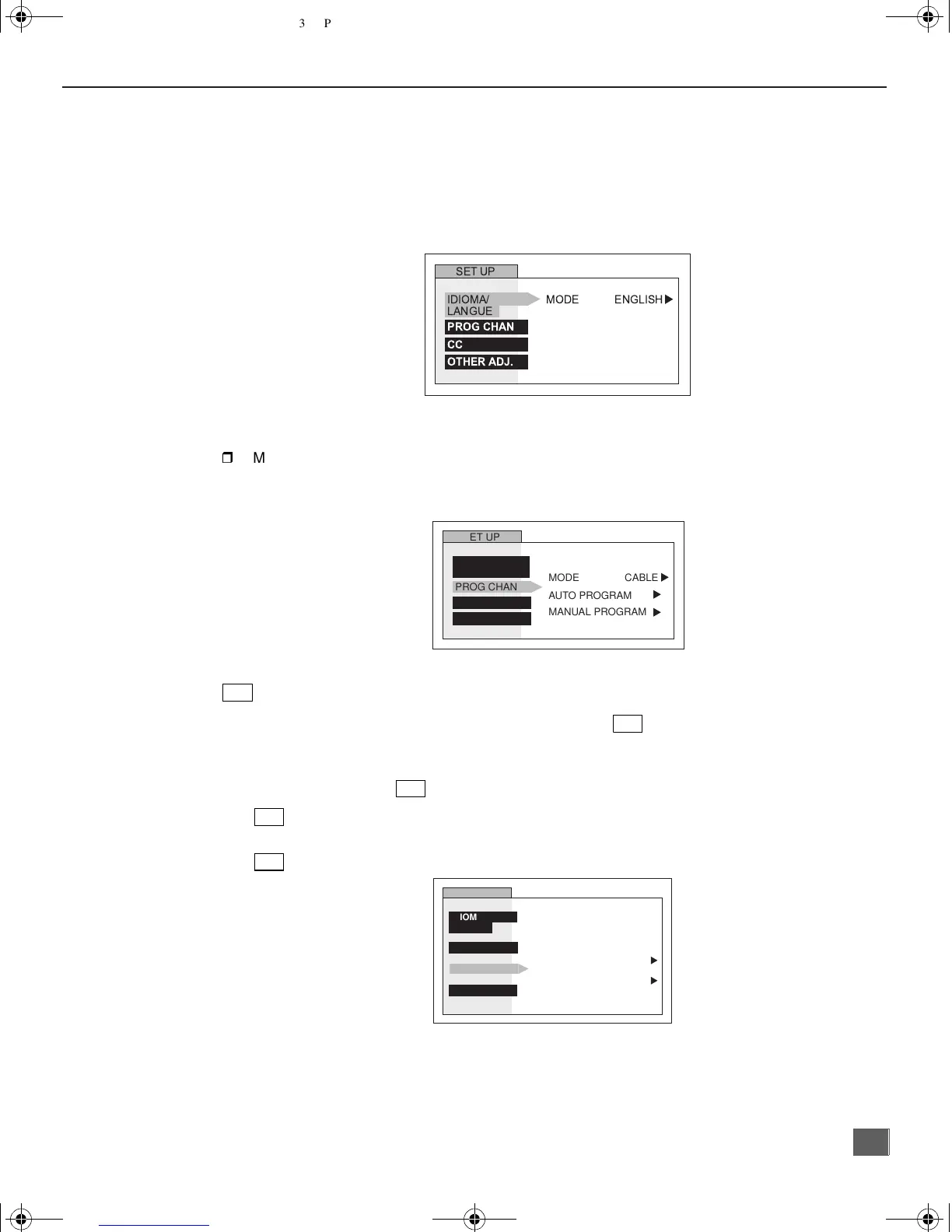
In SET UP Menu, select IDIOMA / LANGUE to change menu language to ENGLISH,
ESPAÑOL (Spanish), or FRANÇAIS (French).
Prog Chan (Program Channels)
In SET UP menu under PROG CHAN select:
r
MODE to select TV (antenna) or CABLE mode depending on the signal source.
r AUTO PROGRAM to automatically program all channels with a signal.
r MANUAL PROGRAM to manually add or delete channels.
(Closed Captioning)
This television contains a built-in decoder that displays (closed captioned) text across the
screen. It allows the viewer to read the dialogue of a television program or other information.
The program viewed must include Closed Captioning for the feature to work.
in SET UP menu under , select:
r On Mute to activate C1-C2 for Closed Captioning display when the remote MUTE
button is pressed.
r
MODE to select C1 or C2 for Closed Captioning, program guides and other information.
Other Adjustments
r Auto Power ON - Select SET to power up the TV at the same time as the Cable Box or
other components or select OFF.
r CHANNEL BANNER - Select ON to display onscreen banner when changing channels.
IDIOMA/
LANGUE
SET UP
MODE ENGLISH
PROG CHAN
CC
OTHER ADJ.
u
SET UP
MODE
AUTO PROGRAM
MANUAL PROGRAM
CABLE
PROG CHAN
CC
OTHER ADJ.
u
u
u
IDIOMA/
LANGUE
CC
CC
CC
CC
CC
SET UP
CC ON MUTE
CC MODE
IDIOMA/
LANGUE
PROG CHAN
OTHER ADJ.
NO
u
OFF
u
0373 -1E.fm Page 17 Monday, February 26, 2001 3:47 PM



 To Next Page