3
English
Quick guide
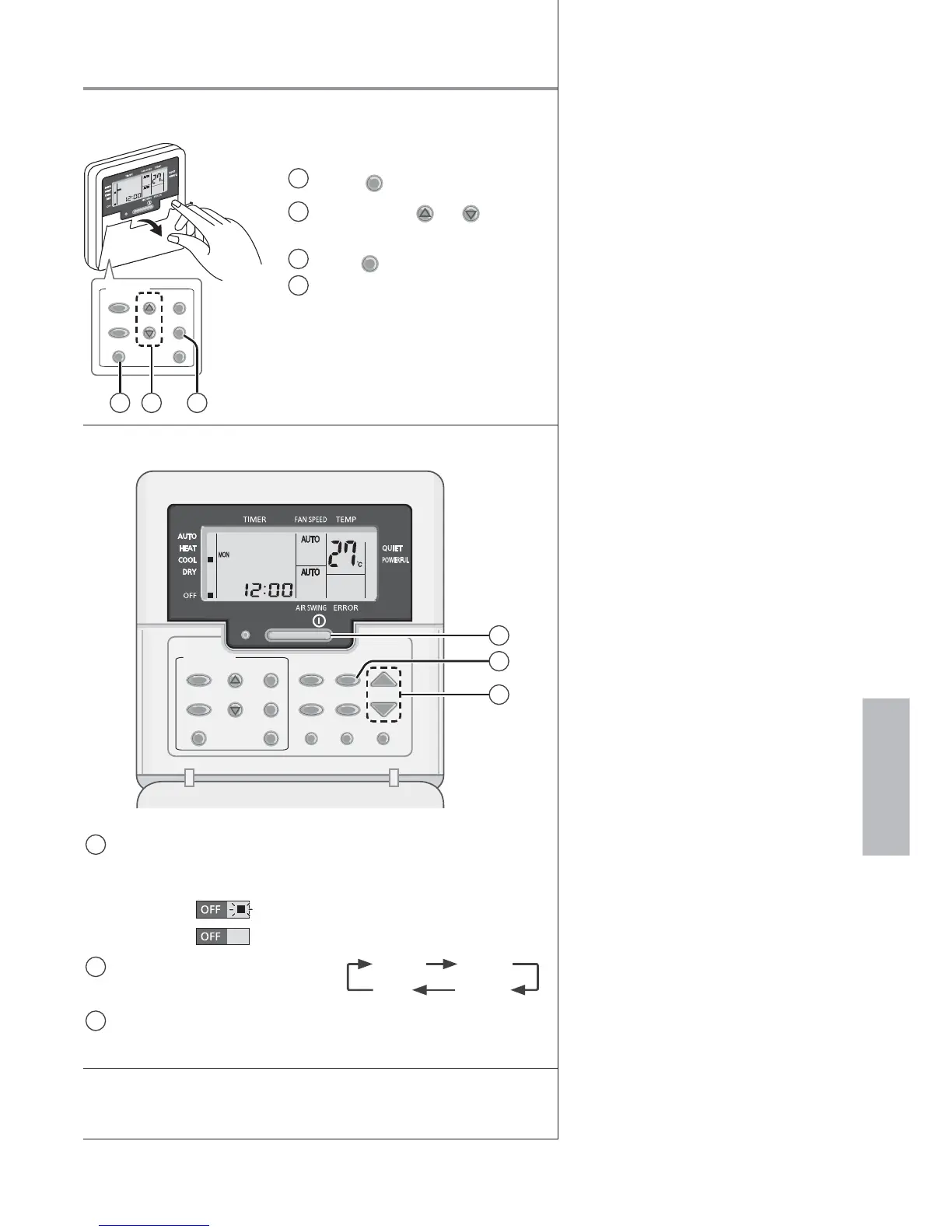
Remote control preparation
OFF
/
ON
TIMER/CLOCK
MODE
OFF/ON
CANCELCLOCK
SET
SELECTUP
DOWN
31 2
Open the cover to use the buttons
1
Press
CLOCK
2
Press
TIMER
UP
or
DOWN
to
select current day
3
Press
SET
to confi rm
4
Repeat steps 2 and 3 to set
the current time
Basic operation
OFF
/
ON
TEMP
TIMER/CLOCK
MODE
QUIET/
POWERFUL
FAN SPEED
MODE
CHECK RESET
AIR SWING
OFF/ON
CANCELCLOCK
SET
SELECTUP
DOWN
AC RC
3
1
2
1
Start/stop the operation
• Please note that the OFF indication is
as follows:
To start:
To stop:
2
Select the desired mode
DRY
AUTO HEAT
COOL
3
Select the desired temperature
• Selection range: 16 °C ~ 30 °C.
The illustrations in this manual are for explanation purposes
only and may differ from the actual unit. They are subject to
change without notice for future improvement.
Table of contents
Safety precautions ...................4-5
How to use...............................6-7
Information...............................6-7
To set the timer ........................7-8
Troubleshooting .......................... 9






 To Next Page