22
Setting connection network
How to use
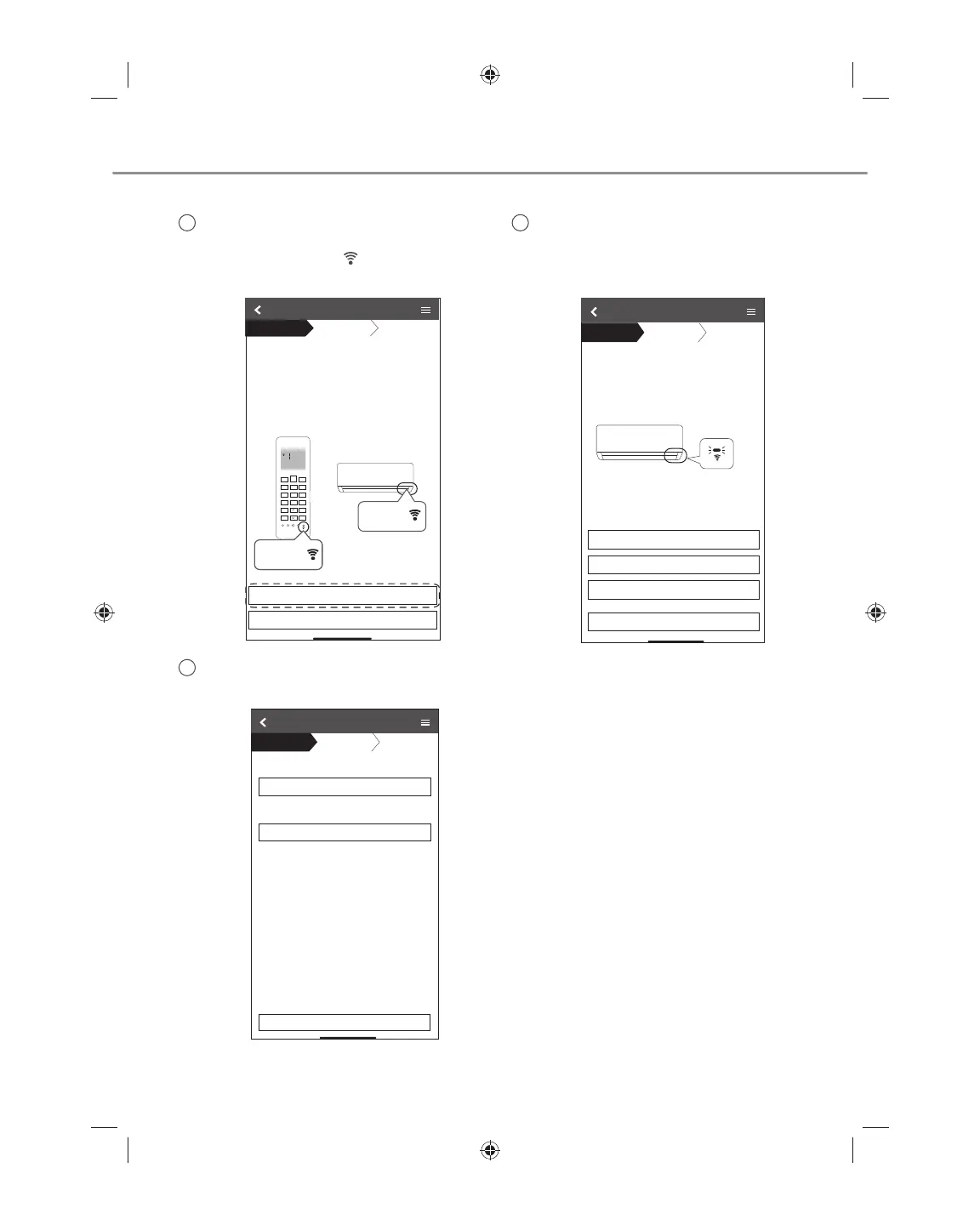
1
Ensure Wireless LAN LED is ON, point
the remote control to air conditioner and
press Wireless LAN
button until the
Wireless LAN LED changed to blinking.
3
Select the preferred router support
connectivity mode.
Connection Guide
Step 1
Step 2
Step 3
Connect with WPS mode
Connect with AP mode
The router supports WPS.
The router does not supports WPS.
Cancel
2
When Wireless LAN LED is blinking,
select the preferred connection setup
mode.
ŚŽŽƐĞƚŚĞďƵƩŽŶƚŚĂƚŵĂƚĐŚĞƐƚŚĞƐƚĂƚƵƐŽĨ
Wireless LAN LED.
ΎtŝƌĞůĞƐƐ>E>ƐƉŽƐŝƟŽŶĂŶĚĐŽůŽƵƌǀĂƌŝĞƐ
ĨŽƌĚŝīĞƌĞŶƚŵŽĚĞůƐ
.
Connection Guide
Step 1
Step 2
Step 3
LED is OFF
LED is ON
LED is Blinking
Cancel
DĂŬĞƐƵƌĞƐŵĂƌƚƉŚŽŶĞŝƐĐŽŶŶĞĐƚĞĚƚŽƐĂŵĞ
ǁŝƌĞůĞƐƐŶĞƚǁŽƌŬ
tŚĞŶtŝƌĞůĞƐƐ>E>ŝƐKEƚĂƉEĞdžƚ
ϭWŽŝŶƚƚŚĞƌĞŵŽƚĞĐŽŶƚƌŽůƚŽĂŝƌ
Ͳ
ĂŶĚƉƌĞƐƐƚŚĞtŝƌĞůĞƐƐ>EďƵƩŽŶŽŶĐĞ
ϮtŚĞŶtŝƌĞůĞƐƐ>E>ŝƐďůŝŶŬŝŶŐƚĂƉEĞdžƚ
Connection Guide
Cancel
Next
Step 1
Step 2
Step 3
Step 1
Step 2
Step 3
ĐŽŶĚŝƟŽŶĞƌ
tŝƌĞůĞƐƐ>E
>
SET
CANCEL
tŝƌĞůĞƐƐ
>EďƵ
ƩŽŶ
tŝƌĞůĞƐƐ>E
ďƵ
ƩŽŶ
ACXF55-24700_FULLSET.indb 22 6/24/2019 3:37:46 PM



 To Next Page