23
EnglishHow to use
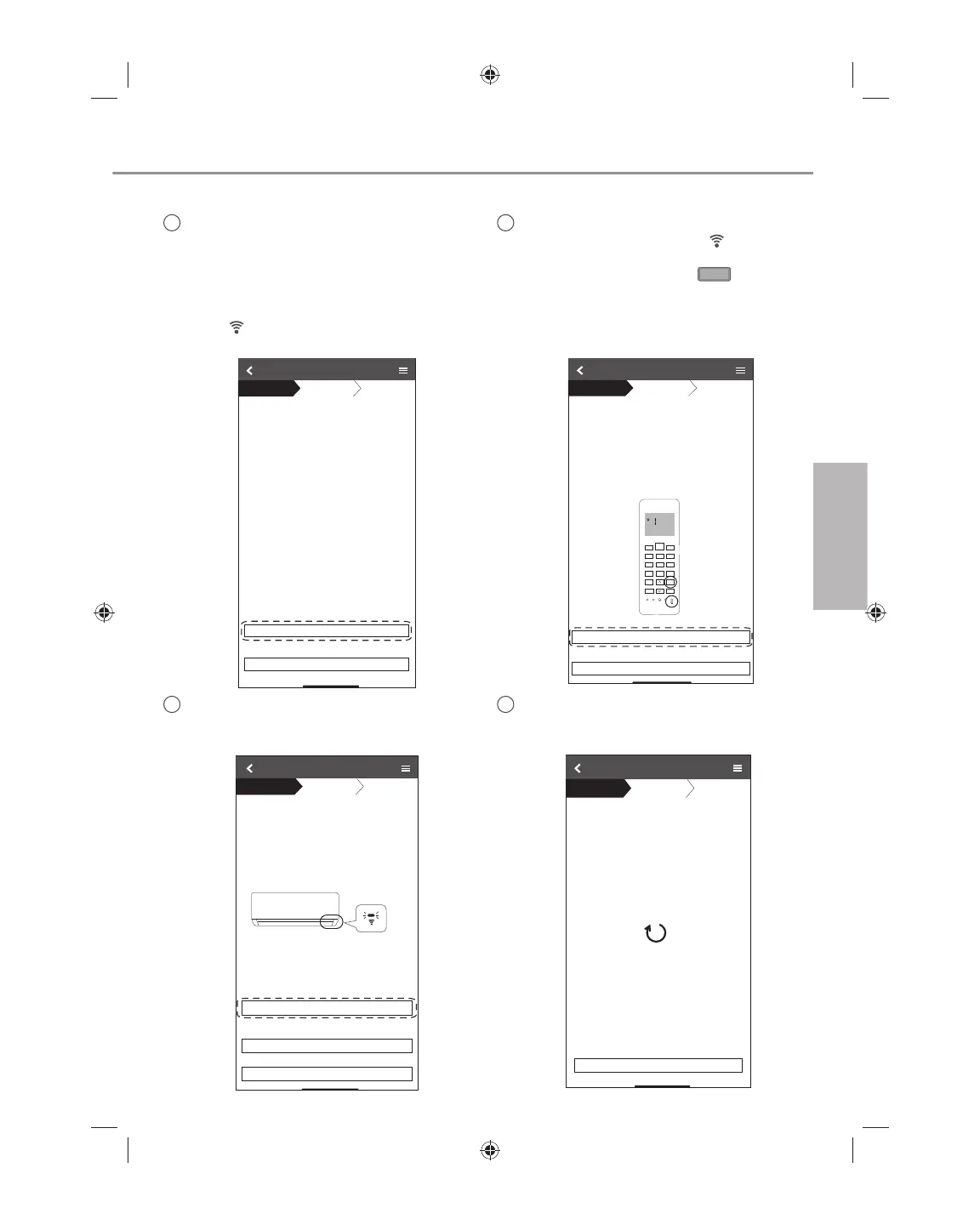
Connection network using WPS mode (method 1)
1
Press the “WPS” button from the
router that will be connected to an air
conditioner.
• Check the status of Wireless LAN LED
on the remote control. If the Wireless
LAN LED is OFF, press the Wireless
LAN
button to enable the Wireless
LAN connection.
WƌĞƐƐƚŚĞtW^ďƵƩŽŶŽŶƚŚĞƌŽƵƚĞƌƚŽĞƐƚĂďůŝƐŚ
ĐŽŶŶĞĐƟŽŶ
dĂƉEĞdžƚĂŌĞƌƚŚĞƌŽƵƚĞƌŝƐƌĞĂĚLJĨŽƌĐŽŶŶĞĐƟŽŶ
Connection Guide
Step 1
Step 2
Step 3
Next
Cancel
2
Ensure Wireless LAN LED is ON. Press
and hold the Wireless LAN
button
for 5 seconds until “1” is shown on the
remote control and press
SET
pointing
to the air conditioner.
/ĨtŝƌĞůĞƐƐ>E>ŝƐK&&ĚƵƌŝŶŐƚŚĞĐŽŶŶĞĐƟŽŶ
ƐĞƚƵƉƉůĞĂƐĞƉƌĞƐƐtŝƌĞůĞƐƐ>EďƵƩŽŶŽŶĐĞ
ƚŽĞŶĂďůĞƚŚĞtŝƌĞůĞƐƐ>EďĞĨŽƌĞƉƌŽĐĞĞĚŝŶŐƚŽ
ƐƚĞƉϭ
ϭWƌĞƐƐĂŶĚŚŽůĚtŝƌĞůĞƐƐ>EďƵƩŽŶĨŽƌϱƐĞĐƐ
ƵŶƟůĞĂƐLJƐĞƫŶŐϭ ŝƐƐŚŽǁŶ
ϮWŽŝŶƚ ƌĞŵŽƚĞĐŽŶƚƌŽůƚŽĂŝƌͲĐŽŶĚŝƟŽŶĞƌĂŶĚ
ƉƌĞƐƐ^dďƵƩŽŶŽŶĐĞ
ϯŌĞƌ ƐƚĞƉϭΘϮŚĂǀĞďĞĞŶĚŽŶĞƚĂƉEĞdžƚ
Connection Guide
Step 1
Step 2
Step 3
Cancel
Next
SET
CANCEL
4
If the Wireless LAN LED keep blinking,
check the wireless router connection.
Searching for air-condiƟoner.
Please wait…
Connection Guide
Step 1
Step 2
Step 3
Cancel
3
When the connection of air conditioner
to router is successful, the Wireless LAN
LED changed from blinking to ON.
Connection Guide
Step 1
Step 2
Step 3
When the connecƟon of air-condiƟoner to router
is successful, the Wireless LAN LED changes from
blinking to ON.
*It may take up to few minutes before changes
to ON.
Next
If the Wireless LAN LED is ON, tap “Next”.
If Wireless LAN LED keep blinking, tap “Check”
Cancel
Check
ΎtŝƌĞůĞƐƐ>E>ƐƉŽƐŝƟŽŶĂŶĚĐŽůŽƵƌǀĂƌŝĞƐ
ĨŽƌĚŝīĞƌĞŶƚŵŽĚĞůƐ
ACXF55-24700_FULLSET.indb 23 6/24/2019 3:37:47 PM



 To Next Page