48
• ECONAVI & AUTO COMFORT Sensor abnormality check mode
• Purpose is to improve sensor serviceability when sensor is malfunction.
1. Control starting condition
When all of the conditions are formed
• Not in ECONAVI & AUTO COMFORT Demo mode.
• ECONAVI & AUTO COMFORT mode ON.
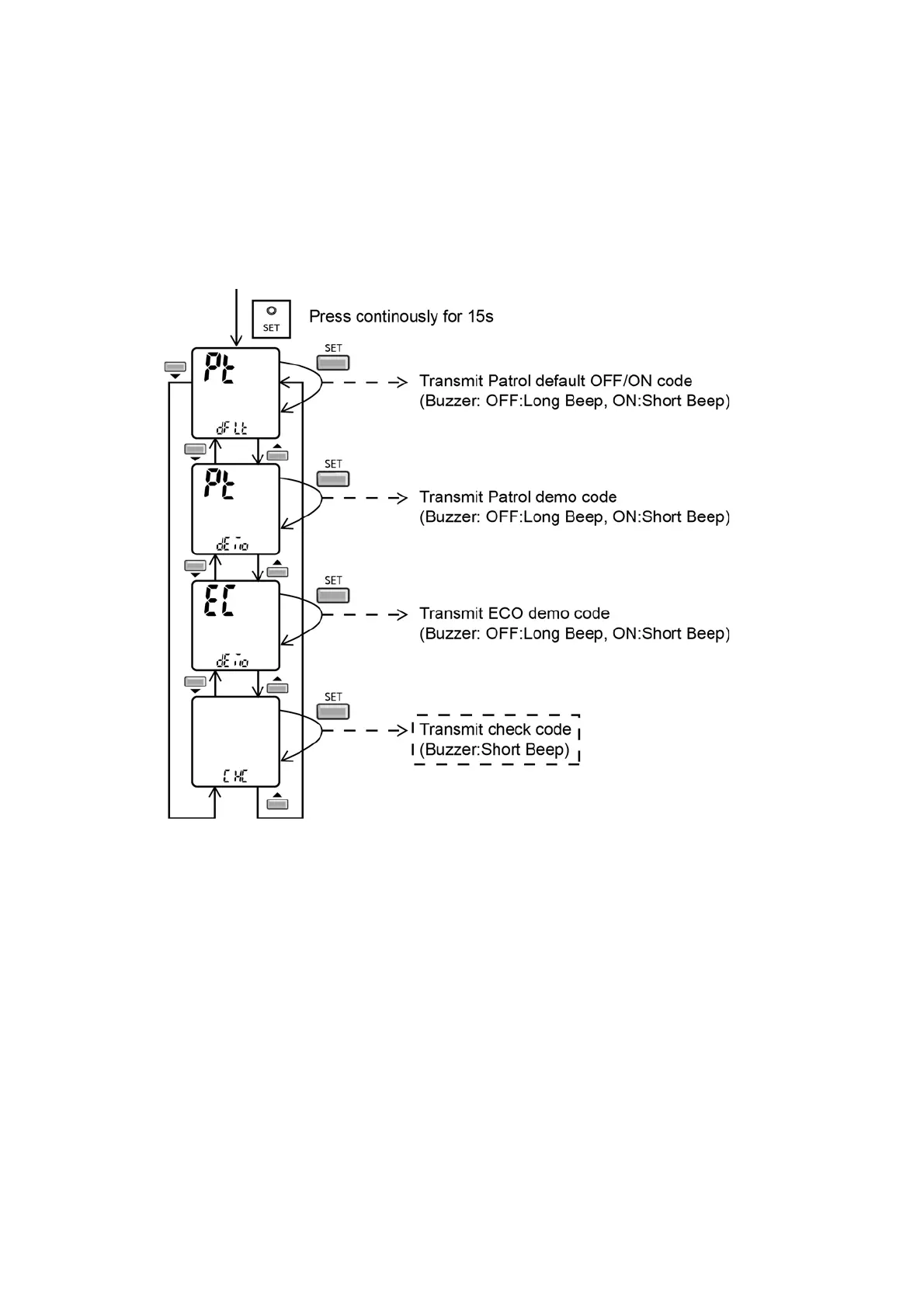
• When ECONAVI & AUTO COMFORT sensor check mode signal is received; the procedure of selection is as shown:
- Press “Set” button continuously for 15 seconds by using pointer to enter internal setting mode.
- Press “Timer Decrement" button to select “CHC”.
- Confirm setting by pressing “Timer Set” button, a “beep” sound will be heard.
2. Control ending condition.
When any of the conditions are formed
• Operation stops.
• “Timer Cancel“ button pressed.
• When ECONAVI & AUTO COMFORT sensor check mode signal is not received for more than 30 seconds.
3. Control content
• During ECONAVI & AUTO COMFORT mode ON, when check signal is received, if (1) or (2) is detected.
• ECONAVI & AUTO COMFORT LED start blinking (ECONAVI & AUTO COMFORT sensor operation
• stops but the unit operates as normal) and ECONAVI & AUTO COMFORT sensor abnormal code is memorized
(the 4 times counter is ignored)
• The blinking of ECONAVI & AUTO COMFORT LED can be cancelled by pressing ECONAVI & AUTO COMFORT button
again.
• Sensor error counter can be cleared only after power supply reset or “AC Reset” button on remote control is pressed.
However, if there is no ECONAVI & AUTO COMFORT sensor abnormally happen, ECONAVI & AUTO COMFORT
sensor operation will continues as normal.



 To Next Page