10
REMOTE CONTROL
CHECK
ERROR RESETRESET
SELECT
SET/CANCEL
AIR CONDITIONER
QUIET
POWERFUL
/
A
B
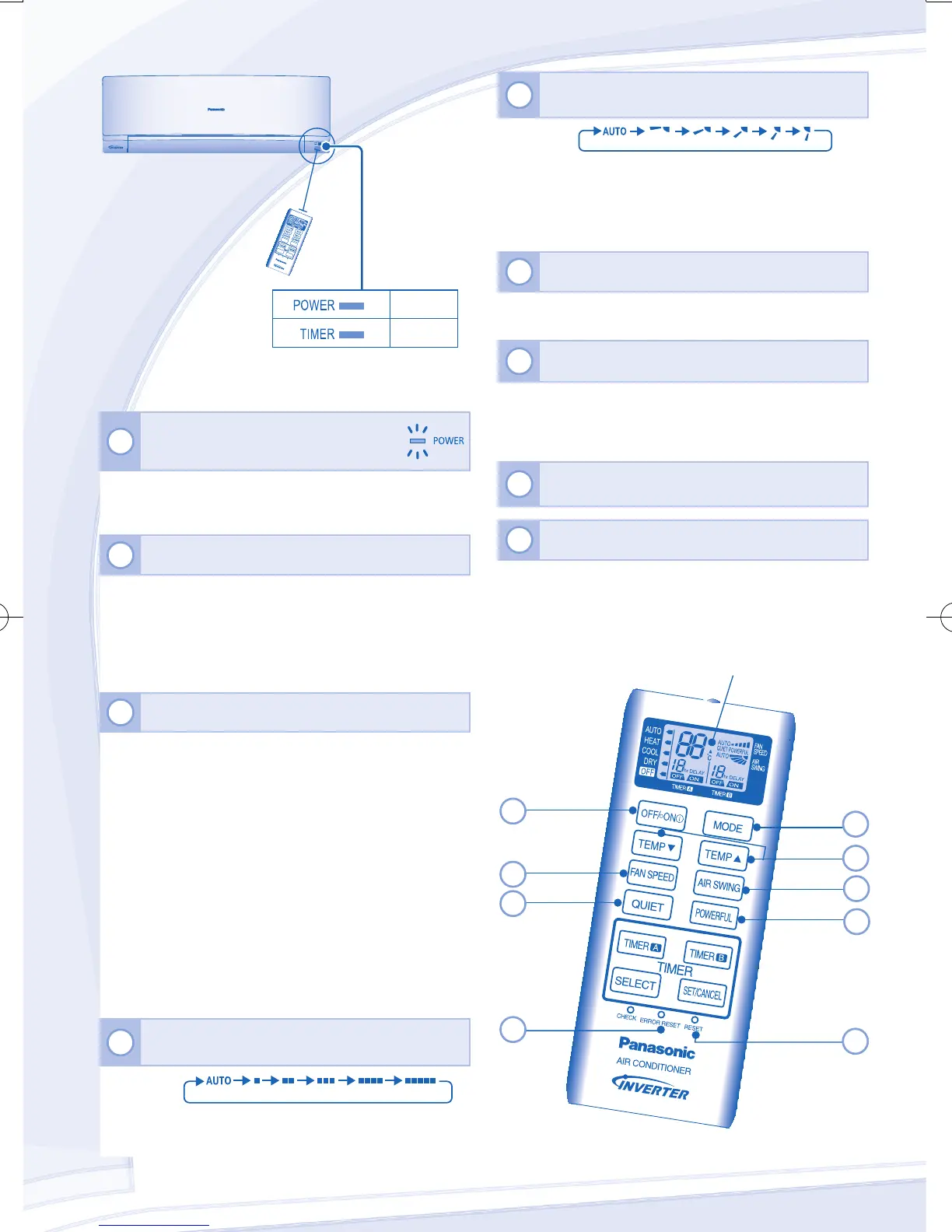
Press the remote control’s button
1
TO TURN ON OR OFF THE UNIT
• Please be aware of the OFF indication on the remote
control display to prevent the unit from starting/stopping
improperly.
2
TO SET TEMPERATURE
• Selection range: 16°C ~ 30°C.
• Operating the unit within the recommended temperature
could induce energy saving.
HEAT mode : 20°C ~ 24°C.
COOL mode : 26˚C ~ 28˚C.
DRY mode : 1˚C ~ 2˚C lower than room temperature.
3
TO SELECT OPERATION MODE
AUTO mode - For your convenience
• During operation mode selection the power indicator
blinks.
• Unit selects the operation mode according to the indoor
intake temperature and remote control temperature.
HEAT mode - To enjoy warm air
• In heat mode, it may take a while for the unit to warm up.
The POWER indicator blinks during preheating.
COOL mode - To enjoy cool air
• Use curtains to screen off sunlight and outdoor heat to
reduce power consumption during cool mode.
DRY mode - To dehumidify the environment
• Unit operates at low fan speed to give a gentle cooling
operation.
4
TO SELECT OPERATION MODE
• For AUTO, the indoor fan speed is automatically adjusted
according to the operation mode.
Maximum distances: 8m
(GREEN)
(ORANGE)
5
TO ADJUST AIRFLOW DIRECTION
(5 OPTIONS)
• Keeps the room ventilated.
• In COOL mode, if AUTO is set, the louver swing up/down
automatically.
• In HEAT mode, if AUTO is set, the horizontal louver x at
predetermined position.
6
TO ACHIEVE TEMPERATURE QUICKLY
• This setting enables the desired set temperature to be
reached quickly.
7
TO ENJOY QUIET ENVIRONMENT
• This setting provides a quiet environment by reducing the
airow noise.
• POWERFUL AND QUIET operations can not be activated
at the same time.
8
PRESS TO RESTORE THE REMOTE CONTROL’S
DEFAULT SETTING
9
NOT USED IN NORMAL OPERATIONS
Remote Control display
1
5
3
6
8
4
7
9
2
PH005430 F567943.indb 10 2011-2-23 13:27:37



 To Next Page